
Table of Contents
- 1. Starting a Standalone Blog (Fast + Simple)
- 2. Building a Content Business (Ownership + Scale)
- 3. Running a Newsletter-Driven Blog
- 4. Adding a Blog to an Existing Website
- 5. Driving Growth for an E-commerce Website
- 6. Building a Blog into a Custom/Headless Stack
- 7. Publishing Content Without Owning a Website
- Best Blog Sites by Use Case
- How to Choose the Best Blog Platform
- FAQs
- Over to You
There is no single “best blog platform.” The right platform depends entirely on what you’re trying to do, and most lists ignore that.
Wix may have a beginner-friendly blogging tool, but it’s not well-suited for content-heavy blogs. Or it won’t be a good fit for you if your site is already created on another website-building platform like Squarespace.
So, when researching the best blog platforms, you should think about what it is that you want to do with your blog. One platform will be best for businesses that want to grow SEO traffic, another for those who want to monetize ads and affiliate programs, and another for those who want to build a community of loyal readers around their blog.
In this guide, we’ll explore the best blog platforms based on different use cases.
| Goal | Best blog platform | Why |
|---|---|---|
| Start a standalone blog | Wix/Squarespace | Easy to set up and use, but not ideal for content-heavy blogs |
| Build a content business | WordPress | Content ownership, easy to scale |
| Publish a newsletter + have a blog | Substack/Ghost | Built-in monetization tools |
| Add a blog to an existing site | DropInBlog | Platform-agnostic, works with any website |
| Drive SEO for an e-commerce site | Shopify native blog/DropInBlog | No need to rebuild a website, strong SEO options |
| Build a custom/headless blog | Headless CMS, DropInBlog API | Flexibility |
1. Starting a Standalone Blog (Fast + Simple)
Use case:
“I want to launch a blog from scratch quickly.”
What matters:
Ease of use: You need a blogging site with a clean interface and an intuitive content editor that lets you easily add and organize your content. You don’t want to spend hours and even days trying to learn how a blogging site works; you want to start blogging almost immediately.
Design out-of-the-box: Creating a visually appealing blog page can take a lot of time without some guidance. So, you should look for a platform that provides you with a blog page that is either already designed or allows you to use a pre-built template.
Low setup friction: You want to launch your blog in a few minutes without complicated, technical instructions.
Platforms:
- Squarespace: Creating a website and adding a blog to Squarespace takes only a few minutes. Once you create your website, you just need to add a blog page and select the desired layout. Then, using the WYSIWYG editor, you can easily create blog posts with text, images, lists, and even code.
Wix: You can launch a Wix website using a template or AI. Then you can add a blog by simply adding the blog section to your site. Like Squarespace, the Wix post editor is WYSIWYG, which you’ve probably already used, or if you haven’t, you’ll learn it easily.
Choose Wix if you want to start a simple blog for free.Choose Squarespace if you want to create a blog that looks polished without too many customizations.While some would argue that the self-hosted WordPress also falls into this category because you can easily add and manage your content, the setup is technical. You’ll need to spend some time setting up your WordPress blog before you get to the easy part – managing your content.2. Building a Content Business (Ownership + Scale)
Use case:
“I want to build a content site that grows traffic, generates revenue, and I fully control.”
What matters:
- SEO control: Instead of the traditional, often limited SEO features most platforms offer out of the box, you need a blogging platform that allows you to expand your blog’s SEO capabilities. The platform of your choice should have advanced features built in or available via a third-party app. Either way, you need to prepare your content for search engines and increase its visibility.
Monetization: Your blog website should give you the option to monetize your blog – whether this is through ads, affiliate programs, products, or content. You need to have full control over each aspect of your monetization strategy.
Extensibility: If there’s a feature you want to use, you should be able to add it either through a platform’s API or a plugin marketplace. If the selected platform doesn’t let you extend your blog’s capabilities, you’ll easily outgrow it.
Platforms:
- WordPress.org: WordPress is one of the best blogging platforms for those looking for advanced SEO features, as it supports dozens of SEO plugins. It’s also quite flexible in other departments, primarily because it has a vast plugin system that allows you to add more features to the core product. You can also monetize your content through integrations like Memberstack and AffiliateWP.
Webflow: Webflow is a no-code site builder with a blogging feature. Although its marketplace isn’t as extensive as the one on WordPress, Webflow also allows you to extend your blog’s functionality through apps. You can use these apps to create memberships and gate your content behind a paywall.
Choose WordPress.org if you’re looking for a traditional blogging experience and an extensive plugin marketplace.Choose Webflow for design control with no or little coding. It’s a good option if you’ve worked with dynamic content before.3. Running a Newsletter-Driven Blog
Use case:
“My blog is part of an audience/subscription business.”
What matters:
- Email capture: If one of your core objectives is to build an audience by capturing email addresses, your blogging platform should let you do that easily. Most often, blogging tools let you integrate with an email marketing service. Try to find the one that supports these features natively, so you won’t have to juggle multiple platforms.
Paid subscriptions: Audience and subscription businesses need a way to create flexible subscription plans. Preferably, you should have these tools within a single platform so you can manage your content, members, and subscriptions in one place.
Distribution: You should be able to easily turn your content into a newsletter, since creating content takes time, and you don’t want to spend even more time converting it into a newsletter. And if you have tiered pricing, you can’t send all your content to everyone, so use a blogging tool that supports audience segmenting.
Platforms:
- Substack: With Substack, you can turn your content into a newsletter with one click, as well as create and manage your subscriptions. It lets you easily create blog posts and podcasts, and schedule live video sessions. To encourage email signups, you can easily insert subscription forms into your content – all of which make it a good fit for newsletter-driven blogs.
Ghost: Ghost is another great platform for blogs that distribute their content through newsletters. Its content editor is clean and allows you to focus on your writing. Like with Substack, you can turn your content into a newsletter in a single click. You can set access levels and offer flexible subscription plans.
Choose Substack if you need a beginner-friendly blogging tool that doesn’t require any upfront investments or technical knowledge.Choose Ghost if you have experience with open-source platforms and you need advanced SEO features, more control over your branding, and access to third-party apps.4. Adding a Blog to an Existing Website
Use case:
“I already have a website and need a blog for SEO/content.”
What matters:
- No rebuild: If you already have a website, you don’t want to start all over with your blog. A much easier solution is to find a blogging solution that works with your existing site.
Blog in a subdirectory: If you’re adding a blog to an existing site, placing it in a subdirectory is preferable, as that way, your blog shares the domain authority and link equity of your main website.
Integration: The blog website you choose should not only integrate well with your website, but it should also work with other tools you already use. Changing your tech stack to have a functioning blog isn’t the most productive solution.
Speed to launch: Instead of launching your blog in days or weeks with the help of developers, your blog should be live in half an hour or less.
Platforms:
- DropInBlog: DropInBlog is a strong option for existing websites. It’s platform-agnostic and works with any platform. So, you don’t have to rebuild your site or change your workflows, as it fits into your existing ones. Your blog is hosted in a subdirectory, too, and to further boost your site’s SEO, it has a live SEO-scoring tool that helps your page rank in searches.
WordPress: WordPress is also a good blogging platform for existing sites. You can add a WordPress blog to your existing site, either in a subdirectory or on a subdomain, depending on your setup. Additionally, thanks to its extensive plugin ecosystem, you can add almost any functionality to your blog.
Choose DropInBlog if you need a dedicated blogging platform that works with your existing site, has advanced built-in SEO features, and doesn’t rely on plugins.Choose WordPress if you have technical knowledge and want to create a highly flexible blog through coding and plugins.5. Driving Growth for an E-commerce Website
Use case:
“I want content to drive product discovery and sales.”
What matters:
- SEO → conversion: Optimizing your content for SEO helps you drive traffic, build awareness of your products, position them as solutions, and ultimately increase sales. Most e-commerce blogs fail because their content isn’t optimized for conversions and search engines, and is separate from the commerce side of their business.
Internal linking to products: To increase your product sales, look for a blogging tool that lets you easily link your content to your product pages, creating a natural transition between the two.
Content + commerce connection: Apart from links, you should be able to embed products into your blog content. Look for a platform that supports dynamic embeds, so that your users can interact with your products before visiting the checkout page.
Platforms:
- DropInBlog: DropInBlog offers advanced SEO tools, including an SEO analysis tool and structured data markup, to help you make your content more visible in search results. It lets you link your blog content to your product pages and insert your store’s products anywhere in your posts.
Shopify or other platforms' native blogs: Most e-commerce platforms have a native blogging tool that offers all the features you need to create and manage your content. Although embedding products into your content might not be as smooth as with platforms like DropInBlog, you can still use these platforms to connect your content to your store.
Use DropInBlog if you want to create SEO-friendly blog content, easily add categories and author pages, and customize your blog slug.Use Shopify if you want to create a simple blog and don’t mind managing your blog’s SEO, categories, and authors through apps.6. Building a Blog into a Custom/Headless Stack
Use case:
“I need full control over frontend + content delivery.”
What matters:
- APIs: APIs allow you to add custom features, customize your blog’s design, and do pretty much anything with your blog. If you have some technical know-how or a dev team to help you out, you should look for a blog site that offers full control over your blog’s functionality and design.
Performance: Fast-loading blogs improve user experience and ultimately improve your site’s SEO. If performance is crucial to you, look for a flexible blogging solution so that you’re not constrained by the limitations of traditional tools.
Flexibility: A custom blog setup not only lets you tailor it to your requirements, but also means that as those requirements change, so can your blogging system.
Platforms:
- DropInBlog API: With DropInBlog’s API, you can create a highly customizable blog regardless of the tech stack you’re using. It optimizes your blog for speed and lets you add interactive elements to your content, adjust your blog layout, and customize your blog’s design to the smallest detail.
Ghost: You can build your blog on a custom frontend and use Ghost’s content API to serve cacheable content, designed to help you create a fast-loading blog. You also have the option to bypass the limitations of Ghost’s themes and use its API to create custom features and elements.
Headless CMS (Contentful, Sanity): Using a headless CMS, like Contentful, means that you can create your own blog structure. You can also design your blog however you like and implement custom features, such as advanced content filtering options.
Use the DropInBlog API if you want to build a blog layer without the complexities of managing a full-featured CMS.Use Ghost if you need a dedicated publishing platform that works without any plugins.Use a headless CMS if you want to build a content system that works with any framework.7. Publishing Content Without Owning a Website
Use case:
“I don’t want to manage a website at all.”
What matters:
- Zero setup: Instead of building a website, then adding a blog, you can use a blogging solution that’s designed only for blogging. That means you don’t have to learn a new web development tool or follow complicated instructions to add a blog to that site. Instead, you can just create an account on the platform of your choice and start adding your content.
Built-in audience: Platforms like Medium already have a broad audience, which checks one item of your to-do list: building your audience from scratch. You won’t have your own website, but you can focus on creating blog posts, and that practice alone will attract at least a small portion of people who already use and visit your selected platform.
Platforms:
- Medium: With Medium, you only need to create an account, and after that, you can immediately move on to creating content. Although you won’t have much flexibility for designing your publications, you can quickly and easily get your content in front of Medium’s built-in audience.
Substack: If you want to turn your content into newsletters and monetize it via subscriptions, Substack might be the best blog platform for you. Since Substack has a built-in network of active subscribers, you won’t have to invest much in marketing – your audience is already using Substack and can easily find your content.
Use Medium if you want to easily distribute your content without having to build your audience from scratch.Use Substack if you publish consistently and want to build a loyal audience through newsletters.Alternatively, you can use Medium and Substack together. Create and publish your content on Substack, then share it on Medium to bring more readers to your Substack publication.Best Blog Sites by Use Case
| Platform | Best use case | Ease of setup | SEO control | Customization | Monetization | Pricing |
|---|---|---|---|---|---|---|
| Wix | Starting a blog quickly | Easy | Basic | Limited by Wix templates | Built-in | $17–$159/month |
| Squarespace | Starting a blog quickly | Easy | Basic | Limited by Squarespace templates | Built-in | $25–$139 |
| WordPress.org | Building a content business | Hard | Advanced (plugins) | High | Available (plugins) | $50–$1,000+/year |
| Webflow | Design + content sites | Moderate | Advanced | High | Built-in | Free–$39/month for Starter, Basic, and Premium (+ add-ons) |
| Substack | Newsletter-first blogs | Easy | Basic | Limited | Built-in (subscriptions) | 10% of revenue |
| Ghost | Newsletter + owned site | Easy | Basic | High | Built-in | $15–$399 |
| DropInBlog | Adding blog to existing site | Easy | Advanced (built-in) | High | Depends on main site | See current pricing |
| Shopify / other e-commerce native blogs | E-commerce content | Easy | Basic | Basic | Available (apps) | $30+/month (depends on platform) |
| DropInBlog API | Custom/headless blog | Hard | Advanced | Advanced | Available | See current pricing |
| Headless CMS | Fully custom builds | Hard | Advanced | Advanced | Available | $200+/month |
| Medium | No website, built-in audience | Easy | Basic | Basic | Built-in | $5/month or $50/year |
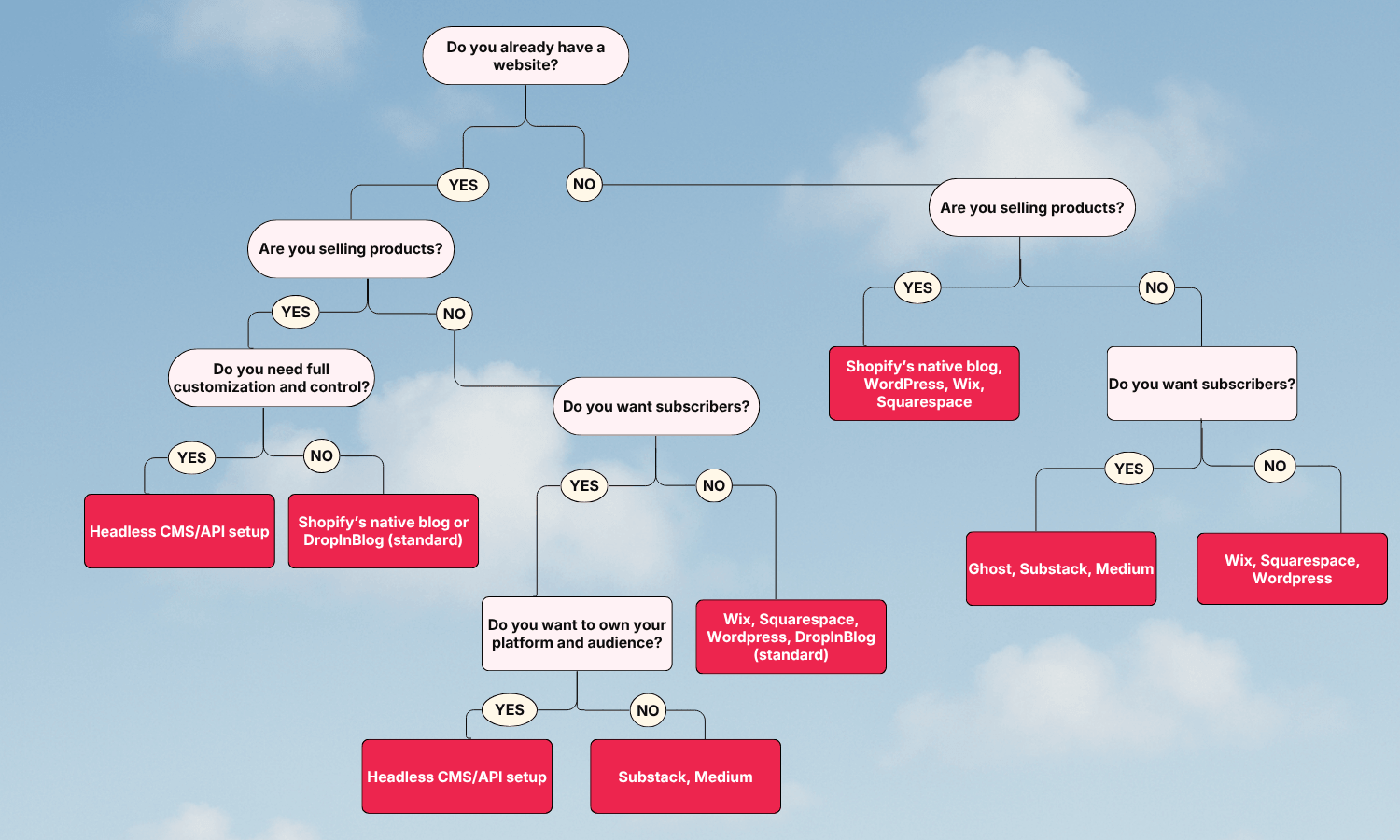
How to Choose the Best Blog Platform
FAQs
What is the best blog platform for SEO?
Webflow and DropInBlog offer great SEO features for your blog out of the box. Other blog sites, like Shopify’s native blog and WordPress, handle SEO through plugins and apps, which increases the ongoing cost of running a blog on these platforms.
Is WordPress still the best?
WordPress may be the best blogging tool for many people, especially those who want to build both a website and a blog on WordPress and have the technical knowledge to customize their blog to their preferences. But WordPress isn’t the best for everyone.
For those who want a beginner-friendly blogging tool, Wix or Squarespace is the best option. And for those who want to easily add a blog to an existing website, DropInBlog is the best.
Can I add a blog to my existing website?
Yes, you can add a blog to an existing website. The easiest, SEO-friendly option is to do so with DropInBlog, but you can also try other platforms and link to an external blog from your site.
What’s the easiest blogging platform?
Wix, Squarespace, DropInBlog, and Shopify’s native blogging engine all offer intuitive blogging tools. Which one you’ll use depends on whether you already have a website, your monetization strategy, and customization requirements.
What blog platform do businesses use?
That depends on the specific business. Most businesses use WordPress, but you’ll also find a lot of blogs created with DropInBlog, Ghost, and Squarespace. The choice depends on what you want to accomplish with your blog: increase site traffic and sales, generate leads, or build a brand image through storytelling. Each of these platforms caters to different needs and use cases.
Over to You
The right platform depends on your goals, and now you have a clear way to choose. It should match your technical skills, blogging goals, and budget.
So, before you choose one, think about your blog’s use case, test the top candidates, and only then make a decision. After all, choosing a blog website isn’t something you should take lightly because a blog is your tool for growing your traffic, sales, and boosting your search visibility.
Need help deciding which blog site to use? Feel free to get in touch with us.
In the meantime, sign up for DropInBlog’s free trial and see if it fits your use case.