
TL;DR
With BigCommerce Catalyst, you can create a fast-loading, highly customizable storefront, but the feature set doesn’t include a blogging tool that delivers the same results. To address this gap, you need a dedicated blogging solution, DropInBlog.Growing your store with BigCommerce Catalyst is easy because this e-commerce solution uses Next.js, React, and Makeswift to offer simplicity and power at its core. But you don’t get the same technology for blogging, which is a considerable limitation given that your company’s growth depends on more than commerce and transactions.
Companies need a place for content that informs, educates, and engages their audience, but with BigCommerce's native blogging features, your growth is ultimately constrained.
Table of Contents
- TL;DR
- The Limitations of BigCommerce’s Native Blog
- Catalyst: Focused on Selling, Not Storytelling
- DropInBlog: Built for Content-Driven Growth on Catalyst
- DropInBlog Enterprise Features That Matter for Catalyst Brands
- SEO Features Tailored for Catalyst Content Teams
- Built for Modern Marketing and Development Teams
- Content Marketing ROI for Catalyst-Powered Brands
- Create a Blog on BigCommerce Catalyst Today
The Limitations of BigCommerce’s Native Blog
While BigCommerce’s native blog works for basic content needs, its limitations become more noticeable as your content volume, SEO requirements, and team size increase. The BigCommerce blogging engine uses a WYSIWYG editor, which makes it easy to add text, media, and links. However, as your blog grows, you’ll run into these limitations:
Limited built-in SEO tools: With BigCommerce, you only have basic control over your SEO metadata and redirects, which limits your ability to optimize your content at scale and compete for organic visibility.
No staging/preview workflows: While BigCommerce lets you preview your blog content before publishing, it does not have a traditional staging environment. That means you don’t have a way to safely test the changes on your blog.
Missing blog schema: BigCommerce doesn’t automatically generate blog schema, and with Catalyst, you have to create custom schema components. Either way, the process is manual, which limits your ability to qualify for rich results.
Limited roles and permissions: User roles are also handled through BigCommerce, which supports several roles. Still, you won’t get content-specific roles, including writers and editors, which takes away your control over who creates, deletes, or publishes your blog posts.
As a result, teams need workarounds to fill the gaps in the default BigCommerce blog. In most cases, they use third-party apps or an external CMS, which adds complexity to their existing workflows.
Catalyst: Focused on Selling, Not Storytelling
Despite not having an enterprise-grade blogging engine, BigCommerce Catalyst has impressive e-commerce functionalities that cater to big brands and large stores:
Quick setup: Catalyst’s one-click setup connects directly to your BigCommerce store and hosting, allowing teams to start building pages in the visual editor almost immediately.
No-code editing: Catalyst relies on Makeswift for visual, low-code development. While this works well for storefront pages, blog content must be pulled in from an external CMS via APIs.
Optimized for speed and performance: Built on Next.js and React, Catalyst allows developers to optimize rendering and deliver fast storefront experiences.
Because BigCommerce handles the backend of your store, and that includes the blog engine, you can’t create a fast and scalable blog to match your store’s outstanding performance. At least, not one that meets enterprise demands.
To close that gap and bring enterprise-grade blogging to Catalyst, you need a dedicated solution like DropInBlog.
DropInBlog: Built for Content-Driven Growth on Catalyst
DropInBlog is a dedicated blogging platform designed to support content-driven growth on BigCommerce Catalyst:
Light-weight and platform-agnostic: DropInBlog integrates with Next.js sites and works well with Catalyst stores. The blogging platform also hosts your content, so your blog doesn’t impact storefront performance or Core Web Vitals.
SEO-friendly: It supports standard SEO options, but it also has a built-in SEO analysis tool. So, you get advanced SEO features that are easy to manage without additional plugins.
Designed for non-technical teams: DropInBlog is easy for marketing and content teams to use, while still allowing developers to make deeper customizations when needed, similar to how Makeswift complements Catalyst.
DropInBlog Enterprise Features That Matter for Catalyst Brands
DropInBlog scales from simple blogs to enterprise-grade content operations, making it well-suited for Catalyst brands managing large volumes of content across teams. Some of the features that cater to enterprises include the following:
Advanced team management: Predefined and custom user roles let you control access at a granular level, enabling writers, editors, and admins to collaborate efficiently without over-permissioning.
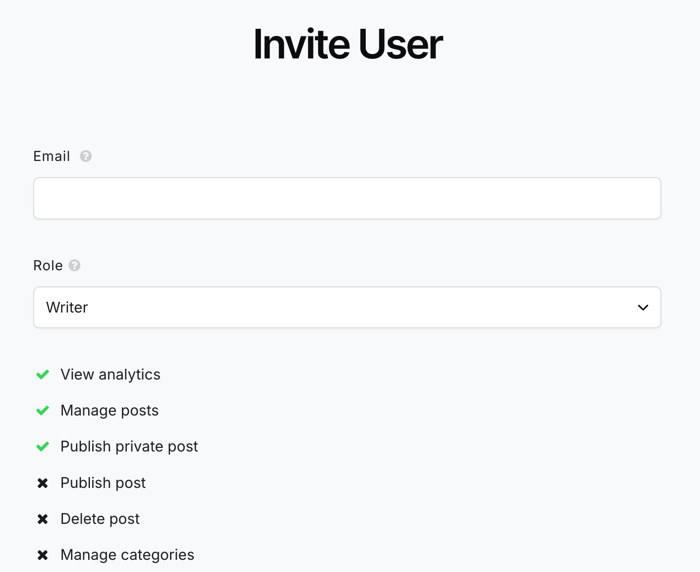
Security and compliance: Audit logs provide complete transparency into actions on your account, aligning perfectly with enterprise security policies. They help prevent unauthorized access and cultivate accountability.
Staging and preview environments: From previewing a single blog post to testing your entire blog on your staging server or local environment, DropInBlog supports safe publishing workflows and lets you review and schedule your content before publishing it live, so that you don’t have any incomplete or broken content on your site.
Fast and lightweight: DropInBlog hosts your content, which means that your BigCommerce Catalyst store performance and Core Web Vitals stay intact. Other blogging solutions can introduce performance overhead.
Enterprise onboarding and support: DropInBlog enterprise plans include a dedicated success manager, migration assistance, and implementation support. That means you have help every step of the way – from moving over to DropInBlog to getting the most out of it.
Custom integrations and SSO: The blogging platform supports single sign-on and custom API integrations to fit enterprise authentication demands and existing workflows. Without custom integrations, you may have to replace the tools you use, which comes with its own set of problems.
Service-level assurance (SLA): Enterprise users can rely on the quality and availability of service and prioritized support response times guaranteed by DropInBlog’s SLA. This helps you avoid excessive downtime, improperly functioning features, and having no one to turn to with your concerns.
Invoices and purchase orders: With multi-year invoicing and PO support, companies have a predictable and auditable way to purchase software. Without these, you may encounter unexpected price increases, which can further lead to compliance and operational issues.
SEO Features Tailored for Catalyst Content Teams
DropInBlog includes built-in SEO features that help Catalyst content teams create search-optimized content without relying on additional tools:
Full blog-level SEO controls: From within your DropInBlog account, you can manage your posts' metadata, set canonical URLs, redirects, and automatically generate an XML sitemap for your blog.
Real-time SEO analysis tool: DropInBlog’s built-in SEO Analyzer scores content as you write and provides actionable recommendations for titles, meta descriptions, and on-page structure.
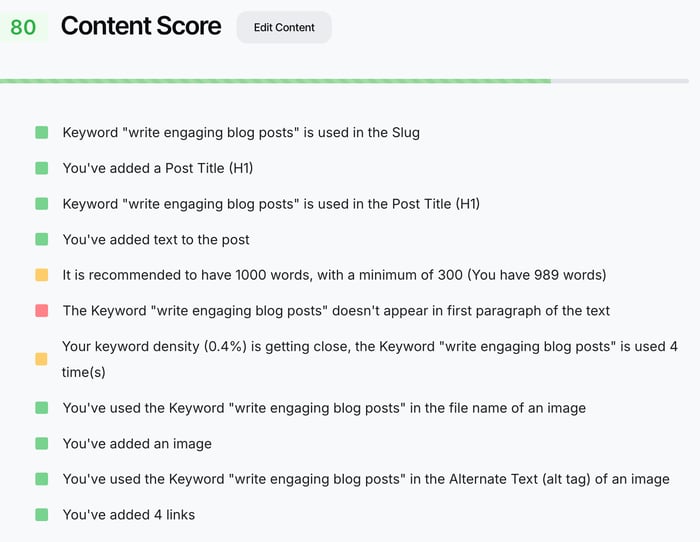
Automatic structured data: Since the BlogPosting, VideoObject, and FAQPage schemas are generated automatically, your posts are eligible for rich results without manual configuration.
AI readiness: Another built-in tool is Mention Boost™, which helps you align your content with how modern search surfaces results. Again, no need for third-party apps – the AI readiness tool is located right inside the content editor.

Built for Modern Marketing and Development Teams
DropInBlog integrates cleanly with BigCommerce Catalyst’s architecture. BigCommerce handles your store’s backend, Catalyst manages the frontend and page rendering, and DropInBlog uses a hosted API to control the blog layer.
You can integrate DropInBlog into your Catalyst store in two ways:
Through the DropInBlog Next.js package, which requires minimal coding and offers a simple setup.
Via the JSON API, which would give you complete control over every aspect of your blog.
Whichever method you choose, you’ll benefit from DropInBlog’s compatibility with Catalyst’s React-based structure. You don’t need heavy plugins or CMS servers – you can have a fast-loading blog with DropInBlog’s Next.js package and API.
The result is faster campaign launches, simpler content workflows, and a blogging setup that scales alongside your Catalyst store.
Content Marketing ROI for Catalyst-Powered Brands
A well-structured blog facilitates organic growth through keyword coverage, improves internal linking to aid product discovery further, and increases time on site. DropInBlog provides the tools to support this growth – from SEO tools to related posts and author profiles.
Another benefit of creating a blog on Catalyst with DropInBlog is that, once installed, running a blog doesn’t require developer support. Your marketing team can publish on-brand content without decreasing your store’s overall performance. And for that, they don’t need to wait for your developer team.
Talk to our team about enterprise onboarding and migration support.
Create a Blog on BigCommerce Catalyst Today
DropInBlog blends seamlessly with Catalyst’s architecture, helping you create a fast-loading, scalable blog. If you have questions about the features or the integration process, book a call with our integration specialists.
Start building a scalable blog for your Catalyst store today.