
The Hardest Part of Blogging Isn’t Writing, It’s Knowing What to Write
Before you write a blog post, you need to figure out what to write. Although this sounds simple, for many businesses it’s the hardest part. Finding the right topics and researching competitors can take hours of work before writing even begins.
Blog Pilot™ changes that. It analyzes your website, discovers blog topics, generates outlines, and helps you start writing in minutes.
Table of Contents
Meet Blog Pilot™
Blog Pilot™ is an AI-powered content research tool that helps with the most time-consuming part of blogging – the planning.
First, it analyzes your homepage to find topics related to your niche. Once it identifies relevant topics, Blog Pilot™ groups them by theme and intent. Each topic group then shows you blog post ideas and automatically generates outlines for them.
Just like that, you’re ready to start creating content for your blog – without all the tedious preparation.
How Blog Pilot™ Works
Below, you’ll see how Blog Pilot™ can get you from thinking about a post to the post editor in just a few steps.
Step 1. Access and Run Blog Pilot™
Blog Pilot™ lives on the left-hand side menu of your DropInBlog account, right below Posts.
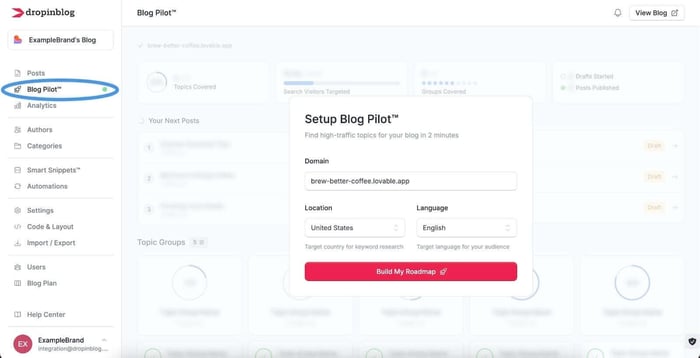
When you first open it, you’ll see the Build My Roadmap button that will prompt Blog Pilot™ to scan and analyze your site.
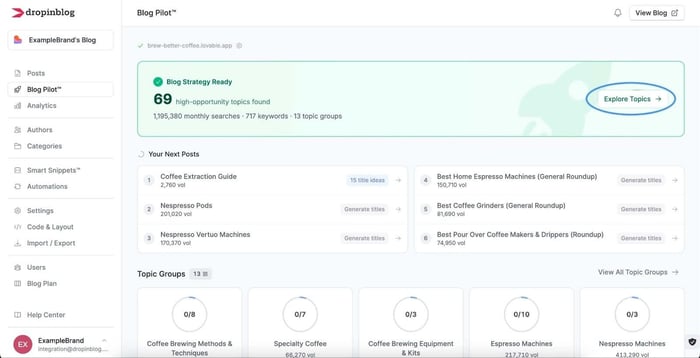
The Setup Complete screen indicates that the analysis is complete, and at this point, you just need to click on the Explore Topics button to view all the topics Blog Pilot™ found.
Step 2. Discover Topic Opportunities
Blog Pilot™ is great at finding good blog post ideas, but it does more than that. Behind the scenes, it does research to help you find the topics that people actually search for on Google. You’ll see “Search Volume” and “Rank Difficulty” next to suggested topic groups.
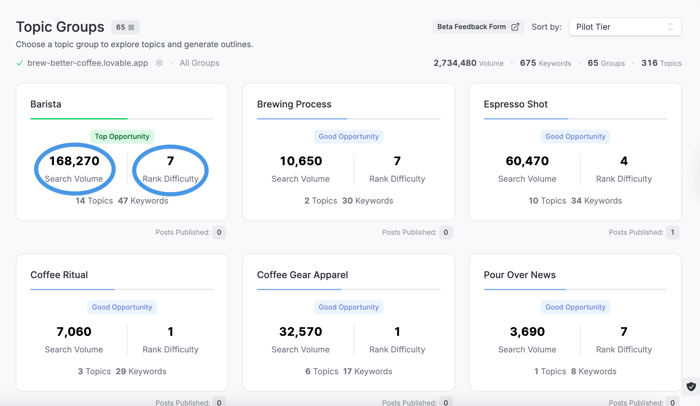
Search Volume is the average number of times per month people search for a specific term or phrase on Google. The higher this number, the better. Rank Difficulty, on the other hand, uses various criteria to assess how difficult it is to appear on Google for a specific term or phrase. A lower difficulty score means it may be easier to rank for that topic.
To help you find the perfect blog post topic, Blog Pilot™ also displays opportunity tags in each topic group. We’ll explain these in more detail shortly, but for now, you can just select a topic that’s relevant to your blog.
Step 3. Choose a Blog Topic and Post Title
When you click on the Generate Post Ideas button in the selected topic group, Blog Pilot™ will generate some post title ideas.
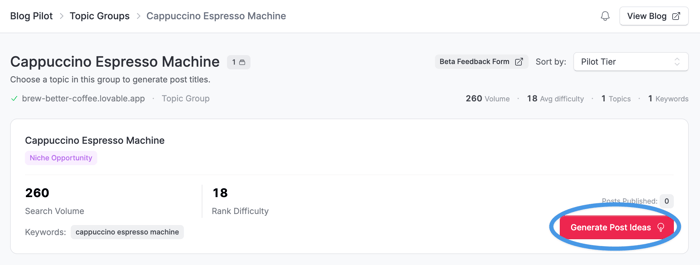
Under the selected topic, you’ll see a list of post title ideas, the main topic keyword, and a short description below each post title idea.
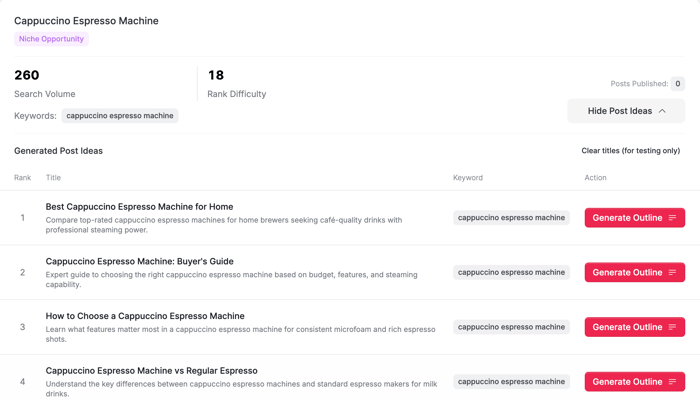
Select one that makes the most sense for your niche.
Step 4. Generate an Outline
You’re now only a step away from writing a new post for your blog. When you instruct Blog Pilot™ to create a post outline, it’ll give you three choices: a short, medium, and long outline. Which of these you’ll select depends on how detailed you want your post to be.
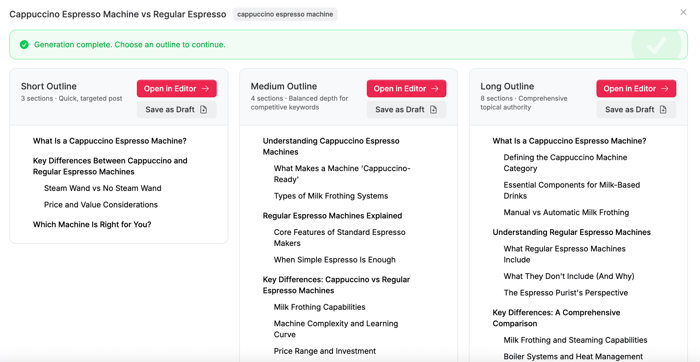
A short outline is great for posts with a few sections that quickly explain an idea or answer a specific question. A medium outline is suitable for posts that, in addition to a brief topic explanation, include tips, examples, and other sections to add value. Long outlines are typically used to showcase expertise and build authority.
Review the outline and, if needed, edit, remove, or reorder sections. Next to each outline section, you’ll see a drag handle for reordering sections, a pencil icon for text edits, and a close icon for removing a section from your outline.
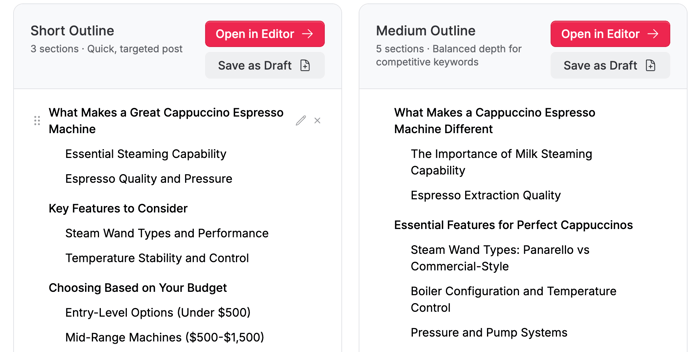
Before you proceed, check if the outline includes logical sections you’d like to include in your blog post.
Step 5. Start Writing
Once you fine-tune your post’s outline, you can open the editor and start writing. If you want to explore other topics and stay in Blog Pilot™, you can also save the outline as a draft. To choose the first option, simply click on Open in Editor, and all of the content from the selected outline will be automatically moved to DropInBlog’s editor.
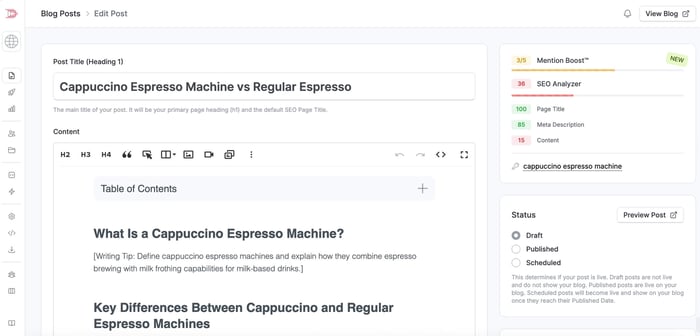
Under each heading, you’ll find writing tips inside square brackets. Review these writing suggestions and start adding your content.
Then, you can structure your blog post as you usually do: add images, videos, tables, FAQs, and other blog elements to your post.
The SEO fields in your post will be automatically populated with your post’s target keyword, SEO title, and meta description, so optimizing your content for search engines just became even easier.
The table of contents will also be automatically placed at the top of the editor, which will increase your Mention Boost™ score. However, you’ll need to adjust the other settings for your post yourself. That will be easy, though, as everything you need is inside the DropInBlog editor.
Step 6. Publish or Schedule Your Post
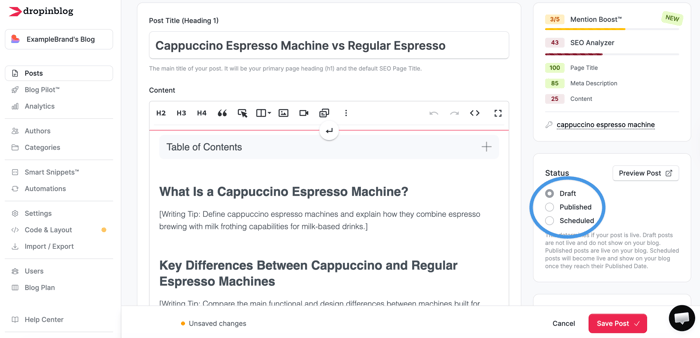
When you add an outline from Blog Pilot™ to the DropInBlog editor, it’ll be saved as a draft. Once you've created and organized your content, you’ll need to publish or schedule it. For that, you’ll use the respective options under Status.
With Blog Pilot™, figuring out how to write can become a 3-minute human-AI collaboration.
Understanding Topic Opportunities
Blog Pilot™ uses opportunity tags to help you identify the most promising blog topics. On the Topic Groups page, you’ll see “top,” “good,” and “niche” opportunity tags below each topic group. These opportunity tags are determined based on potential, helping you find the type of opportunity that will work best for your blog.
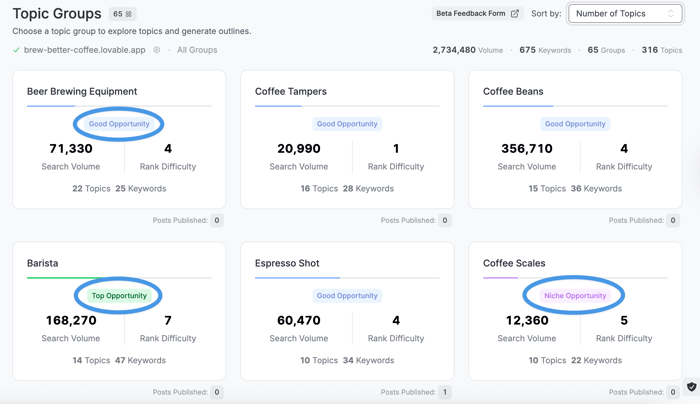
Here’s what each of them means:
Top Opportunity: Topics with low competition and significant interest on Google. You should use these topics to improve your chances of quickly increasing traffic to your blog.
Good Opportunity: Topics with significant interest on Google, but more competition than Top Opportunity topics. It may be slightly more difficult to secure a spot on Google for them.
Niche Opportunity: Topics that focus on more specific and usually longer search phrases. They often have low search volume but target a very specific audience and are relatively easy to rank for on Google.
Keep in mind that the opportunities, keywords, and topics Blog Pilot™ provides should be used as guidance, and they can’t guarantee results.
Search Volume/Rank Difficulty Cheatsheet
| Search volume / Rank difficulty | Explanation |
|---|---|
| High search volume | Many people search for the phrase on Google. |
| Low rank difficulty score | There aren’t many websites competing for the phrase on Google. |
| High search volume, high rank difficulty score | Many people search for the phrase on Google, but many websites already rank for it. |
| Low search volume, low rank difficulty score | Not many people search for the phrase, and there isn’t much content ranking for it. |
| Low search volume, high rank difficulty score | Not many people search for the phrase, but there is still a lot of content ranking for it. |
| High search volume, low rank difficulty score | Many people search for the phrase, but relatively few websites rank for it. |
Why Use Blog Pilot™
Blog Pilot™ is another built-in tool from DropInBlog designed to make blogging easy. This AI content planning tool helps you easily find the best topics for your blog. You don’t need to learn new tools, and you certainly don’t need to be an SEO expert.
Blog Pilot™, in combination with Mention Boost™ and the SEO Analyzer, will help you discover what to write about, how to improve your visibility on Google, and how to increase your chances of appearing in Google’s AI Overviews.
Don’t worry about writer’s block either. In just a few minutes, the tool will provide you with blog post title ideas, create outlines, and guide you through content creation with writing tips. On top of that, you’ll also get SEO-friendly outlines, with SEO meta tags already filled in. That means you only need to improve your content score a bit, and your content will be ready for search engines.
Who Blog Pilot™ Is For
Anyone can benefit from Blog Pilot™. Whether you’re a small, medium, or big business, think of Blog Pilot™ as a new member of your SEO and content team that helps you quickly draft new content.
Agencies that manage blogs for their customers will also find this AI-powered content planning tool useful. Instead of spending hours on content planning and keyword research, your team can focus on content quality and other aspects of your clients’ accounts.
Blog Pilot™ is also a valuable tool for solo bloggers, helping them run a successful blog on their own.
If you started your blog a while ago but haven’t been consistent in adding new content, Blog Pilot™ is just the tool you need.
Regardless of your business and blog size, Blog Pilot™ takes a lot of work off your plate, allowing you to focus on creating high-quality content.
Example Use Case
Want to see Blog Pilot™ in action? No problem. Let’s see what it can do for a website that sells coffee equipment.
Upon analyzing the website, Blog Pilot™ identified these topics: cold brew equipment, espresso gear, pour-over coffee makers, and coffee tampers. 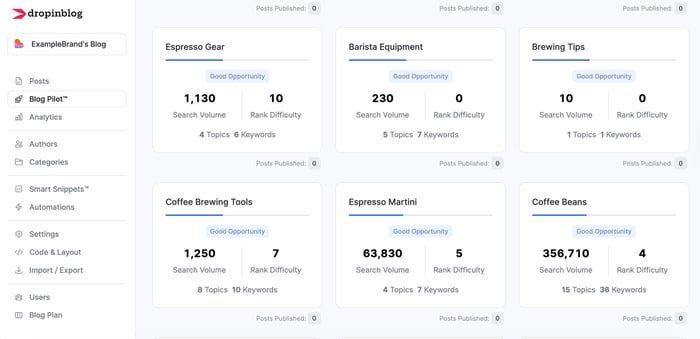
For one of the topic groups, pour-over coffee makers, the tool suggested more specific topics, including automatic and plastic pour-over coffee makers, and pour-over coffee makers with thermal carafes.
When we selected one of the topics, pour-over coffee makers with thermal carafe, the tool gave us topics on the benefits and cleaning of these coffee machines, along with a buying guide.
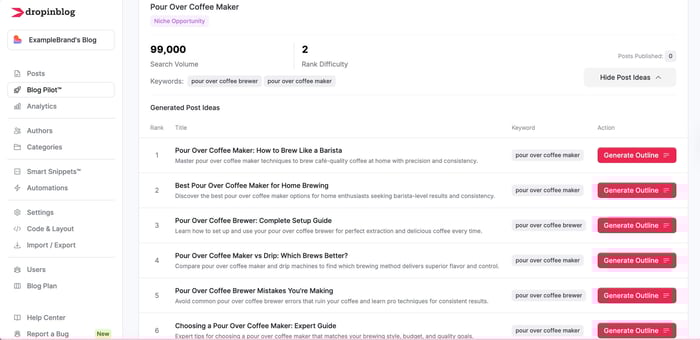
We selected one of the titles, cleaning tips for pour-over coffee makers with thermal carafe, and got 3 outline suggestions on how to clean these machines.
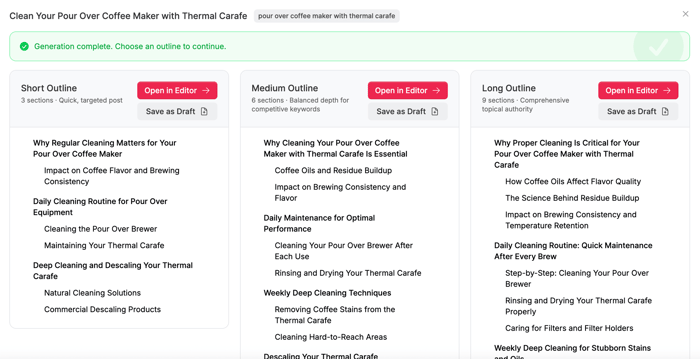
We selected the short outline and generated a blog post draft that discusses how coffee oils affect coffee taste, washing techniques for ceramic carafes, and natural and commercial cleaning solutions.
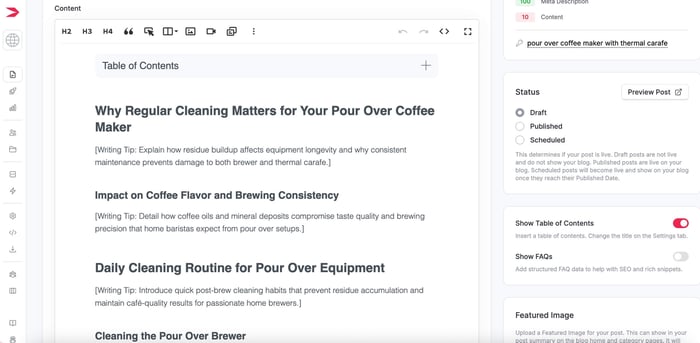
Everything from choosing a blog topic to drafting a new post took only a few minutes.
Start Planning Your Blog Content Faster
Blog Pilot™ transforms blogging from a guessing game into a clear, organized process. You can easily come up with blog topics without specialized research or content planning tools. All you have to do is run Blog Pilot™ and start writing.
Create your first post with Blog Pilot™ now.If you need any help, reach out to us anytime. We’re here to help!