
With DropInBlog, you can create rich author profiles that build trust and meaningful connections with your readers. We’ve enhanced our Authors feature with new customization options that make it easier to showcase expertise, experience, and author identity.
Table of Contents
What Is the Authors Feature?
As mentioned, the Author feature was already part of DropInBlog’s offering, which allowed you to create detailed profile pages for blog authors.
Before, you could create SEO-ready author pages and use the content editor to create extensive author bios. Now, you have even more fields to enhance your author authority and your content’s credibility.
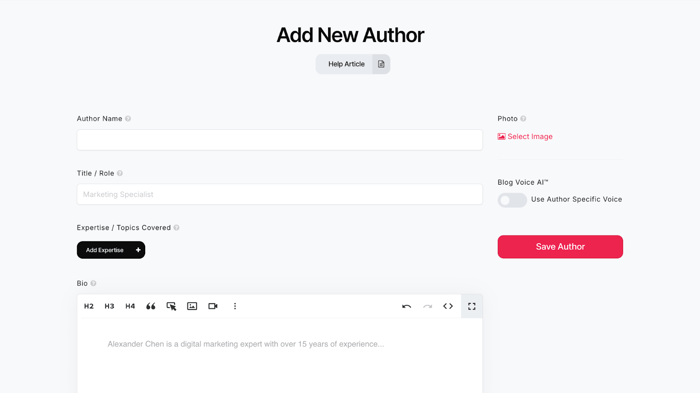
The new fields you’ll find on the Authors page include:
Title/Role
Expertise/Topics Covered
Featured links
Social media profile links
Before we give you the whys and hows of blog author profiles, let us explain the connection between author profiles and search engine rankings. It’s a subtle one, but worth having in mind.
Author Profiles and Search Rankings
Author profiles aren’t a direct ranking factor, but they affect your content’s visibility in search engines. Here’s how:
Google employs people who rate the quality of content based on these criteria: experience, expertise, authoritativeness, and trustworthiness – known as Google’s E-E-A-T guidelines.
Quality raters look for these four signals in both the content and its author.
These evaluations help Google assess and improve its search algorithms over time.
For content creators, that means clearly identifying who wrote the content and why they’re qualified matters more than ever.
Why Should You Use the Authors Feature?
In short, you should use the Authors feature if you want to meet Google’s E-E-A-T requirements, improve your content’s credibility, and gain trust from your readers. With comprehensive author pages, you can:
Send stronger E-E-A-T signals: Clearly show who wrote the content, what they specialize in, and why they’re qualified. Search engines take all of these pieces of information into account when rating content quality.
Establish trust: Create rich author profiles that position you as a reputable, reliable source.
Show professionalism and editorial standards: Instead of generic author profiles, use this feature to show your readers that your writers are qualified and that you have high editorial standards.
Easily manage multi-author blogs: Whether you’re an agency or a team with multiple authors, with DropInBlog’s Authors feature, you can create a detailed profile for everyone without extensions and plugins.
Using the enhanced Authors feature, you can showcase your work, the topics you cover, and links to your social media profiles. And with over 50% of content on the internet created with AI, this feature will help you distinguish your content from low-effort AI-generated content.
Who Is the Authors Feature For?
All blogs that promote trust, credibility, and thought leadership will benefit from the Authors feature. Additionally, the feature comes in handy for the following users:
SaaS blogs that want to build topical authority
Agencies managing multiple blogs
YMYL (Your Money, Your Life) sites
Content creation experts in any field
Shopify store owners who want to add author pages to their blogs
How to Use the Authors Feature
You can access the Authors feature from the Authors tab of your DropInBlog account. Here, you can add a new author profile or edit an existing one.
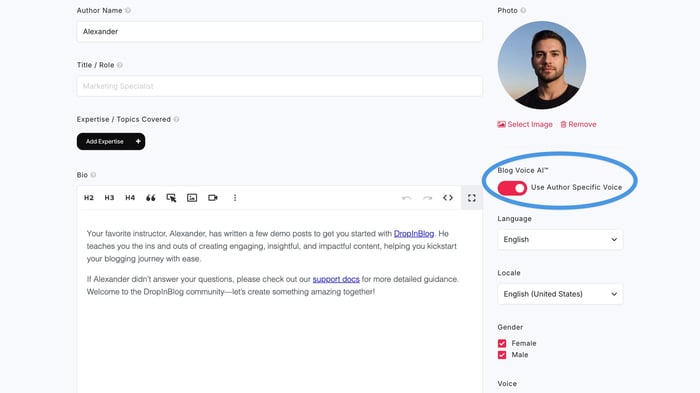
You can create beautiful E-E-A-T-friendly author profiles using the topics covered, featured links, and social profiles fields. To make a more engaging author page, you can use the rich-text editor and assign an author-specific AI voice to your blog’s authors.
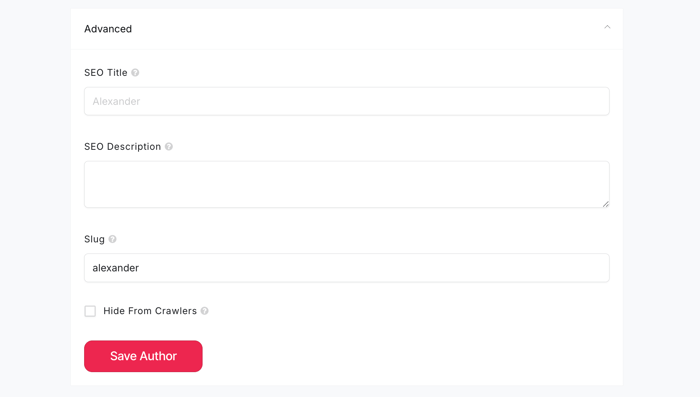
Like before, your author pages will be optimized for search engines and support the ProfilePage schema out of the box. The option to add an SEO title, description, and slug has been moved to the Advanced section, near the bottom of the Authors page. Simply expand the section to fill out these fields.
Ready to enhance your author pages and strengthen your blog’s credibility?
Explore the Authors feature in your DropInBlog dashboard, check out our knowledge base for step-by-step guidance, or reach out to our team if you have questions.
Happy blogging!