
Crafting great titles and writing your own meta description is an essential part of SEO nowadays. A compelling title will grab attention, and the meta description will give a little more insight into what information the blog post covers. If you want to know how to write a meta description and a killer title, keep reading.
Table of Contents
Why Meta Titles and Descriptions Matter
Your meta title and description are more than just a label for your blog post; they’re often the first thing someone sees in search results. A well-written meta title grabs attention, while a strong meta description builds interest and nudges the reader to click.
Together, these two elements impact both your click-through rate (CTR) and how clearly your content communicates value to search engines. For bloggers, nailing this small but crucial detail is an easy win.
If you don’t write this yourself, the search engine will automatically generate it based on the article’s first heading and the first paragraph. However, when you write it yourself, you can ensure it’s the best possible portrayal of your post.
What Is a Meta Title?
A meta title (or SEO title) is the headline that appears in search engine results. It’s typically clickable, short, and designed to describe the content of your page in a compelling way.
So a meta title:
- is different from your on-page blog post title, and can be edited separately.
- is often used by Google to determine what your page is about.
- influences how your result stands out in a crowded SERP.
Meta Title Guidelines
Your meta title needs to spark interest and curiosity – in the sea of search results, it needs to stand out. The language you use is very important. For example, using power words to suggest action or evoke an emotion is the secret to grabbing attention.
Interestingly, including a number in your SEO title can also be especially helpful. There’s something about how our brains process the combination of numbers and text that makes it more appealing.
To write a title that ranks and earns clicks:
Include your primary keyword (ideally near the front)
Keep it under 60 characters (so it doesn’t get cut off)
Match the searcher’s intent and promise what they’ll get from the post
Use emotional or action-based language when appropriate
Some examples of well-written SEO titles include:
“10 Best Travel Destinations for Solo Travelers” – includes a list, keyword, and clear benefit
“How to Create a Blog in 5 Minutes” – includes a how-to, time frame, and strong promise
“Beginner’s Guide to Writing Meta Descriptions” – positions the content as educational and helpful
It should be a no-brainer that your title also needs to include your chosen keyword, but it shouldn’t be exactly the same as your <h1> title in the article itself. This gives you more opportunity to rank for keywords variations.
Lastly, your meta title must be within the character limit of 60 characters. If not, your title will not be seen completely, and you are unlikely to get the full benefit of your creatively written SEO title.
What Is a Meta Description?
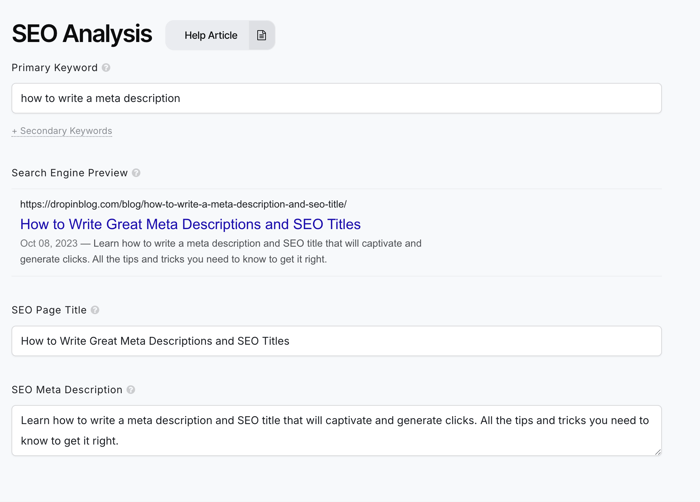
A meta description is the short paragraph of text shown below your title in search results. It doesn’t directly impact rankings, but it does influence clicks, especially if it’s clear, relevant, and keyword-aligned.
It’s your opportunity to pitch the post in 160 characters or fewer.
Meta Description Guidelines
The meta description doesn’t hold as much weight when it comes to ranking factors, but it’s still important. For this reason, every page on your site should have a meta description. Good meta descriptions do 3 key things:
Summarize what the post is about
Include the primary keyword or a close variation
Encourage action: click, learn, read, try, explore
Writing tips:
Keep it under 160 characters
Avoid passive phrasing (“This post will…” or “In this blog, we…”)
Be specific – what value will someone get from reading?
Use words like: learn, discover, explore, master, create, grow, build
Avoid keyword stuffing or generic copy (“Welcome to our blog post about SEO…”)
Finally, make sure your meta description provides a really clear snapshot of what the content on that page is about. It can also help to see what your high-ranking competitors include in their meta descriptions.
Remember: If you don’t write your own meta description, Google will pull one – and it may not be what you want.
Common Mistakes to Avoid
When developing an eye-catching meta title, don’t be tempted to create clickbait. This doesn’t work well and only results in your site losing credibility. Similarly, writing misleading meta descriptions in order to draw in a reader is a bad move.
Try to make your SEO title and meta description as close to the maximum character limit as possible. Short meta descriptions are unlikely to fully convey what’s in the content of the page and risk being replaced by something the search engine creates.
Also, don’t be afraid to go back and freshen up old content by rewriting meta descriptions.
Here's a short list of what you need to watch out for:
Titles or descriptions that are too long and get cut off
Not including the primary keyword
Repeating the same phrases in both fields
Over-promising or clickbaiting (hurts trust and bounce rate)
Leaving these fields blank
Taking a few extra minutes to customize each one makes a real difference in both traffic and trust.
DropInBlog for SEO Success
Most blogging platforms will allow you to write your own meta description and SEO title. If not, you should definitely move to something better, like DropInBlog.

DropInBlog is a professional blogging platform that makes writing and managing your SEO-optimized content super easy.
From inside the post editor, you can:
Edit your meta title
Customize your meta description
Preview exactly how your post will appear in Google
Get real-time tips with the SEO Analyzer
You also get control over other SEO-critical features like custom URLs, schema markup, social sharing buttons, and clean HTML, no plugins or extra tools needed. Everything’s built to follow SEO best practices by default.
Whether you’re embedding DropInBlog into Shopify, Webflow, or your own custom site, the same SEO toolkit travels with you. The full range of features is long, so you certainly won’t be lacking functionality with DropInBlog.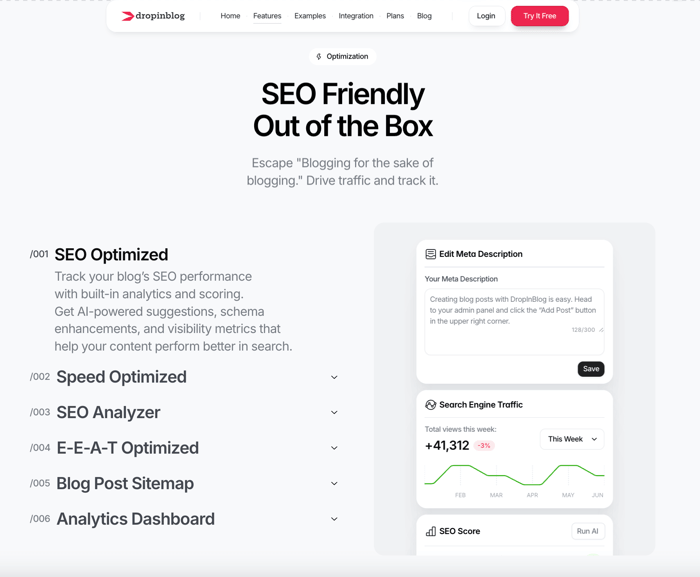
To make it nice and simple, DropInBlog integrates easily with a wide range of platforms. It even automatically adopts your site's CSS, so there’s no need to spend time reformatting posts.
FAQs
How long should a meta title be?
A meta title should be under 60 characters to avoid being cut off in search results. Aim for clarity, keyword inclusion, and click appeal.
What’s the ideal length for a meta description?
Keep it under 160 characters. Focus on summarizing the post clearly while using your main keyword and a call-to-action if it fits.
Do meta descriptions affect SEO rankings?
Not directly. Meta descriptions don’t impact ranking, but they influence click-through rate (CTR), which is a behavioral signal that can affect visibility over time.
What happens if I don’t write a meta title or description?
Google will generate one from your content. This usually results in lower CTR because the snippet may not represent your post well.
Should I include keywords in my meta title and description?
Yes. Including your primary keyword in both helps search engines understand your content and reassures users that your post is relevant to their query.
Can I use the same meta description across posts?
Avoid it. Every meta description should be unique, just like your content. Reusing them can confuse search engines and limit click appeal.
Final Thoughts
Writing clear, clickable meta titles and descriptions is one of the easiest SEO wins available to bloggers. With a bit of strategy and structure, your posts will not only rank better – they’ll get clicked more often.
If your current blogging setup doesn’t let you control these elements, you’re leaving traffic on the table. DropInBlog is built to help bloggers like you take full control of SEO essentials, without needing extra tools or dev help.
Want to test it out? Try DropInBlog free and see how easy it is to optimize your next post.