
Final Verdict: Is Bloggle Worth It?
Bloggle is one of the most popular blogging apps for Shopify, and it successfully bypasses many limitations of Shopify’s native blogging engine. It has a flexible content editor and makes it easy to create SEO and conversion-optimized content, but paying for an extra app in your Shopify account is only worth it if you blog regularly.
If you haven’t used it before, here’s what you should know:
Bloggle’s section-based blog builder makes it easy to structure and organize your posts. To do the same in Shopify, you need to put in more effort and time.
To add elements to your post, just select them from the list on the left side of Bloggle’s editor. Additionally, the editor supports reusable sections, which speeds up the process of building new content.
Compared to Shopify, Bloggle has more advanced SEO features, including an SEO scoring tool.
It’s much easier to add products to your blog posts with Bloggle than with Shopify. However, keep in mind that Bloggle’s product embeds aren’t dynamic, so visitors won’t be able to interact with them until they’re on a product page.
Bloggle is a Shopify-only app. So if you decide to switch platforms, you’ll need to look for a new blogging solution. If you need a blogging tool that will work outside Shopify, you should consider DropInBlog.
Also, Bloggle isn’t a full-featured CMS. If you need one to manage your content, WordPress is probably a better option – especially with its extensive plugin system that can extend your blog’s functionality.
You should use Bloggle only if blogging drives traffic or revenue, but again, make sure to explore other blogging apps for Shopify before committing to Bloggle long-term.
Keep reading to learn more about Bloggle – its essential features, pricing plans, pros, and cons. At the end of this Bloggle review, you’ll have everything you need to make an informed decision about whether this is the right solution for you.
Want a Blog Without Rebuilding Your Site?
If you want a structured, SEO-focused blog that works inside Shopify but isn’t limited to it, DropInBlog offers a flexible alternative without replacing your existing site infrastructure.Table of Contents
What Is Bloggle?
Bloggle is a specialized blogging app for Shopify, launched in 2021. Like many other Shopify blogging apps, Bloggle was designed to enhance the native blogging experience. Compared to the built-in blog, Bloggle is different and, in some respects, better.
The difference between Bloggle and Shopify’s native blog is that in Bloggle, you’re working with a modular blog (and page) builder. With Shopify, you get a traditional WYSIWYG editor with some basic formatting options, which is quite different from Bloggle’s section-based approach.
Creating a blog on Shopify is somewhat similar to creating one on WordPress. In contrast, with Bloggle, the process is more like building pages with a traditional website builder like Wix or Weebly.All the content you publish with Bloggle lives on your Shopify domain and can be accessed from within the Content section of your Shopify account. That means Bloggle only controls the editing experience.
The “better” part of blogging on Shopify with Bloggle is its SEO features, which are far more advanced than Shopify’s basic metadata control. The app has a built-in SEO analysis and a UX scoring tool that give you more options to optimize your content for search engines.
Still, having access to SEO tools is one thing, and using them to create a blog that performs is another. You can bridge the knowledge gap by joining DropInBlog's monthly newsletter below.
What Are Bloggle’s Key Features?
Bloggle is a structured blog builder that supports a variety of blog elements, SEO features, and design options. Let’s explore these in greater detail.
1. Editor and Section-Based Builder
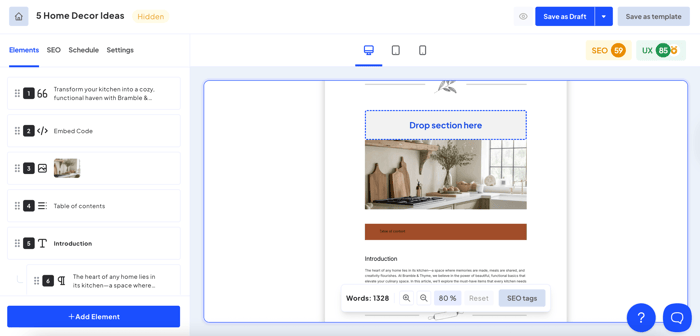
In Bloggle, you build blog posts by adding elements. These sections range from simple headings and paragraphs to videos, buttons, product embeds, and galleries, so you can add diverse media to your content.
For paragraph-style content, Bloggle uses rich text formatting, which means you can add links, headings, images, and tables to your text. To add videos, you can embed YouTube and Vimeo videos, or add a video URL from another video service. To add images, you can upload them or paste in an image URL.
The post layout includes some default options that you can modify to some extent.
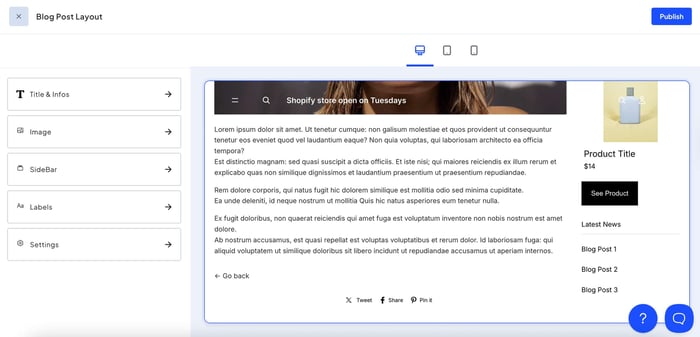
For example, you can choose whether you want to show a sidebar with products and related posts. You can also specify where in the blog post you want to add a header image and apply different heading styles.
To move between sections, you can use the up and down arrows or drag and drop them into a desired position. Selecting an element from the left menu opens all its editing options, allowing you to easily modify and style your content.
2. Reusable Sections and Templates
Bloggle offers a feature called “sections library,” which lets you save an author box, a video, or a simple paragraph, then add these elements to another blog post with a single click.
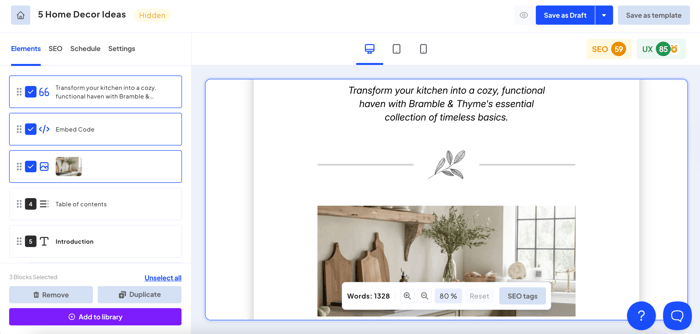
This functionality can be quite useful if your posts have a similar outline (e.g., you always add an about-the-author section and store products below the post content). Additionally, you can save several elements at once, which is again useful if you want your posts to have a cohesive look.
When it comes to templates, Bloggle lets you start a post with a template or from scratch. The template library currently offers 14 blog post templates that combine text, images, products, and summaries.
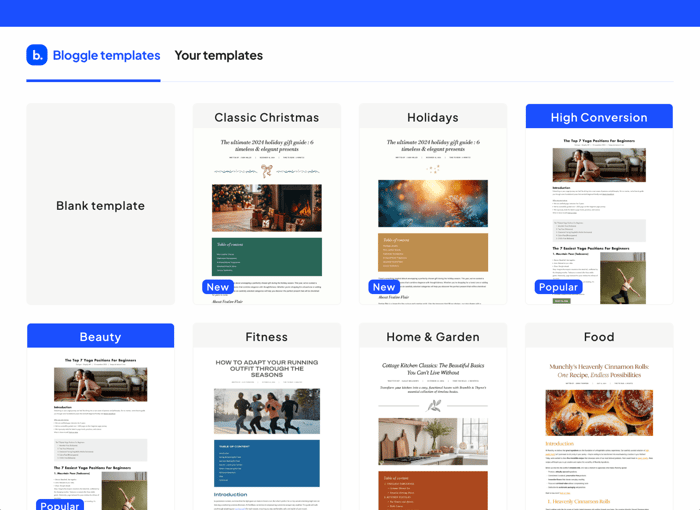
You can also add or remove elements from a template and save it for future use.
Compared to Shopify, you can create your content more easily with Bloggle, thanks to pre-built elements, templates, and sections.
3. E-commerce Features
Another advantage Bloggle has lies in how you add products to your Shopify blog posts. Instead of working with code, or using third-party apps and buy buttons, you can add products to your posts created with Bloggle in just a few clicks.
The products you embed in your blog posts serve as previews of the real product pages. Your visitors can see the product, and once they click on it, Bloggle takes them to its page.
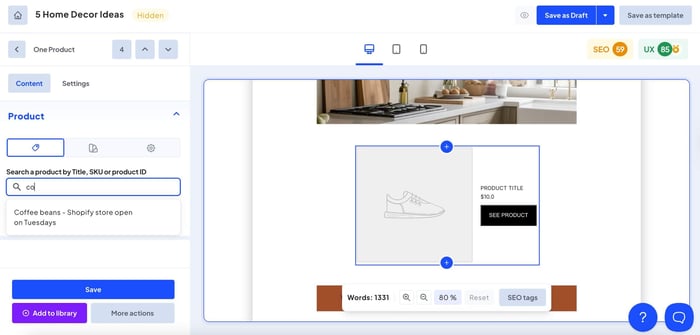
While this method is certainly more straightforward than building a buy button, the products within the blog content aren’t dynamic. Visitors can’t view product variants or add products to a cart until they open the product page. Other Shopify blogging apps, such as DropInBlog, offer dynamic product embeds that allow readers to interact with products directly from within a blog post.
In comparing Bloggle’s product embeds to Shopify’s native capabilities, or what you can do in DropInBlog, Bloggle is a middle-of-the-road option.
4. Table of Contents
Bloggle supports a table of contents feature that’s automatically generated from your blog post’s headings. This feature gives it an edge over Shopify, as adding a ToC in Shopify requires either an app or creating a ToC in the HTML editor.
To add a ToC to your blog post with Bloggle, just add this element where you want it to appear.
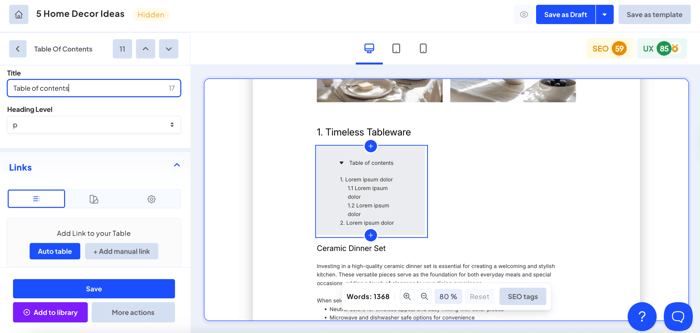
You can let Bloggle automatically detect the headings in your posts and add them to your ToC, but there’s also the option to add them manually.
The one downside of this feature is that if you change a heading title in the post, the changes won’t automatically reflect in your ToC. That means you have to manually change the anchor text every time you update heading titles, which can be annoying. That same feature, on the other hand, works without a glitch in DropInBlog. You can change heading titles as much as you want, and your ToC will always reflect the last update you’ve made.
Customization-wise, you have a few options to style your table of contents in Bloggle. You can change the background color, add borders, adjust the element height and width, and apply custom CSS.
5. Google Docs to Bloggle
If you’re creating your blog posts in Google Docs or Word, you can easily paste them into Bloggle’s content editor.
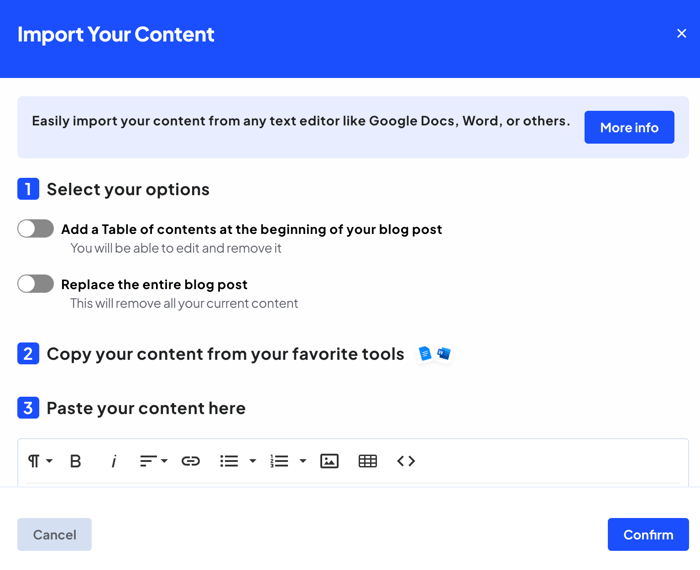
This option preserves the formatting from the source and transfers it into the editor. It generally works well, but occasionally, you’ll have to make some adjustments manually. For example, you may need to adjust the spacing or revert the changes if the heading formatting transfers to paragraphs.
In addition to formatting, this functionality transfers images from Google Docs and automatically creates a ToC for your posts, which can cut your posting time in half.
6. SEO Workflow
When you create a new blog post in Bloggle, you’ll get several features and tools to optimize it for search engines.
The SEO tab on the left side of the editor is where you can add an SEO title and meta description, and customize your URLs.
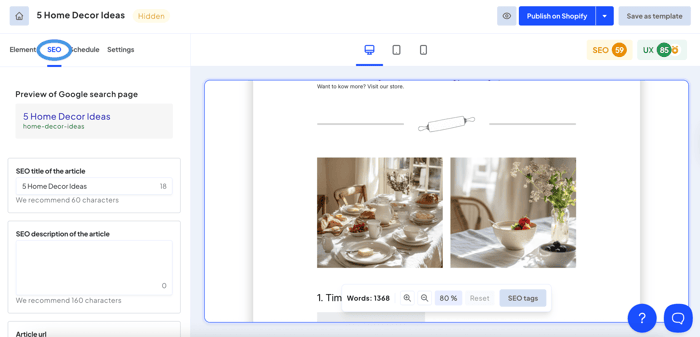
Note that, like with Shopify’s native blog, you can’t remove the “blogs” part of the URL, only the part that comes after your blog’s name. If you want your blog to have a clean URL, you should consider DropInBlog, which removes “blogs” from the URL.
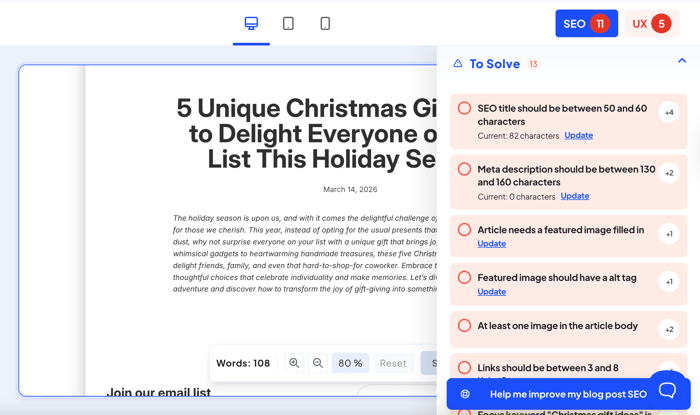
On the top right, you have the SEO and UX tabs. The SEO tab is where you add a search term or phrase for which you want your content to appear on Google. Once you do that, the tool will guide you through SEO best practices and help you increase your content’s visibility in online search. Some of the suggestions you’ll see here include adding keywords to headings, bolding text, and adding alt text to images.
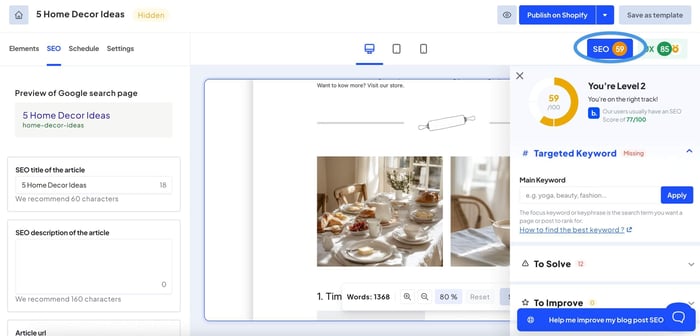
The UX tab works similarly. It offers suggestions for increasing readability, conversion rates, and user experience. This isn’t something you can do with Shopify’s native blog engine, which scores Bloggle some extra points.
7. AI Writing
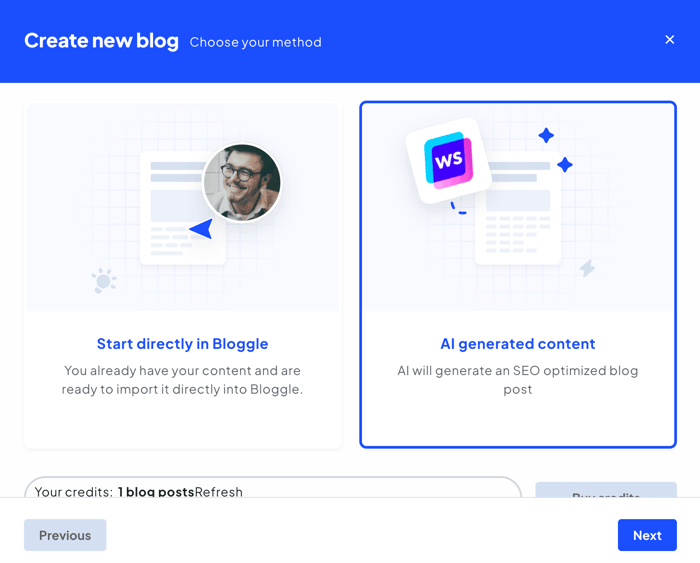
Bloggle integrates with Writesonic, an AI-powered content creation tool. You can use this tool to create outlines for your blog posts, as well as the actual content for them. This concept of using AI to help you run your blog is relatively new, but there are a few blogging apps that support it.
The way the AI tool works in Bloggle is that it asks you to describe a topic and add a keyword you want to use for that blog post. It then generates a post title, an introduction, an outline, and eventually the content for your blog post.
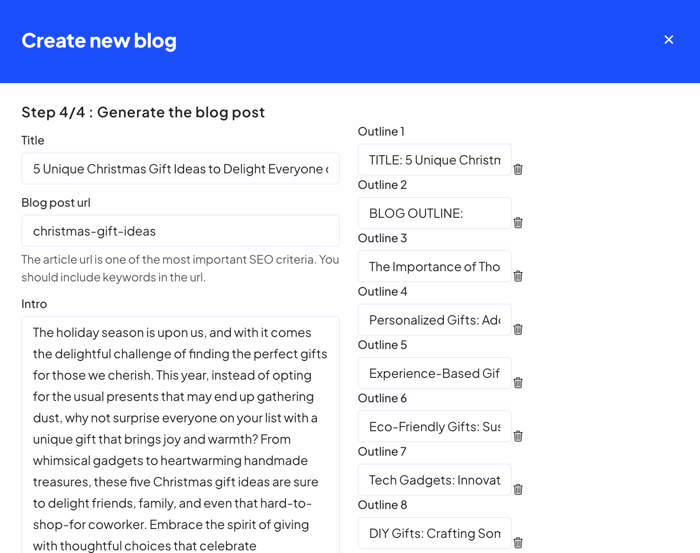
Still, you have to come up with a topic for your next blog post and do some keyword research to ensure you’re writing for the right audience and about the topics that people search for in Google.
The output from Bloggle’s AI tool is solid but requires that you delete a few unnecessary lines here and there, as with most AI-generated content.
The problem is that this feature is still in beta and occasionally won’t deliver the required content. You might get an intro and an outline, but not the actual post content. Add to that the tool’s separate pricing, which is not included in Bloggle’s pricing plans, and you’ll have a couple of reasons to look for another AI planning tool.
The bottom line is that although Bloggle’s AI tool can be useful, it still needs a lot of improvement.
8. Blog Listing Layout
In Bloggle, you can tweak the design of your blog homepage. This page is called “blog layout list,” and it shows excerpts of all your blog posts. The design changes you can make here range from small ones, like changing the page layout and text labels, to some more advanced changes handled through custom CSS.
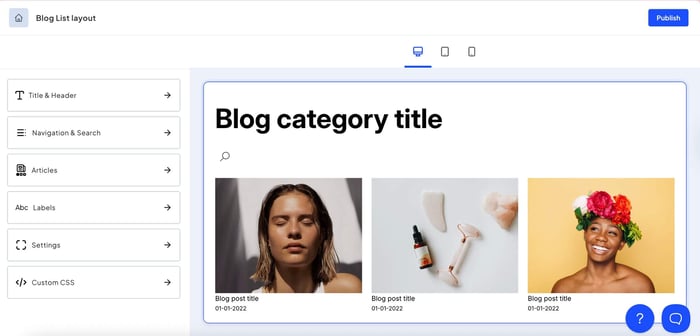
When it comes to your blog’s navigation, Bloggle follows Shopify’s philosophy. To add a category to your navigation, you have to create a new blog from your Shopify admin. The app also supports tags, but creating a filtered navigation with them is somewhat complex. Plus, if you’re on the entry plan, you won’t even have access to tags.
9. Integrations and Translation
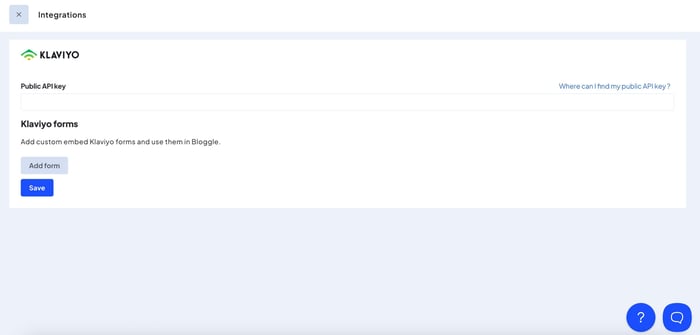
With Bloggle, you won’t get a broad ecosystem of third-party integrations like you would with platforms such as WordPress or even some other Shopify blogging apps. Instead, it offers very few options – Klaviyo for email marketing and a handful of Shopify translation apps.
This means that if your blogging workflow relies on connecting tools like Zapier for automation, analytics, SEO, or commenting, you won’t find many native options inside Bloggle. Instead, you’ll often need to rely on workarounds or handle those integrations outside of your blog entirely.
For stores with simple needs, this won’t be a dealbreaker. However, for workflows that depend on multiple tools working together, Bloggle’s limited integrations can quickly become a constraint.
With DropInBlog, you get a pool of integrations via Zapier, and you can even access GA4 data from within your DropInBlog account to track your blog’s performance.Bloggle Free vs. Paid Plans
Bloggle has three pricing plans: Starter, Pro, and Business, and lets you test them with a 14-day free trial.
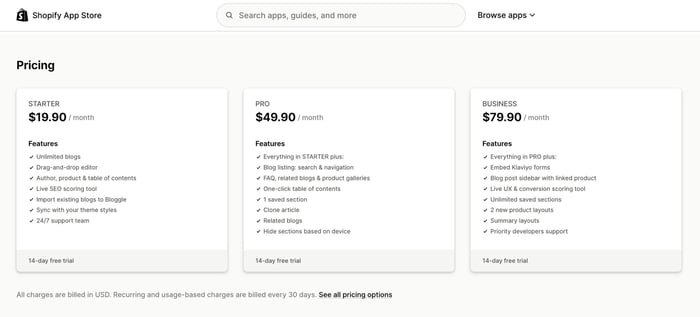
The Starter plan has a reasonable price of $19.90/month and lets you create unlimited SEO-friendly posts using pre-built templates. The downside of this plan is that it excludes many essential features, such as FAQs, related blog posts, tags, a blog search bar, and even the option to duplicate a blog post.
At $49.90/month, the Pro plan gives you access to more blogging features that give Bloggle an advantage over Shopify, including a one-click table of contents and saved sections. However, even with this plan, you won’t get access to Bloggle’s most popular features. To leverage the app’s UX scoring tool, add sidebars with products, and make CSS-based changes on your blog, you’ll need the Business plan ($79.90/month).
Bloggle lists monthly prices on its website and Shopify’s App Marketplace. However, inside the Shopify billing screen, you may see discounted pricing for yearly subscriptions.
Bloggle Pricing: Is It Worth It?
Bloggle’s pricing can be difficult to justify, depending on your publishing habits. If you regularly add new blog content, adding Bloggle to your store probably makes sense, but that depends on your budget. Although the entry plan costs $19.90/month, it doesn’t include many of the features that bypass Shopify’s limitations. So, to get the most out of Bloggle, you’ll need to consider the Pro and Business plans.
Even with the most expensive plan, you still won’t be able to bridge some of the restrictions related to Shopify’s native blog. That includes the URL structure and author profiles. If removing these limitations is important to you, it might be worth comparing Bloggle with other Shopify blogging solutions, such as DropInBlog, which have different pricing structures.
Overcoming Shopify’s limitations requires an investment, but the results for your blog make it worthwhile, as long as you choose a good content strategy. Luckily, that part doesn't require an investment.
Sign up for DropInBlog's monthly newsletter, and you will receive all the SEO & blogging tips you need for building a blog that drives traffic to your store.
Bloggle vs. Other Blogging Platforms
Bloggle vs. Shopify Native Blog Editor
| Bloggle | Shopify's native blog | |
|---|---|---|
| Setup time | 30+ minutes | Several minutes |
| Writing speed | Fast | Moderate |
| Section-based building | ✓ Yes | ✗ No |
| Templates/reusable blocks | ✓ Yes | ✗ No |
| SEO control | ✓ Yes | ✓ Yes |
| SEO guidance/scoring | ✓ Yes | ✗ No |
| Product embeds | ✓ Yes | ✓ Yes (complex) |
| Table of contents | ✓ Yes | ✗ No |
| Google Docs import | ✓ Yes | ✗ No |
| Design flexibility | High | Low-moderate |
| Best for | High-frequency publishing, visually appealing blogs | Basic blogs with low publishing frequency |
Now that you’ve seen how Bloggle compares to Shopify’s native blog, take a look at how it fares against other blogging platforms.
Bloggle vs. WordPress vs. DropInBlog
| Bloggle | WordPress | DropInBlog | |
|---|---|---|---|
| Best for | Shopify users who need an improved version of Shopify’s native blog | Tech-savvy users who need a fully customizable CMS | Store owners who need an advanced blogging platform that’s easy to use |
| Where it lives | On Shopify’s servers | On your servers | On DropInBlog’s servers |
| Customization level | High | High | High |
| SEO workflow depth | Medum | High | High |
| Content team workflow | None | Advanced | Advanced |
| Integrations ecosystem | Limited (Klaviyo + translation apps) | 61,000 plugins | Zapier-based integrations Google Analytics Social media and comments |
| Maintenance burden | Low | High | Low |
| Cost predictability | High | Low | High |
Strengths of Bloggle
1. Structured Publishing Workflow
One of Bloggle’s biggest strengths is that it lets you quickly create and publish blog posts for your Shopify blog. The rich section library supports everything from simple headings and paragraphs to image galleries and product embeds, making it easy to structure your posts.
2. Reusable Sections and Templates
Saving several elements as blocks and then adding them with a click or two to another blog post is a huge time-saver for post creation. It also supports post templates, which makes publishing new content for your blog an even smoother process.
3. Built-in SEO Scoring Tool
Another great thing about Bloggle is its native SEO scoring tool – something you won’t find in many other apps. The tool suggestions are easy to implement and can make a big difference for your blog’s visibility in online searches.
4. Simple Product Embeds
Shopify’s buy buttons can’t compare to the ease of adding products to your blog posts with Bloggle. And since in-post product embeds are an excellent tool for increasing your store’s conversion rates, Bloggle’s product embed feature is one of its most useful ones.
Common Bloggle Complaints
1. Shopify-Only Scope
One of Bloggle’s biggest limitations is that it can only be used on Shopify. If you decide to move to another e-commerce platform like BigCommerce, you won’t be able to use Bloggle for blogging. If, on the other hand, you use a platform-agnostic solution like DropInBlog, you’ll be able to use it for blogging on any platform, not just Shopify.
2. Author Page Limitations
If you have a blog on Shopify, you already know that you can’t create an author page without creating a staff account. Bloggle, unfortunately, doesn’t solve this problem, but only offers a workaround for displaying an author’s bio on individual posts.
3. Non-flexible Blog URL Structure
We’ve mentioned earlier that Bloggle changes the editing experience on Shopify, but since your posts live on Shopify, you can’t change the “blogs” part of the URL. While this isn’t a big downside, it’s still something to consider when choosing the blog solution for your Shopify store.
4. Content Export Limitations
When you add new content through Bloggle, it will publish it on your Shopify domain. The problem is that Shopify makes it difficult to export your blog, so most store owners use a third-party app to do so. So, moving the content you’ve created in Bloggle to another platform will probably require a paid app.
With DropInBlog, you can create comprehensive author pages without adding members to your store. You can also add traditional categories to your blog and, more importantly, import and export your content whenever you want.Getting Started With Bloggle
1. Sign Up
You can easily create an account on Bloggle. Find the app in Shopify’s App Store, and after you start the installation process, select a pricing plan.
Use the Apps menu to launch Bloggle, and once in the app’s dashboard, open the Content menu and decide whether you want to import blog posts from Shopify’s native blog or start a new one.
2. Create a Blog Post
To create a new blog post in Bloggle, select a template, then fill out the basic post data, i.e., title, author, and URL handle. The next screen you’ll see is Bloggle’s editor, with all available sections on the left. Review the sections that came with the template, and use the left-hand side of the editor to add your own.
Before you publish your post, add SEO meta tags, then review SEO suggestions labeled To Solve and To Improve on the right side of the editor.
Once done, publish your new blog post on Shopify.
3. Tips for Managing Posts on Bloggle
To manage your blog more efficiently, consider building parts of your blog before you start a new post. With the Save section feature, you can create an end-of-post section where you’ll display products, author info, and related posts. The next time you start writing, you’ll easily add these conversion-focused elements to your blog, which will give you more time to focus on the actual content.
Since Bloggle offers a lot of different SEO options for blogs, it’s easy to get carried away in trying to get a perfect score. Don’t fall into this trap because a perfect SEO score can sometimes lead to overstuffing your content with keywords or their unnatural placement. Use your common sense instead of blindly implementing all suggestions, or, even better, learn exactly which strategies are worth implementing.
Don't feel like doing in-depth SEO research regularly? The team at DropInBlog does it every month, then shares the conclusions in the newsletter. You can join it by entering your email address below.
Bloggle Alternatives
If Bloggle doesn’t meet all your blogging requirements, consider exploring its alternatives.
1. Shopify Native Blog Editor
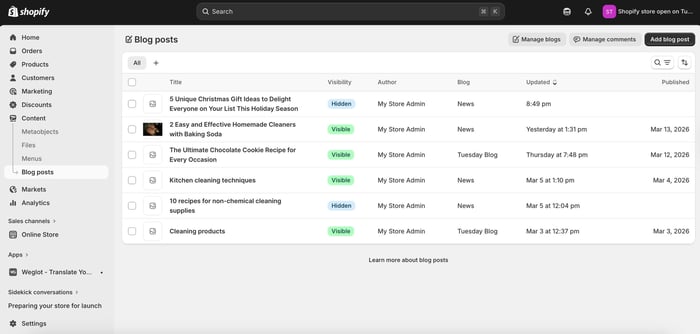
Who it’s for: Small blogs on a budget that don’t need advanced blogging features.
Cost: Included in your Shopify subscription.
Why use it: It handles basic blogging features without additional cost.
As we previously mentioned, Shopify’s native blog isn’t a bad solution. It’s just lacking in some areas, like SEO features, E-E-A-T-friendly author pages, and a blog URL structure. However, for creating simple blog posts, Shopify does a decent job.
Compared to Bloggle, Shopify has fewer options that make blogging easy. It lacks one-click features like ToC and product embeds, and it doesn’t support reusable sections.
Still, you should consider this blogging solution if you don’t create new blog content very often, you already use an SEO app with your blog, and don’t need advanced blogging features.
The built-in blog is free and makes perfect sense if you’re on a budget.
2. DropInBlog
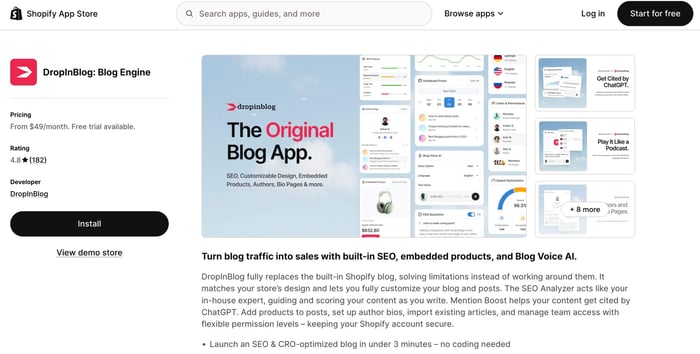
Who it’s for: High-volume, SEO-friendly blogs that use blogging to attract traffic and boost store conversion.
Why use it: To create SEO-friendly blogs that focus on boosting conversions and audience engagement.
DropInBlog is another dedicated app for Shopify blogs. While its pricing plans are slightly higher than Bloggle’s, DropInBlog doesn’t use feature gating. This allows you to explore all of its features even with the entry-tier plan.
DropInBlog also offers more features to improve blogging on Shopify. Apart from the features you’ll find in both Bloggle and DropInBlog, such as automatic ToC, reusable sections, and product embeds, DropInBlog also offers a proprietary text-to-speech engine, an AI content planning tool, and dedicated blog categories and author pages. Also, blogs created with DropInBlog don’t have “blogs” in their URL.
Another important aspect of DropInBlog is that it works with Shopify and other e-commerce platforms, which means you can move away from Shopify and still use DropInBlog for blogging. The platform also caters to businesses of all sizes, including enterprise customers for whom Bloggle doesn’t have a plan.
3. WordPress
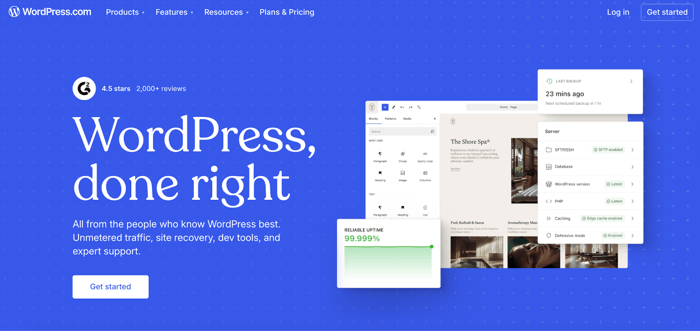
Who it’s for: Companies with a dev team looking to create a highly customizable blog.
Cost: Varies depending on your hosting service, tech resources, plugins, and themes.
Why use it: To create a highly customizable blog without theme or feature limitations.
WordPress is a full-featured CMS that allows you to build a blog however you like. The self-hosted version is endlessly flexible, which solves the problem with Shopify’s design limitations. The platform also comes with a plugin ecosystem. If there’s any functionality you want to add to your blog, you have a massive pool of plugins and extensions to help you with that.
On the other hand, WordPress differs from Bloggle in the level of skill required to start and manage your blog. Bloggle is primarily focused on users without coding knowledge, while setting up WordPress often requires some technical knowledge. So choose this alternative only if you have some prior coding knowledge or a dev team to help you out.
4. Webflow
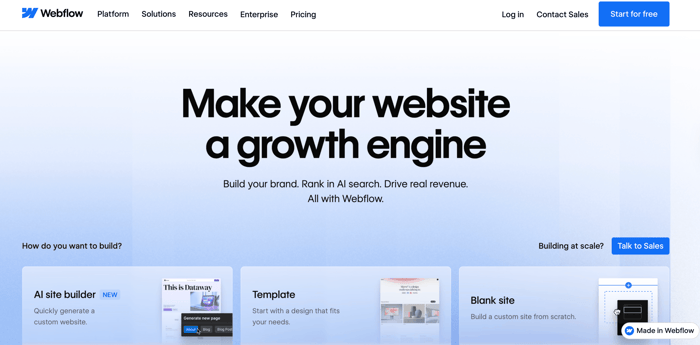
Who it’s for: Companies that need flexible blog design and layout options.
Cost: $18 to $49
Why use it: To create a beautiful blog without technical knowledge.
Webflow is a powerful no-code website builder with blog functionality. It’s different from Bloggle in that it lets you make advanced design customizations without adding your own CSS. It also uses CMS collections, which is how you build a blog on Webflow.
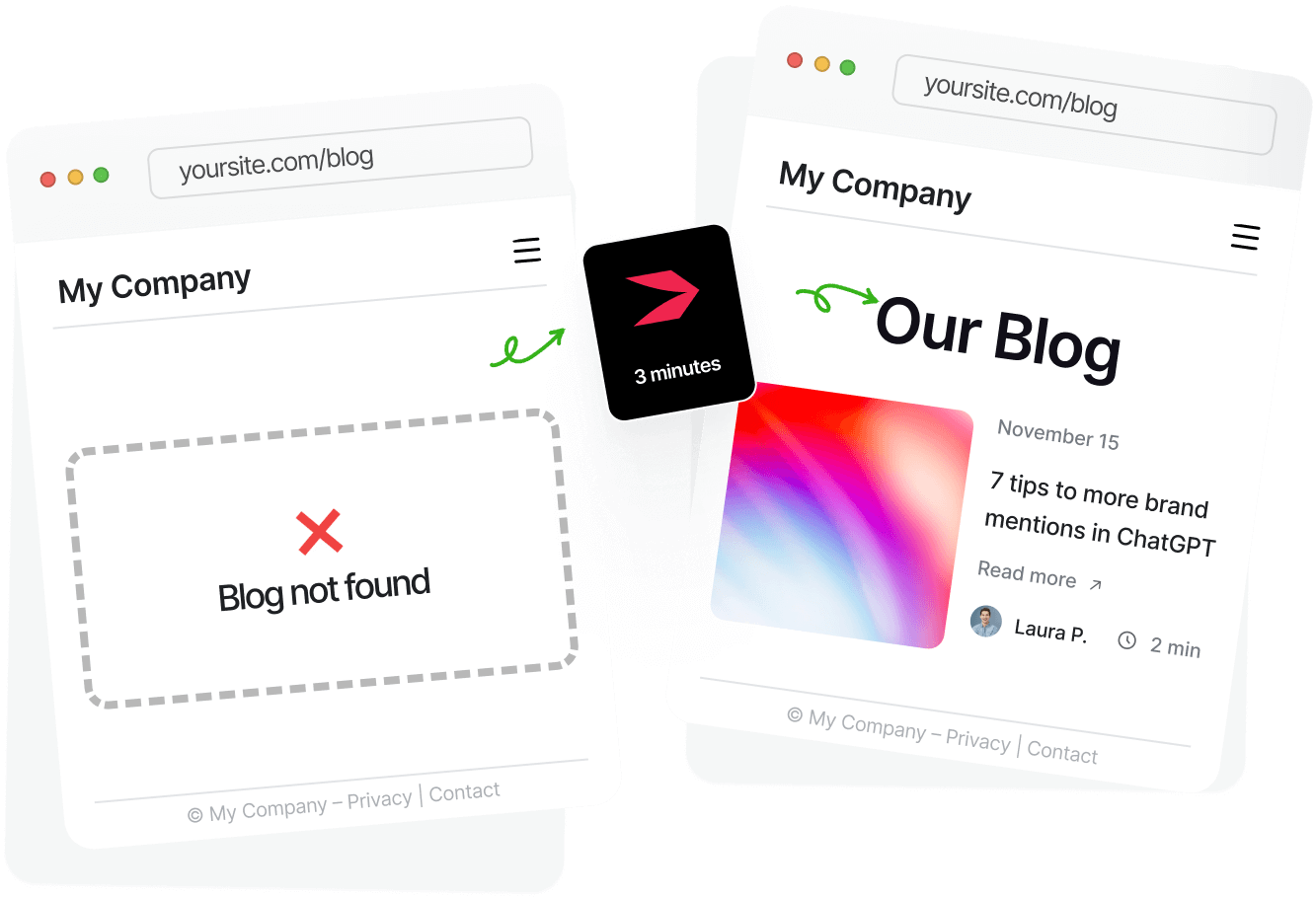
However, creating a blog for your Shopify store with Webflow is more difficult than with Bloggle. So, if you don’t mind creating a blog with some effort and managing it outside your Shopify account, you should give Webflow a try. If you prefer a solution that can be set up quickly, and can be managed within Shopify, you might want to start a free trial with DropInBlog. You will have a live, powerful blog on your site 3 minutes into your trial
Who Should Use Bloggle?
If you’re still unsure if Bloggle is the right solution for your blog, reassess your blogging requirements.
Bloggle May Be For You If:
You have an online store on Shopify and need a better blogging solution than what Shopify offers out of the box.
You publish new blog content regularly.
You want your blog to drive traffic to your Shopify store.
You want to create structured layouts easily and without coding.
Bloggle Is NOT For You If:
You have a small blog that doesn’t often see new content. In this case, it might be better to stick with Shopify’s native blog.
You need a blogging solution that works in and outside of Shopify. For this purpose, DropInBlog, with its platform-agnostic nature, will better serve your blogging needs.
You need detailed author pages, blog categories, and versatile user roles. DropInBlog offers all these features and is probably a better fit.
You require deep plugin ecosystems to expand your blog’s functionality. WordPress might be a better fit for this.
FAQs
How much does Bloggle cost?
With a monthly subscription, Bloggle’s pricing ranges from $19.90 to $79.90. You can get additional savings with the yearly subscription, which lowers the prices of the Pro and Business plans. The exact numbers are available on Shopify’s billing screen.
Is Bloggle better than Shopify’s native blog editor?
Yes, Bloggle offers several features that enhance Shopify’s native blog engine, including a section-based editor, a one-click table of contents, reusable content blocks, and simple product embeds.
Does Bloggle improve SEO?
Bloggle has a built-in SEO scoring tool, which, if used properly, can improve your blog’s SEO. A lot of it depends on how well you do keyword research, which is outside Bloggle’s scope.
Can Bloggle import Google Docs?
Yes, Bloggle lets you copy your content from Google Docs and paste it into Bloggle’s editor. It transfers the original formatting, which can save you a lot of time when moving your content from Google Docs to Bloggle.
Can you embed products with Bloggle?
Yes, Bloggle integrates with your Shopify store, allowing you to easily add a product element to your blog posts.
Final Word
There you have it – a full review of Bloggle and everything it can do. Compared to Shopify’s blog, Bloggle offers a much easier way to structure and optimize your content for search engines. If blogging plays a crucial role in your marketing strategy, Bloggle can help you create content that attracts website traffic and ultimately converts visitors.
However, Bloggle is only worth the extra cost if you publish regularly. Stores that blog occasionally may find Shopify’s native blog sufficient for their needs.
Also, keep in mind that Bloggle is an app for Shopify only. If you plan to stay within the Shopify ecosystem long-term, that limitation may not matter. But if you want a blogging platform that works across different e-commerce platforms, solutions like DropInBlog offer a more flexible alternative.