
On May 13, 2026, Lovable started building new projects with server-side rendering (SSR) instead of client-side rendering (CSR). In simple terms, this changes what happens when someone visits your site: the page is now put together on the server instead of in the visitor’s browser.
If you created your site before that date and haven’t migrated it to the new setup (built on a framework called TanStack Start), your site still uses CSR. So, in this guide, we’ll talk about what the new setup means for your site, how to check which setup you’re on, and how to migrate.
If your Lovable blog is built with DropInBlog, it may be using CSR, and migrating your site doesn’t automatically change that. That’s why we’ll also show you how to check whether your blog uses CSR and how to move it to SSR.
Table of Contents
Old vs. New Lovable Setup: What Changed
Before May 13, 2026, all Lovable projects used client-side rendering. Projects created since May 13, 2026, use server-side rendering by default.
So what was happening behind the scenes before, and what is happening now?
When a visitor searches for something, sees your site's page in search results, and clicks on it, their browser asks your site's server for that page. This part has stayed the same. What’s different is how the page is assembled after the request.
With client-side rendering, the server sends the browser an almost empty page and the code needed to build it. The browser has to run that code before the visitor sees the full page.
With server-side rendering, the server builds the page before sending it to the browser, so the browser has less work to do.
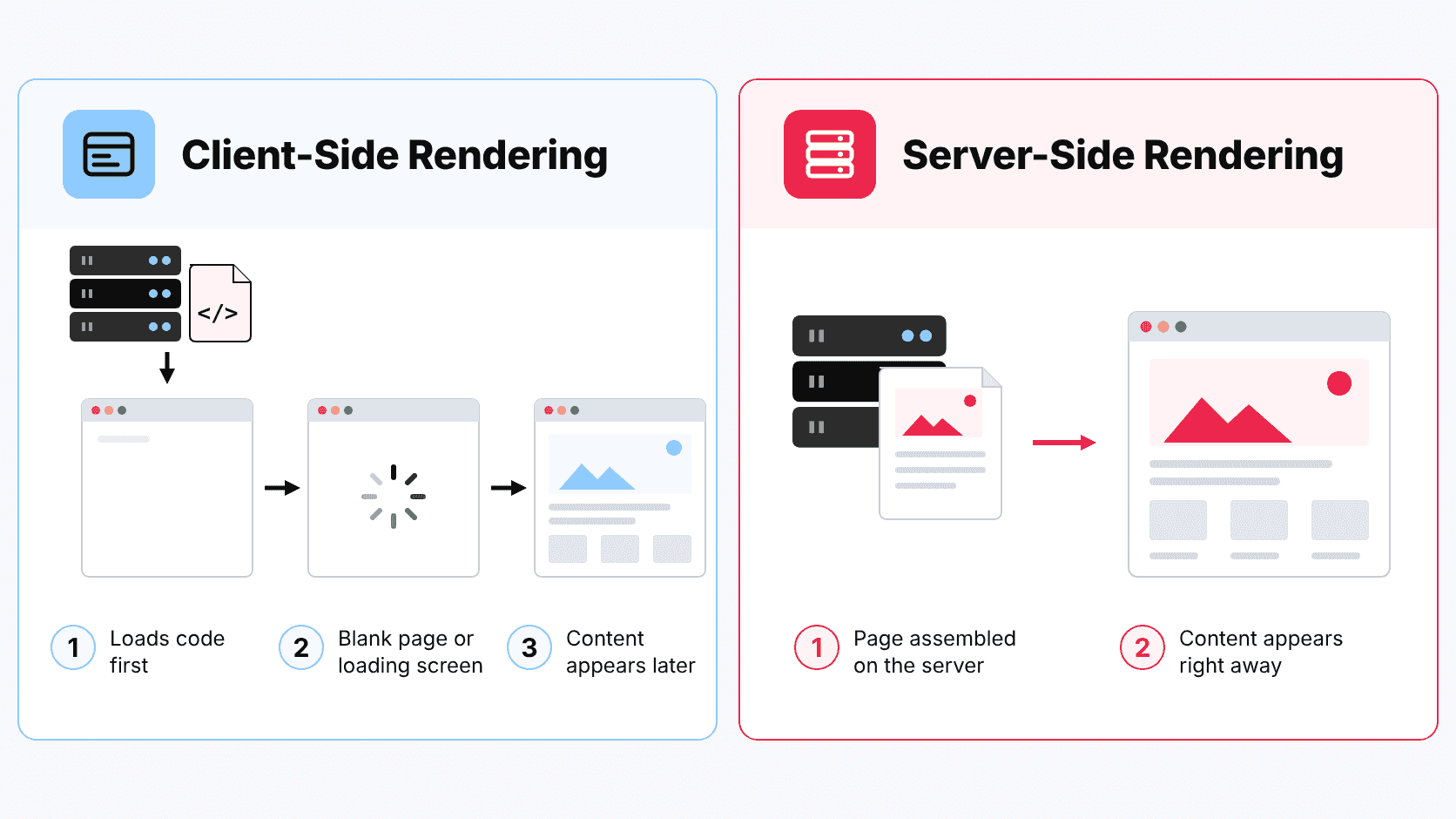
If we compare these two types of rendering to ordering food, server-side rendering is like ordering a meal from a restaurant. It arrives cooked, and you can eat it right away. Client-side rendering is more like ordering a meal kit: you need to prepare it before you can eat. How long that takes depends on your kitchen, just as first-load speed on CSR sites depends on the visitor’s device.
How Do These Two Setups Affect Your Site?
The first time visitors open a CSR site, they typically wait longer to see the content than they would on an SSR site. On a site that uses CSR, the browser has to load and run code before it can display a complete page, so visitors often see a blank page or a loading screen while they wait. On a site that uses SSR, that work is already done on the server, so the page appears much sooner.
That doesn’t mean SSR is always better. CSR works well for interactive pages, such as dashboards and account areas, where the content changes as the visitor clicks around. SSR is the better fit for content pages like blogs, where a fast first load and visibility in search matter most. Ideally, a site uses each method where it fits best. New Lovable projects can do that. Old Lovable projects can’t, because they use CSR for every page.
| Old setup | New setup | |
|---|---|---|
| Framework | Vite + React Router | TanStack Start (TanStack Router) |
| Hosting | Static hosting (Cloudflare Pages) | Cloudflare Workers |
| Rendering | Client-Side Rendering (CSR) only | Server-Side Rendering (SSR) or Static-Site Generation (SSG) or Client-Side Rendering (CSR) (per-route) |
Another thing to keep in mind is that old Lovable sites rely on a workaround to stay visible in search. When a verified crawler, such as Google’s Googlebot, visits one of these sites, Lovable builds the page on its server and hands Googlebot a finished copy. Other crawlers, including third-party SEO tools and link checkers that aren’t on Lovable’s verified list, get the client-rendered version instead. Because some of these crawlers don’t run code at all, a client-rendered page looks nearly empty to them.
Even crawlers that do run code can take a while to process it. As Lovable notes on its blog, Google takes about ten seconds longer to process a typical client-rendered page compared to a server-rendered page. Lovable’s pre-rendering helps old projects avoid that delay. With SSR, however, you don’t need a workaround because both people and tools get a complete page from the start.
Link previews are another weak spot on CSR sites. When you share a link on X, LinkedIn, Slack, or WhatsApp, the platform sends a bot that reads the page’s preview tags (title, description, and image) as soon as the page arrives. These bots don’t run the code that builds a client-rendered page, so unless they get one of Lovable’s pre-rendered copies, they only see generic tags and show a generic card. With SSR, the page-specific tags are already in the page when it arrives, so every preview bot can read them.
Compared to the old Lovable setup, the new one also adds end-to-end type safety. Type safety means checking that each piece of data is the right kind, which is a bit like a form that won’t let you type letters into a phone number field. Lovable says this gives its AI clearer rules and helps catch more mistakes before they reach your site.
How to Check Whether Your Lovable Site Uses SSR or CSR
If you built a Lovable project before May 13, 2026, and haven’t moved it to the new setup manually, the project is using the old setup. If you’re not sure when you created your Lovable site, here are a few ways to check its current setup:
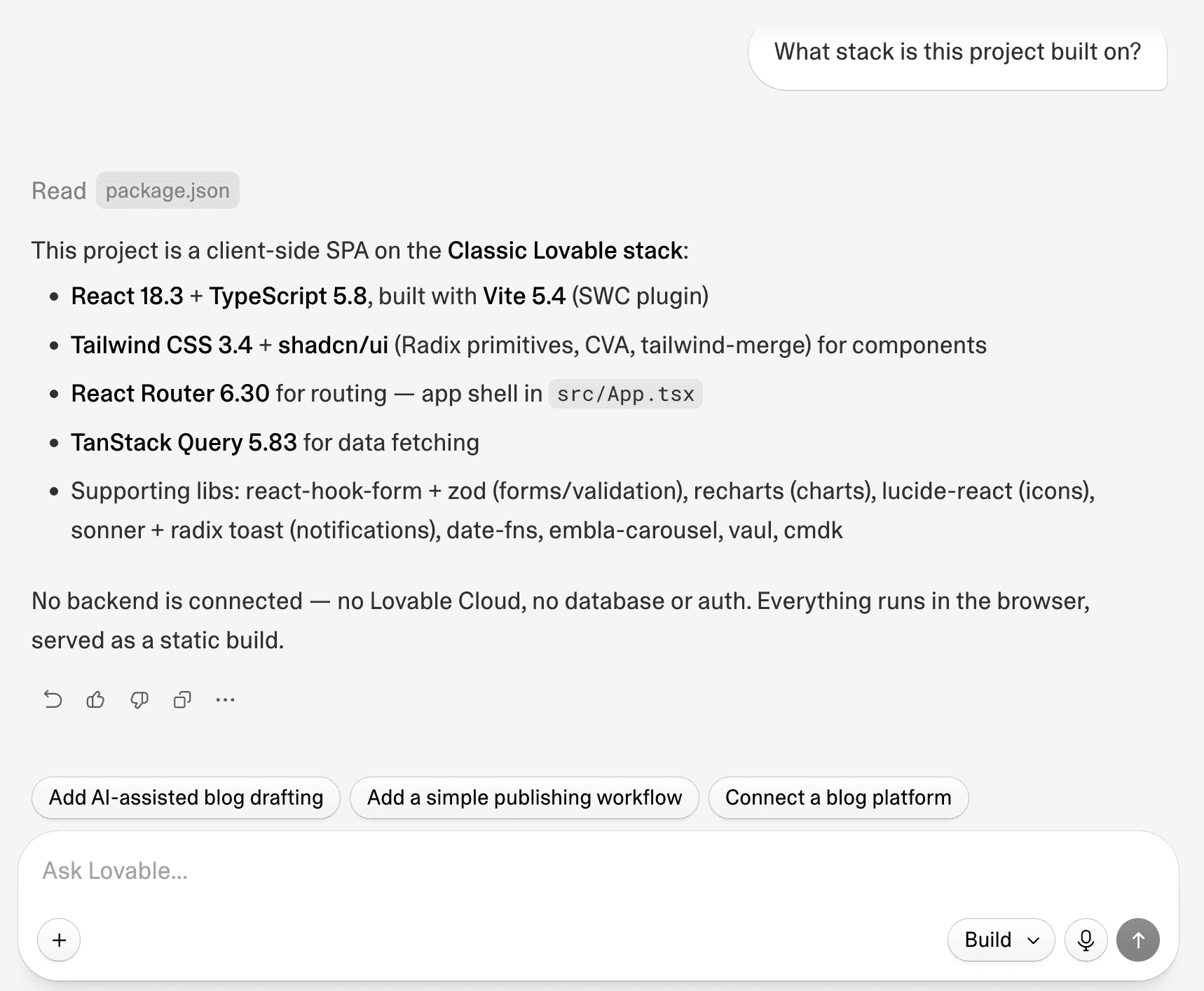
- Open a chat in your Lovable project and ask Lovable whether your project uses the old or the new setup. Use this prompt: “What stack is this project on?” This is Lovable’s recommended method.
- View the page source: Open your live site, right-click your homepage or a blog page, and select View Page Source. A common mistake is selecting Inspect, since this shows the page after it’s been assembled. Look for the heading and text in the Page Source. If you see them, your site uses Lovable’s new SSR setup. If you don’t see your page’s headings and text, your site is built with the old CSR setup.
- Check the files: If you connected your project to GitHub, open the src folder. If you see src/router.tsx and src/routeTree.gen.ts, your site uses the new setup. If you see a file called src/main.tsx but not router.tsx or routeTree.gen.ts, your site uses the old setup.
Some people assume a vite.config.ts file means the old setup. It doesn’t: Lovable used Vite before and still uses it with the new setup, so this file appears in both.
How to Migrate to the New Lovable Setup
Moving your Lovable project from the old setup to the new one is easy since the migration tool is built into Lovable. To migrate your project, use any of these methods:
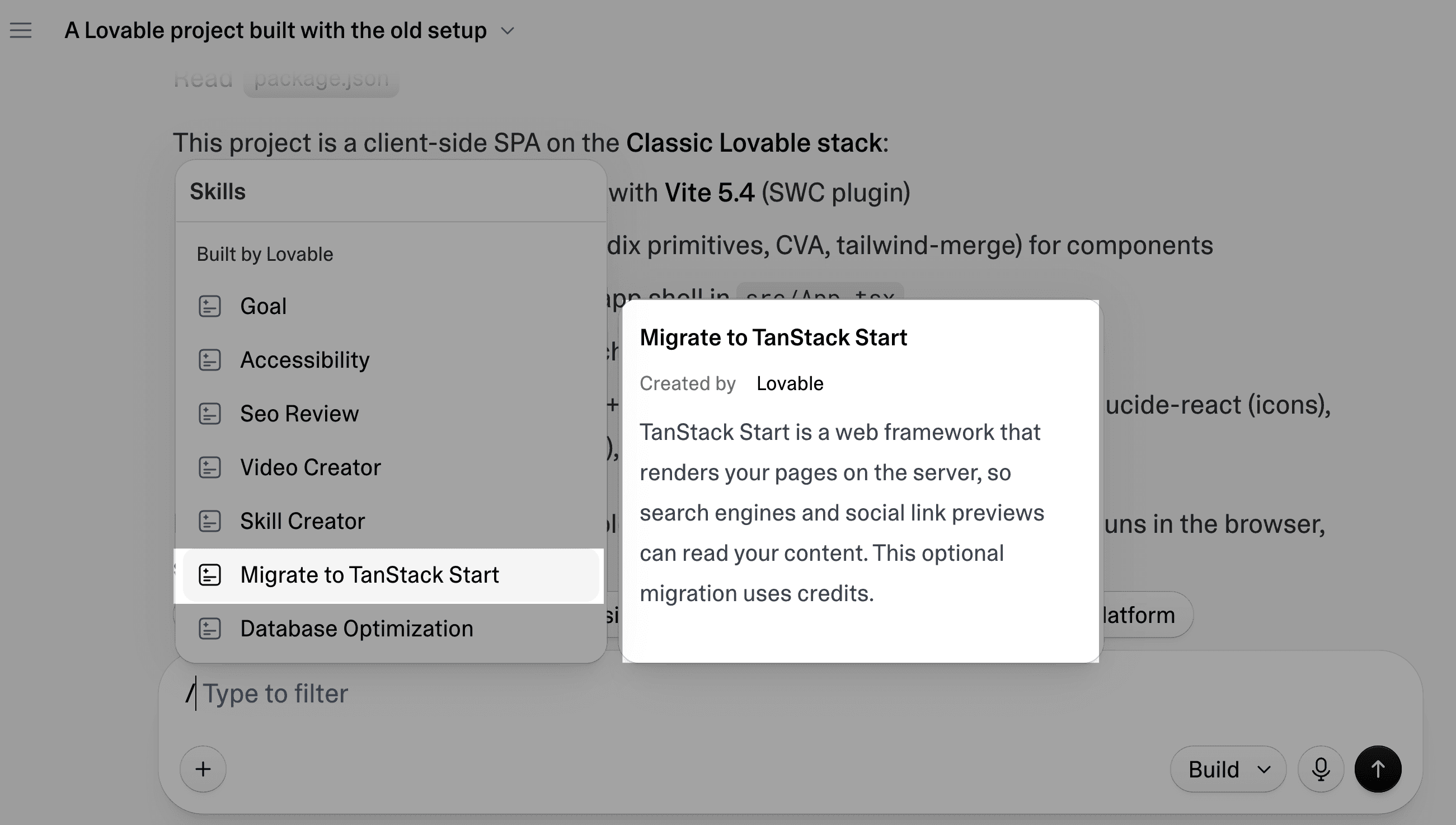
- Type a forward slash (/) into your project’s chat and select Migrate to TanStack Start.
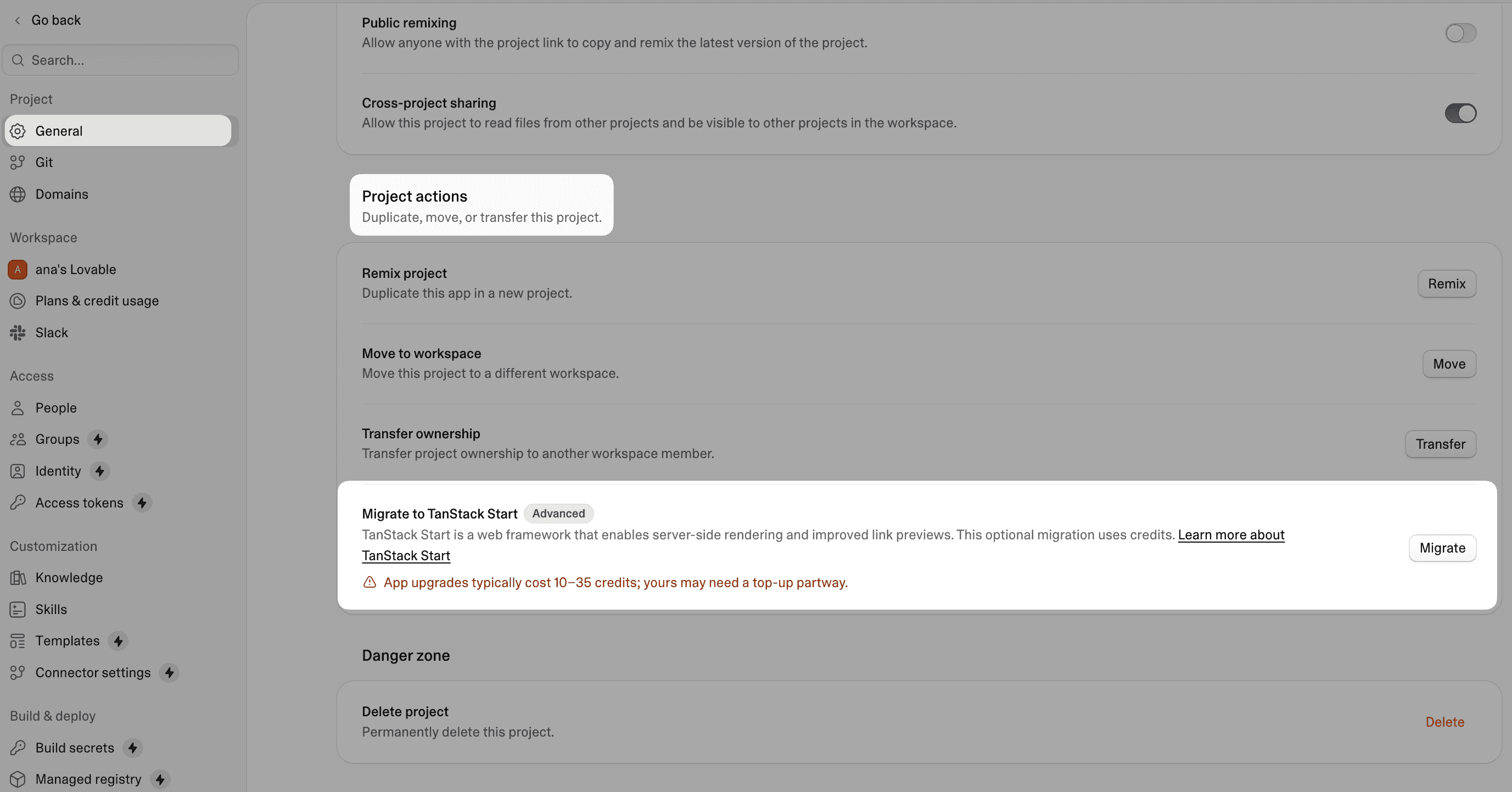
- In your Lovable dashboard, open your project’s Settings page, then under the General tab, look for Project actions. You’ll see the option called Migrate to TanStack Start. Click Migrate to start. If your site uses the new setup, you won’t see this option in your project’s settings.
- In the chat box of the project you want to migrate, just ask Lovable’s Agent to move your project to the new setup.
During the migration, Lovable updates the project structure for the new setup while preserving your existing pages, content, and design. It then builds the migrated version for you to review before you publish it.
Now, here are a few more things you should know about migrating your project to the new setup:
- You can review the changes before going live. Your live site stays on the old setup until you publish the migrated version.
- You can undo it. If you don’t like the result, restore the pre-migration version from your project’s version history.
- Large projects may need your input to resume. If the migration stops, Lovable will list the tasks it completed and those still pending. You can then ask it to finish the remaining tasks.
Some browser-only libraries may stop working after the migration. We suggest checking the important pages on your site before publishing.
How to Switch Your DropInBlog Blog to SSR
Migrating your site to SSR does not automatically make the blog SSR too. You don’t want to migrate your site to SSR for better crawlability and performance, only to leave the blog using the old rendering method.
If you added DropInBlog before migrating to TanStack Start, your blog was set up for the old client-rendered setup, so it will still render in the browser until you switch to the new package. To check which setup your blog uses, open a blog post, right-click it, and select View Page Source. If you don’t see the post’s content or headings on that page, your blog is using CSR.
Follow the steps below to enable server-side rendering for your blog:
- Open the Lovable project where you installed DropInBlog.
- In your DropInBlog account’s Code & Layout page, copy the prompt under Prompt Setup.
Return to Lovable and paste the prompt into the project’s chat.
- If asked to add your blog ID and API key, go back to DropInBlog’s Code & Layout page, where you’ll find your blog ID. If you didn’t store your API key, you’ll have to generate a new one. Click the Manage your keys link under API Key to open the API Keys page, where you’ll be able to create a new one.
- Publish your site to make your updated blog live.
Once you finish setting up your blog, open one of the blog posts, right-click the post page, and select View Page Source to verify that the blog uses server-side rendering. If you see the post’s content in the Page Source, your blog is rendering the content on the server.
Developers can also set the blog up manually using the DropInBlog package and full instructions on GitHub.
If you haven’t used DropInBlog before, visit DropInBlog’s integration guide for Lovable for step-by-step instructions on how to add it to your site.
FAQs
Is Lovable good for SEO now?
Yes, with the new tech setup that uses server-side rendering, Lovable handles more SEO aspects of your site than it did before with the old React + Vite setup. TanStack Start projects get reliable crawling from every tool, page-specific link previews, and faster first loads.
Do I have to migrate to Lovable’s new setup, or can I stay put?
No, you don’t have to migrate to the new setup. Sites that use the old setup will continue to run normally, and verified crawlers will continue to get pre-rendered versions of your pages.
Will migrating to TanStack Start break my site or change my design?
Migrating your Lovable project to TanStack Start shouldn’t break your site or change its design. Some code libraries need a browser to run, though, and they can leave a page blank after the switch. Before you publish, open important pages in the preview and make sure they work.
Will my blog URLs change after the migration to Lovable’s new setup?
No, your blog URLs won’t change after the TanStack Start upgrade. This applies to both blogs created with Lovable and DropInBlog-powered blogs.
What does it cost to migrate to Lovable’s new setup?
Migrating to Lovable’s new setup typically costs between 10 and 35 Lovable credits. If your balance is low before you start the migration, Lovable will let you know you might have to add credits before it finishes the migration.
Migrate Your Site, Then Your Blog
Older Lovable sites keep working, so migrating is your call. If you want search engines, SEO tools, and link previews to see full pages, it's worth the 10 to 35 credits. Just remember the site and the blog switch separately: after you publish the migrated site, re-run the DropInBlog prompt and check a post's page source to confirm it's server-rendered.
If your Lovable site doesn’t have a blog, sign up for a free trial at DropInBlog to see how easy it is to run a blog on Lovable.