
Adobe Commerce doesn’t support a blogging tool out of the box. The platform’s decision to exclude blogging functionality from its offering is deliberate, though. Adobe has a separate product, an enterprise CMS, that you can use for blogging: Adobe Experience Manager (AEM). But that’s just one of the four ways to add a blog to your Adobe Commerce store. Besides AEM, you can use a blog extension from Adobe’s Marketplace, Adobe’s page builder, or an embeddable blogging solution.
This guide comes from the people behind DropInBlog, so we want to be transparent about our standpoint. While we believe our product is a great fit for some businesses, we know that it’s not the right choice for everyone. That’s why this guide focuses on helping you compare the available options and choose the solution that best fits your business.
Table of Contents
- TL;DR
- Does Adobe Commerce Have a Built-In Blog?
- Option 1: Adobe Experience Manager
- Option 2: A Marketplace Blog Extension
- Option 3: Page Builder
- Option 4: An Embedded Blog
- Comparison Table: Adobe Commerce Blogging Options
- How the DropInBlog Integration Works
- Customer Spotlight: Jellycat
- FAQs
- Create a Blog on Adobe Commerce Today
TL;DR
There are four ways to add a blog to Adobe Commerce. You can use Adobe Experience Manager (AEM), a marketplace blog extension, Adobe’s Page Builder, or an embeddable blogging solution.
If you already use Cloud Experience products to manage your e-commerce operations, customer journeys, and projects, creating a blog with AEM may be the best fit for your business.
If you already use extensions from Adobe’s Marketplace and want your content to be stored in Commerce, a blog extension may better fit your needs.
Page Builder is a good solution if you publish only a few blog posts per year.
An embeddable blogging solution like DropInBlog may be a perfect fit if you need a scalable solution that’s easy to install and manage.
Does Adobe Commerce Have a Built-In Blog?
Adobe Commerce doesn’t have a built-in blog, which makes it an exception in the e-commerce space. Other e-commerce platforms, such as BigCommerce and Shopify, have built-in blogging engines. So, when you open a store on Shopify, for instance, you can start creating new blog content right away. Then, if the native solution doesn’t meet your requirements, you can look at other available options on the platform’s marketplace.
Adobe handles blogging differently. Blogging functionality isn’t included in the core product. So, if you want to start a blog on Adobe Commerce, you'll need to add blogging separately, whether that's AEM, an extension, Page Builder, or an embedded blog.
Option 1: Adobe Experience Manager
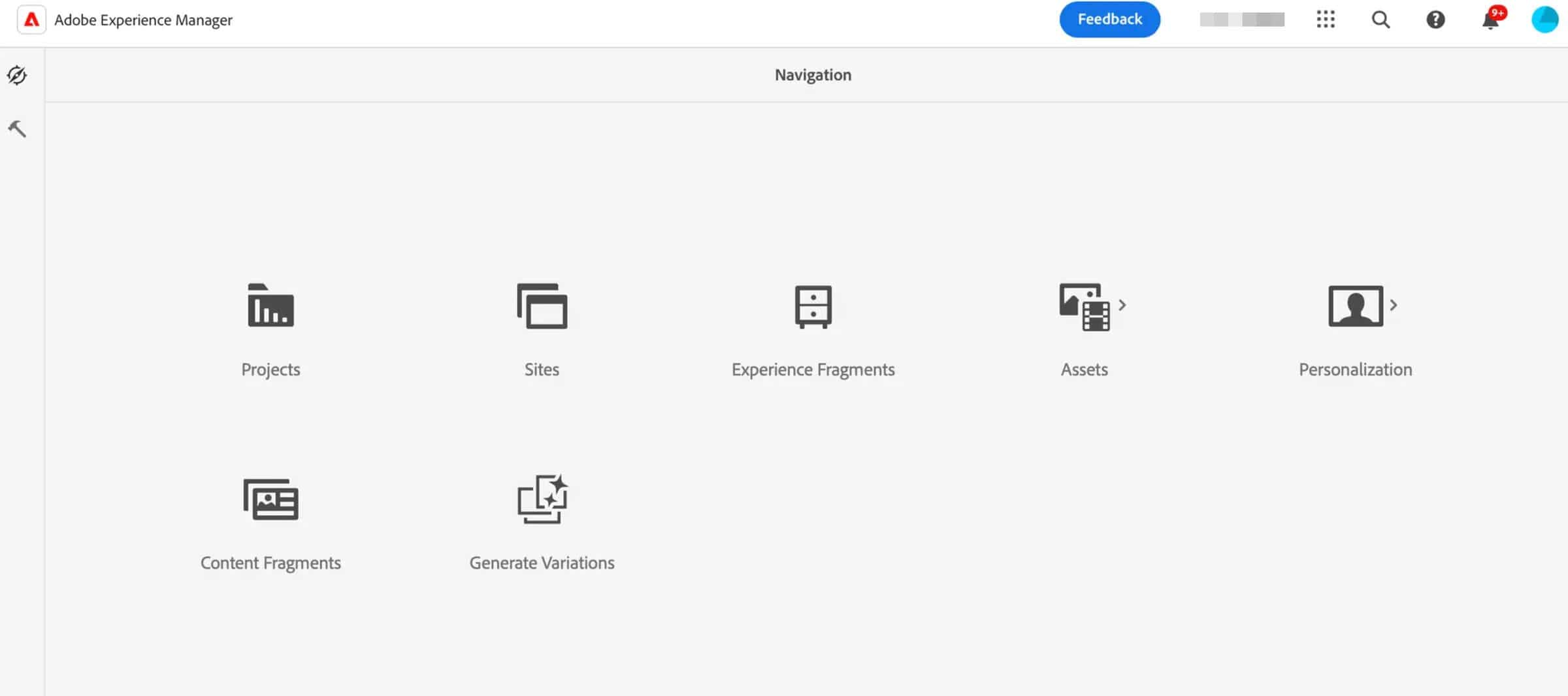
Adobe Experience Manager (AEM) is a strong fit for large organizations that already use Experience Cloud and want to manage content across brands and regions.
AEM works with Adobe Commerce. You can connect it to your store using the Commerce Integration Framework (CIF) add-on. Thanks to this add-on, you have access to your store’s product data directly in AEM. That means you can add products, categories, pricing, and other commerce components to your blog content. For this, you don’t need developer help, which, as Adobe highlights, lets marketers and non-technical users create shoppable experiences.
On the other hand, AEM is an enterprise content platform and, as such, costs more, takes longer to set up, and requires more training than the other three options. With that in mind, using AEM to run a blog is usually more than what you need.
Option 2: A Marketplace Blog Extension
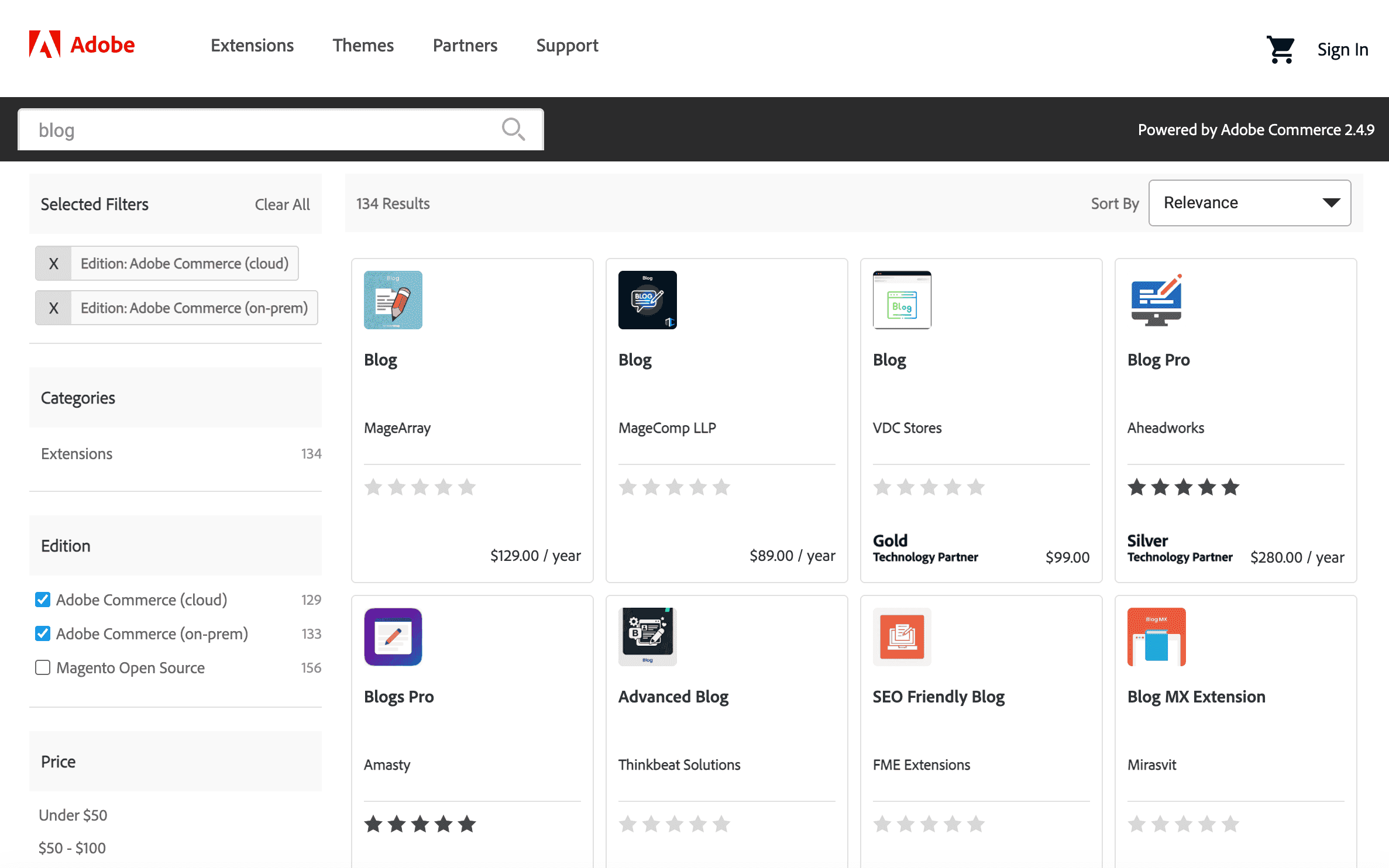
Creating a blog on Adobe Commerce using a blog extension from Adobe’s Marketplace may be a great fit for teams with developer resources who want their content to be stored directly in Adobe Commerce.
The most widely used Adobe Commerce blog extensions are Amasty Blog Pro, Aheadworks, and Magefan.
Amasty Blog Pro and Aheadworks are listed on Adobe’s Marketplace, meaning they have passed Adobe’s quality and technical checks. Amasty’s Blog Pro costs $949/year for the first year and $575/year after that, while Aheadworks is priced at $280/year.
Magefan is the only one of the three blog extensions that doesn’t have its blog extension listed on the marketplace. Still, it’s widely popular among Magento and Adobe Commerce users. Their blog extension has over 2 million downloads and is installed on over 10,000 stores. Unlike the first two options, Magefan requires a one-time payment, ranging from $149 to $349.
What all of these blog extensions have in common is that they are installed via Composer. They also become part of your Adobe Commerce setup, so whenever you upgrade Adobe Commerce, you need to ensure that your blog extension still works properly.
Hyvä adds another compatibility layer. Some of these blog extensions were originally built for Magento’s Luma frontend, so they need separate Hyvä compatibility packages. Those packages may also need updates or fixes as the extension or Hyvä changes.
And if you use a headless or custom storefront, check compatibility with your specific setup before choosing an extension.
Option 3: Page Builder
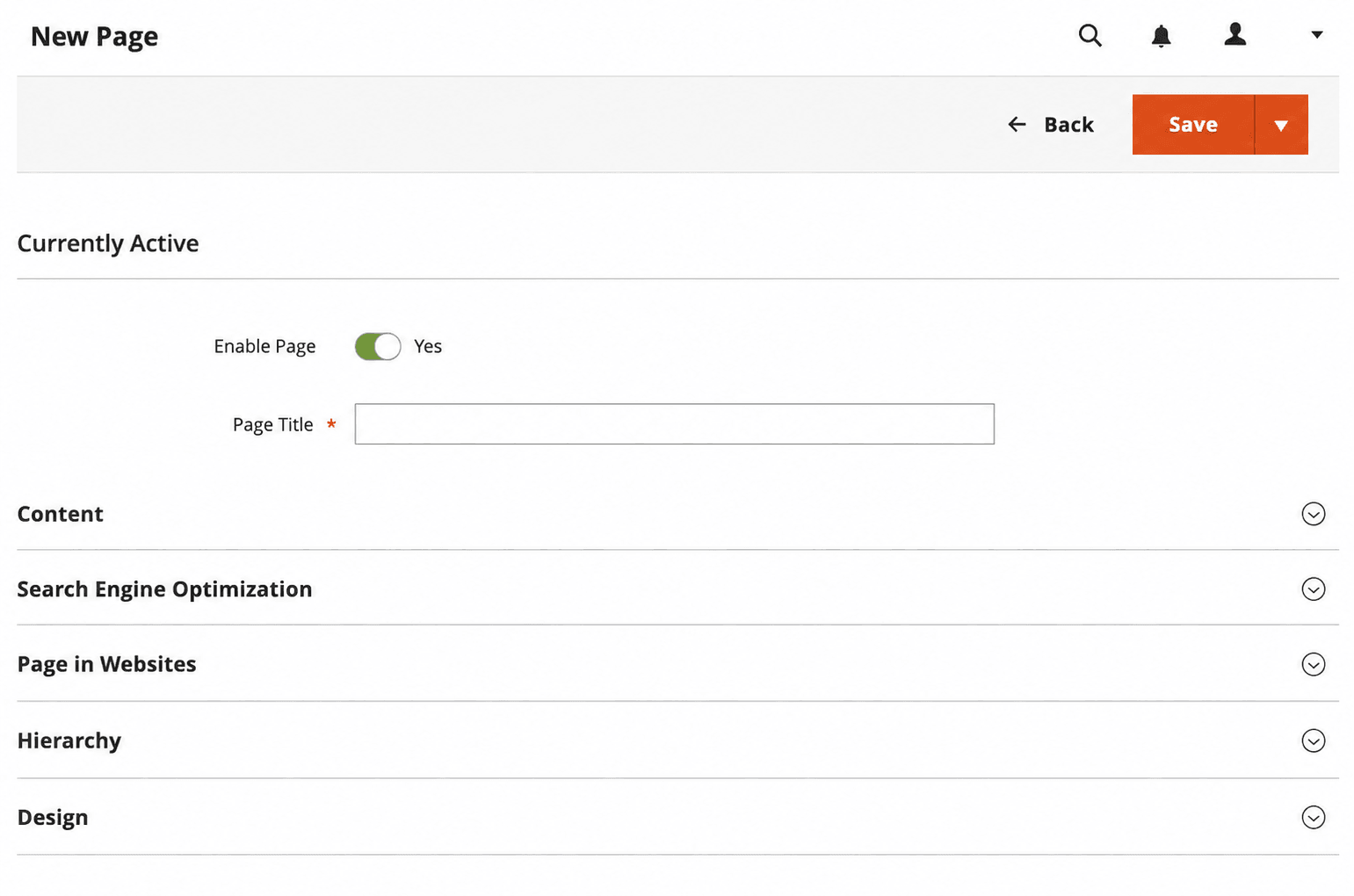
Adobe Commerce’s page builder is an excellent fit for teams that publish new content a few times a year.
Although this approach works and costs nothing, the Adobe Commerce page builder wasn’t designed to replace a dedicated blogging solution. There are no categories, author pages, tags, or index pages. You have to create a new page for each blog post, which isn’t sustainable in the long run. Additionally, editing your content with Adobe’s builder becomes cumbersome once your publishing frequency goes from infrequent to frequent.
We suggest using this blog integration method only if you plan on adding new content once in a while (e.g., quarterly announcements). Otherwise, you should consider the other three blogging options.
Option 4: An Embedded Blog
DropInBlog’s embeddable blogging solution is a great fit for teams who want to install a full-featured blog without extensions and lengthy technical setups.
DropInBlog runs separately from Adobe Commerce. You add it to your store by pasting two lines of code into a CMS page. You don’t need to install a blog extension or retest the blog tool after platform updates. DropInBlog also avoids theme conflicts because it doesn’t rely on Magento’s frontend code.
Performance-wise, the embeddable blogging solution doesn’t add extra database queries or XML layouts, allowing you to create a fast-loading blog.
This high-performance, enterprise-grade blogging engine offers the features that make enterprise blogging easy:
Audit logs: With audit logs, you can keep a close eye on all activities in your account. If someone changes, adds, or edits content, you’ll have insights into who, when, and what.
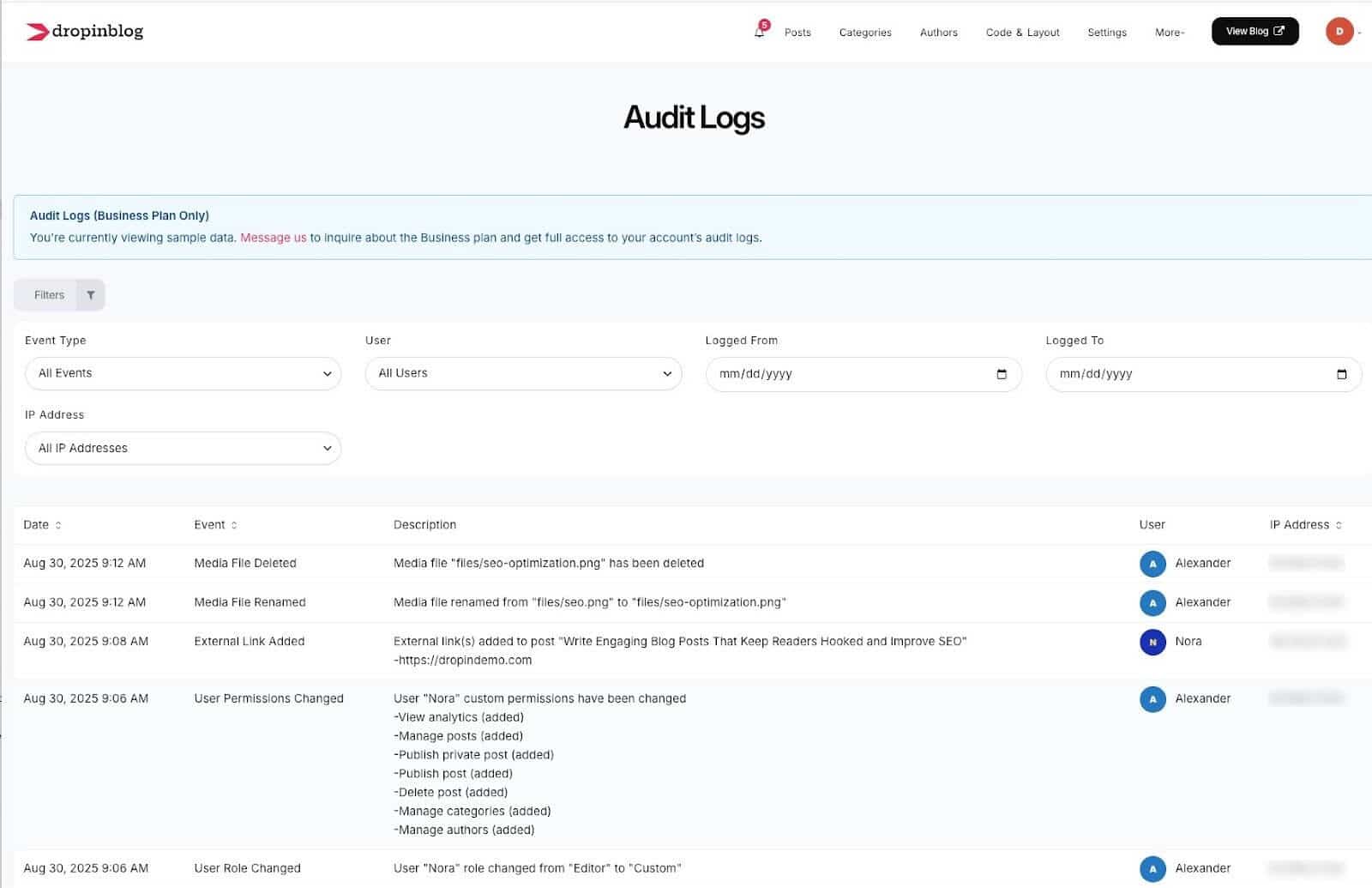
Role-based access: Thanks to DropInBlog’s support for user levels, you can invite team members to help you manage your blog account. You can use the default roles or create custom ones to ensure everyone’s in the right place and that your data is secure.
Automated BYOS backups: To ensure all your data is safe and under your control, DropInBlog automatically backs up your content and stores it in your Amazon S3 or Cloudflare R2 account.
Staging environment for safer publishing and previewing: DropInBlog provides a safety net for new integrations. You can use a non-public environment to ensure everything works as expected before publishing your changes live.
Single Sign-On (SSO): If you want to streamline access control for teams across departments, you can connect DropInBlog with the SSO provider of your choice.
SLA (Service Level Agreement): With DropInBlog, you also get uptime and performance guarantees that match enterprise expectations.
Custom integrations: DropInBlog is platform-agnostic and will integrate seamlessly with your Adobe Commerce store. If there’s a way to make the blog integration even smoother, you can request a custom integration for your existing Adobe Commerce tech stack.
Tier 2 success manager: And if you have any questions or issues, you can contact your dedicated success manager at any time.
Comparison Table: Adobe Commerce Blogging Options
| AEM | Marketplace blog extension | Page builder | Embedded blog | |
|---|---|---|---|---|
| Setup time | Long (requires implementation project) | Medium | Short | Short |
| Cost model | Enterprise license Quote-based | Magefan: $149–$349 (one-time) Aheadworks: $280/year Amasty: $949/year (then $575/year) | No extra costs | Subscription-based See current pricing |
| Developer required | Yes | Yes | No | No |
| Content location | AEM content repository | Commerce database | Commerce database | External platform |
| Retesting needed after Commerce upgrades | No | Yes | No | No |
| Blog platform type | Blogging CMS | Blog extension | Manual pages | Embeddable blogging platform |
| Editorial workflow | Yes | Varies | No | Yes |
| Store performance impact | Low | Medium (adds queries and layout XML) | Low | Minimal |
| Best for | AEM is best for teams already using Experience Cloud | An Adobe Commerce blog extension is best for teams that want blog content stored in Adobe Commerce | Adobe Commerce Page Builder is best for teams with an infrequent publishing schedule | DropInBlog is best for teams that prioritize speed and low overhead |
How the DropInBlog Integration Works
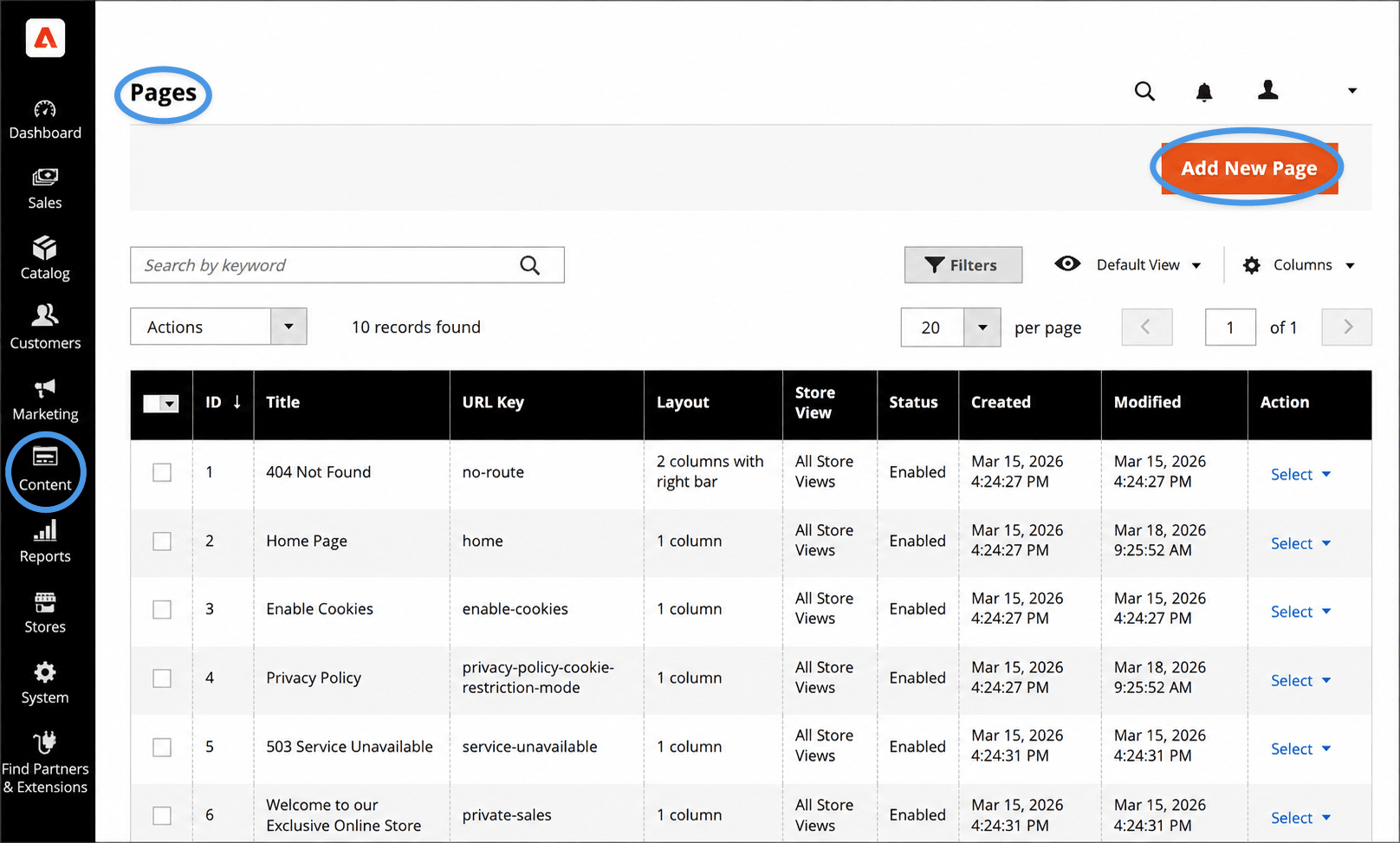
To integrate DropInBlog with your Adobe Commerce store, you’ll need to create a new page first, then add your blog code from your DropInBlog account.
Step 1: Create a New Page with an HTML Element
From your Adobe Commerce admin, open the Content page, select Pages, and create a new page by clicking on the Add New Page button.
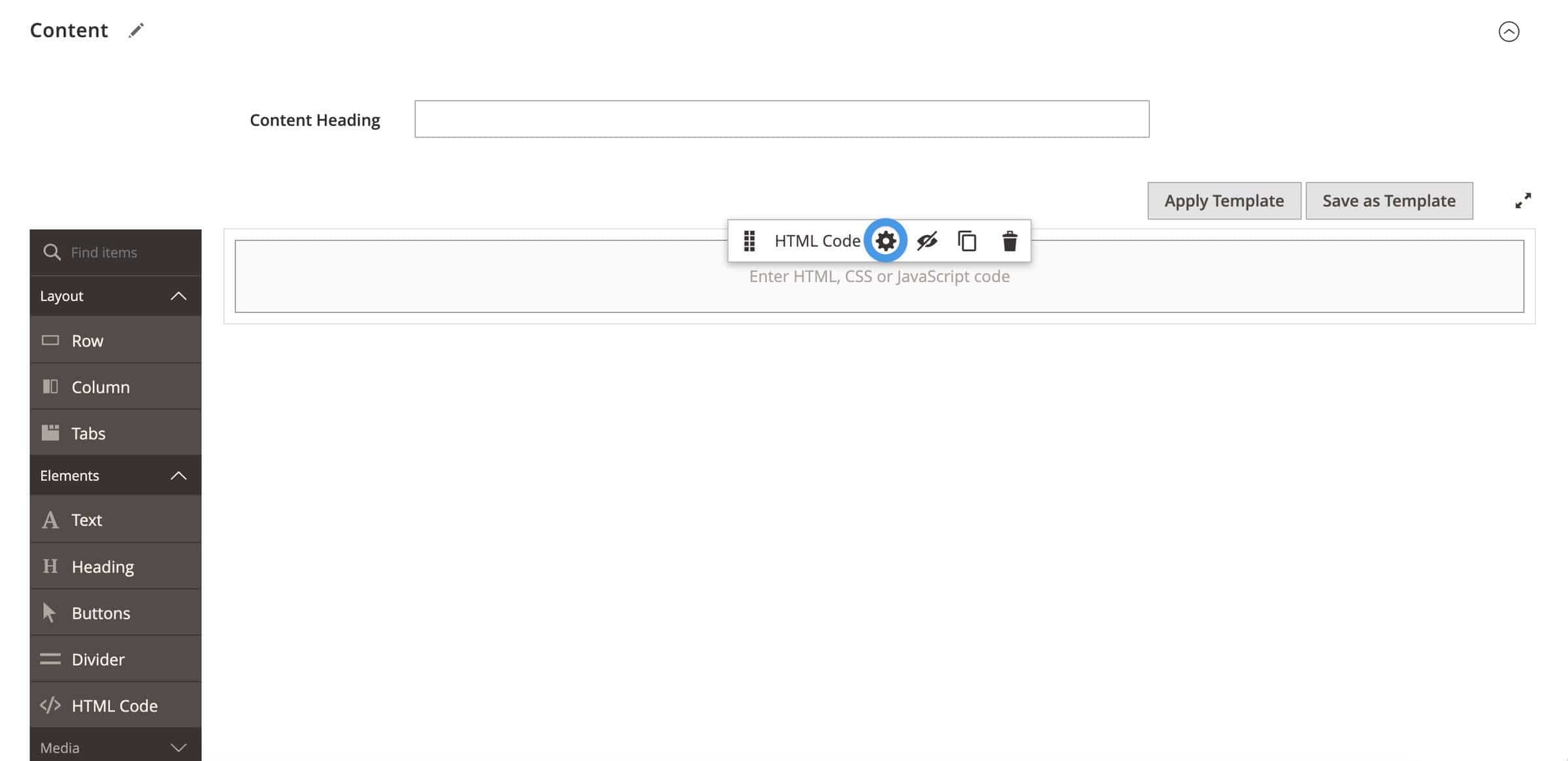
Expand the Content menu, then find HTML Code under Elements. Drag and drop the HTML Code element onto the page.
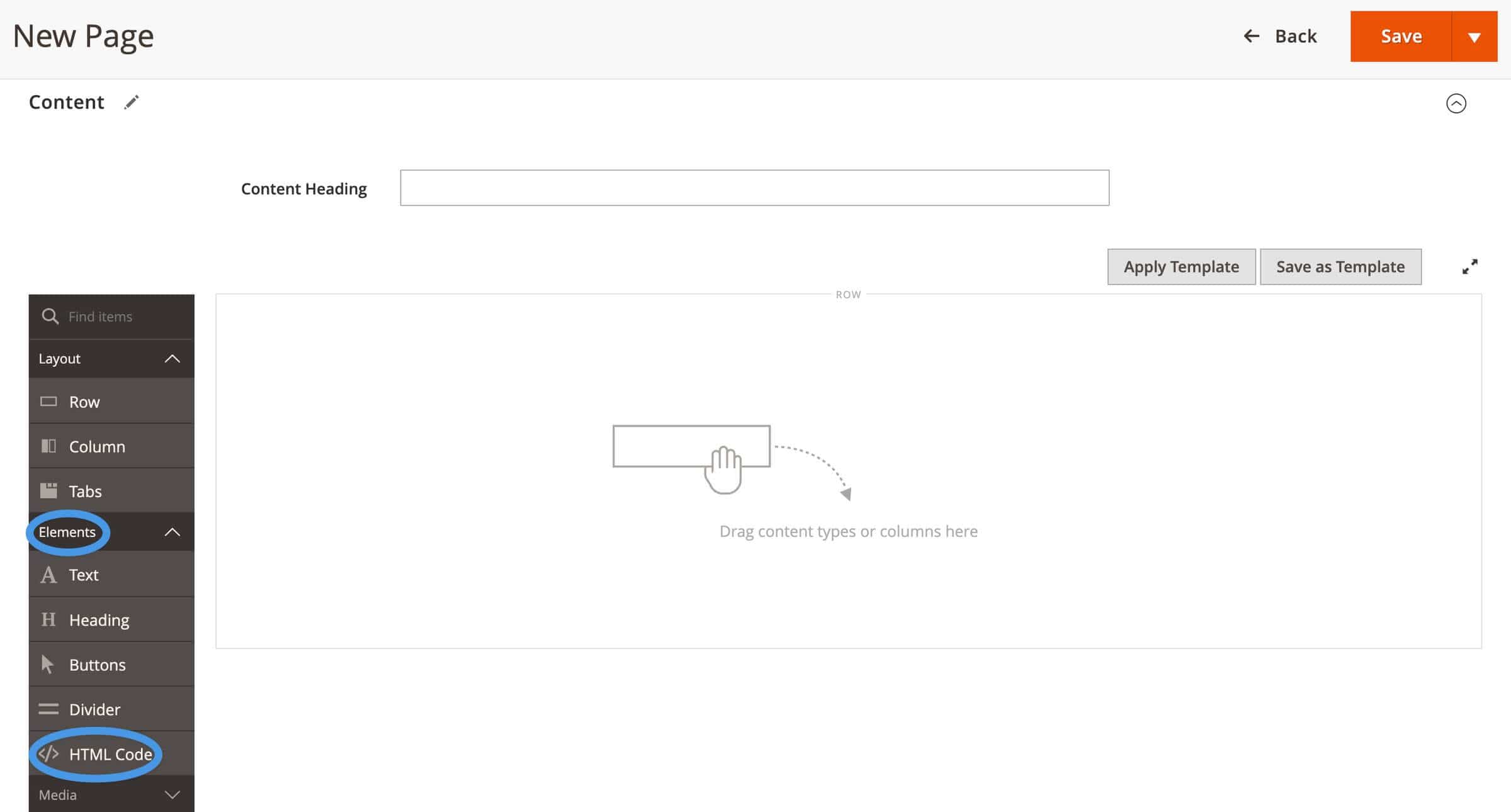
Hover over the element, then click on the gear icon to open the HTML editor. Here, you’ll paste the blog code from your DropInBlog account.
Step 2: Add Your Blog Code from DropInBlog
On the Code & Layout page of your DropInBlog account, you’ll find two lines of code – one under Blog Script and the other under Blog Container.
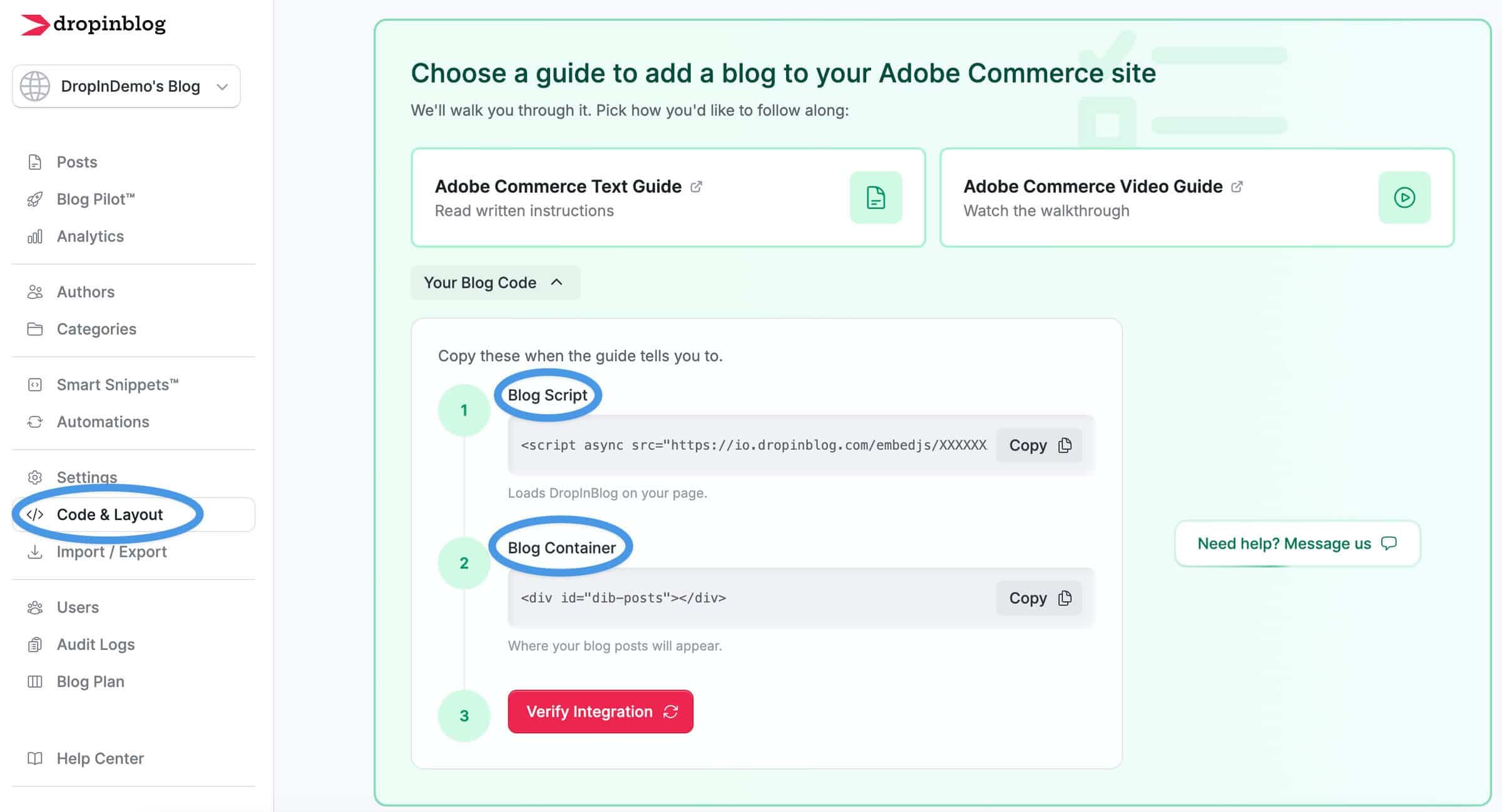
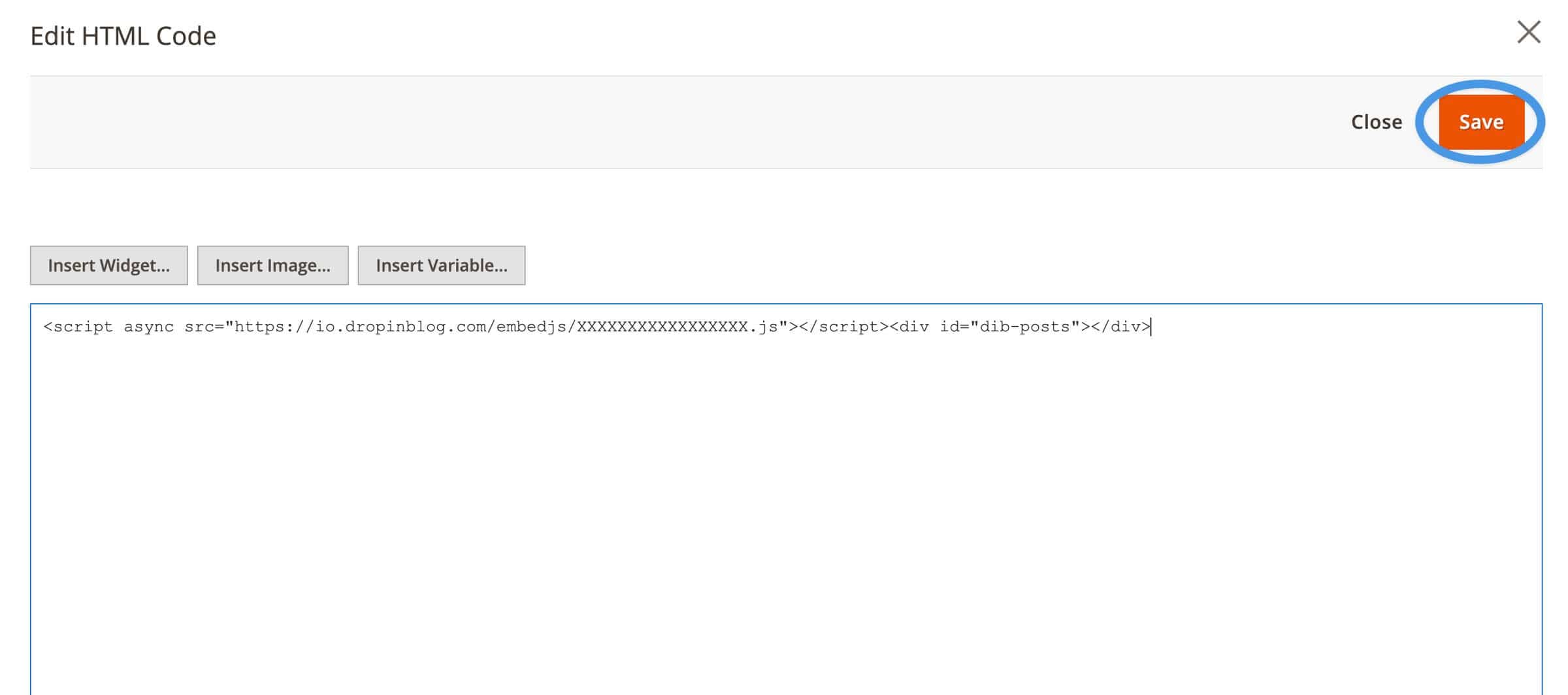
Copy the Blog Script code first and paste it into the HTML editor in your Adobe Commerce account. Then, repeat this step to add the Blog Container code.
Once you add your blog code to your Adobe Commerce blog page, click on the Save button in the top right and exit the page builder.
Step 3: Verify the Integration
The last step is to check if the blog integration works as expected. To do that, go to the Code & Layout page in your DropInBlog account, and click on the Verify Integration button.
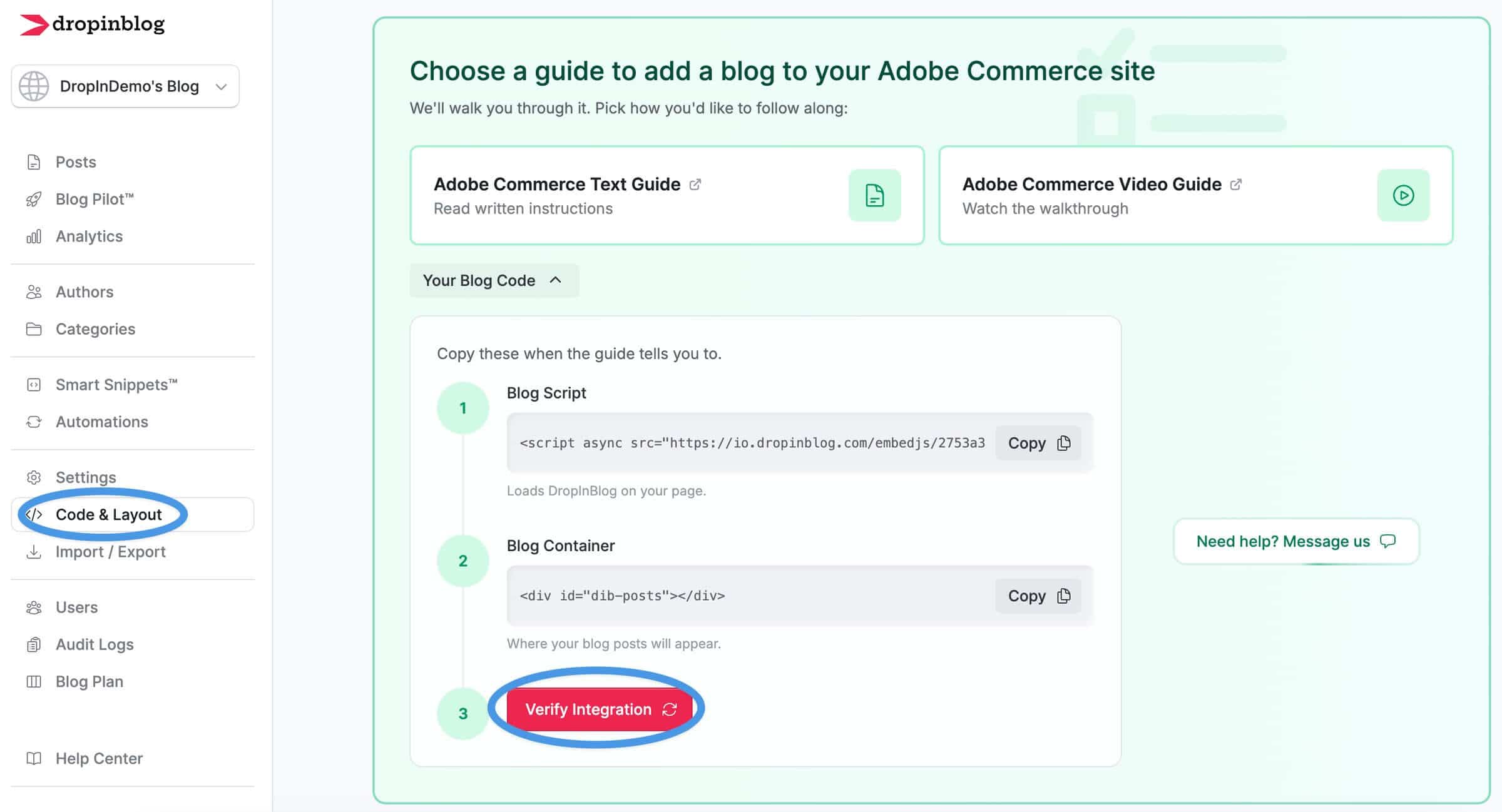
If prompted, add the link to the blog page you’ve just created in Adobe Commerce, and you should see the message that your blog is live.
Now you can start adding content to your Adobe Commerce blog. You’ll be doing that from the Posts page of your DropInBlog account. Everything you create in DropInBlog will automatically appear on your Adobe Commerce site.
Customer Spotlight: Jellycat

Jellycat uses DropInBlog for its blog, Jelly Journal. It features tips, how-to guides, and fun stories about Jellycat's plush toys.
FAQs
Does Adobe Commerce have a built-in blog?
No, Adobe Commerce doesn’t have a built-in blog. You can use one of the four methods to add a blog to your store: Adobe Experience Manager, a marketplace blog extension, the Adobe Commerce page builder, or an embeddable blogging solution.
Should we use Adobe Experience Manager for our blog?
It makes sense to use Adobe Experience Manager for your blog if you already use AEM to manage your website content. If you use the Page Builder, a separate CMS, or a website builder for this purpose, you likely won’t need AEM just to run and manage a blog.
What blog extensions work with Adobe Commerce?
Adobe Commerce works with various blog extensions. Some of the most popular ones are Amasty Blog Pro ($949/year for the first year, then $575/year), Aheadworks ($280/year), and Magefan ($149–$349, one-time). To use a blog extension for your Adobe Commerce store, you need to install it via Composer and check that it works properly after each platform update.
Will a blog extension slow down our storefront?
A blog extension can slow down your storefront since modules add queries and layout XML across your store’s pages. An embeddable blogging tool, on the other hand, loads only on blog pages, helping you protect your store’s performance and Lighthouse scores.
Can we use Page Builder to create blog posts?
Yes, you can use Page Builder to create blog posts. However, you should use this option if you don’t have many blog posts, since you’ll need to create a new page for each one. Page Builder also lacks index pages, author profiles, categories, and tags, so using this option for blogging isn’t ideal for someone looking to create a full-featured blog.
Where does our content live with an embedded blog, and can we get it out?
With an embedded blog, your content lives on an external platform. If you use this option to create a blog on Adobe Commerce, use a solution that supports content exports. That way, you’ll be able to take your blog with you if you decide to move away from Adobe Commerce.
Does this meet enterprise security and compliance requirements?
An embedded blog usually meets security and compliance requirements, but that depends on your blogging provider. DropInBlog, for instance, supports audit logs, BYOS backups, contractual SLAs, and multi-year contracts to help you meet all those requirements.
How do these blog options work with a headless or custom storefront?
Blog extensions often need more work with headless and custom storefronts. Embeddable blogs are more flexible because they appear wherever you add embed code. Still, you should check compatibility with the vendor before making the final decision about the blogging option you’ll use for your store.
Create a Blog on Adobe Commerce Today
DropInBlog is a flexible blogging solution for Adobe Commerce (Magento Commerce) stores, offering a quick setup and all the features you need to run your enterprise blog.
Or start a free trial today to experience the DropInBlog blogging experience first-hand.
Have any questions? Get in touch with us.
Happy blogging!