
Lodgify is one of the fastest-growing platforms in the vacation rental space – and for good reason. In this Lodgify review, we’ll look at how it helps independent hosts and small property managers take control of their business, grow direct bookings, and move away from relying solely on third-party platforms like Airbnb or Vrbo.
Table of Contents
Designed as an all-in-one property management solution, Lodgify includes a centralized calendar, website builder, booking engine, and channel manager, all wrapped into one easy-to-use platform.
Who Is Lodgify Best For?
Lodgify works best for:
Independent vacation rental owners looking to manage listings on Airbnb, Vrbo, Booking.com, and direct channels.
Small property managers with 2–20 properties who want automation without enterprise-level pricing.
Digital nomads and part-time hosts who want to rent out a space but don’t want to deal with the headaches of scattered tools.
Ambitious hosts who are growing fast and want to own their guest relationships (not just give away commissions to OTAs).
This balance of simplicity and scale is a major reason Lodgify is surging in popularity, especially among hosts who care about owning their brand, growing bookings, and building a sustainable business.
In this post, we’ll break down Lodgify’s pricing, core features, user reviews, and how this property management platform stacks up to its top competitors. Whether you’re brand new to hosting or thinking about switching platforms, this guide will help you decide if Lodgify is the best fit for your business.
What Is Lodgify? (A Closer Look at How It Works)
Lodgify goes beyond listing your rental – it’s a centralized control panel for running your entire operation. It brings together everything from booking management to automation and website hosting, so you can manage your listings, pricing, and guest communications from a single dashboard.
Unlike platforms that only help you advertise, Lodgify helps you build your brand and own your guest relationships.
Here’s how it actually works:
Channel Manager: Syncs your listings (availability, pricing, bookings) across major platforms like Airbnb, Vrbo, and Booking.com in real time.
Website Builder: Lets you launch a custom, mobile-friendly booking website in minutes with your own branding, domain, and payment system.
Central Reservation System: Allows you to manage all your calendars, guest communications, and pricing rules from one place.
Automation Tools: Supports auto-messages, payment scheduling, and smart rules to help reduce repetitive tasks.
Analytics Dashboard: Lets you track occupancy, revenue, and booking trends to optimize performance over time.
While platforms like Airbnb or Vrbo let you list a property, Lodgify helps you build a brand.
Lodgify is built to give you ownership. You keep guest contact info, set your own policies, and build loyalty through repeat bookings, privileges you don’t get with third-party marketplaces.
In short, if you’re ready to go from “just another listing” to running a fully independent hospitality business, Lodgify gives you the tools to make it happen.
Lodgify Pricing
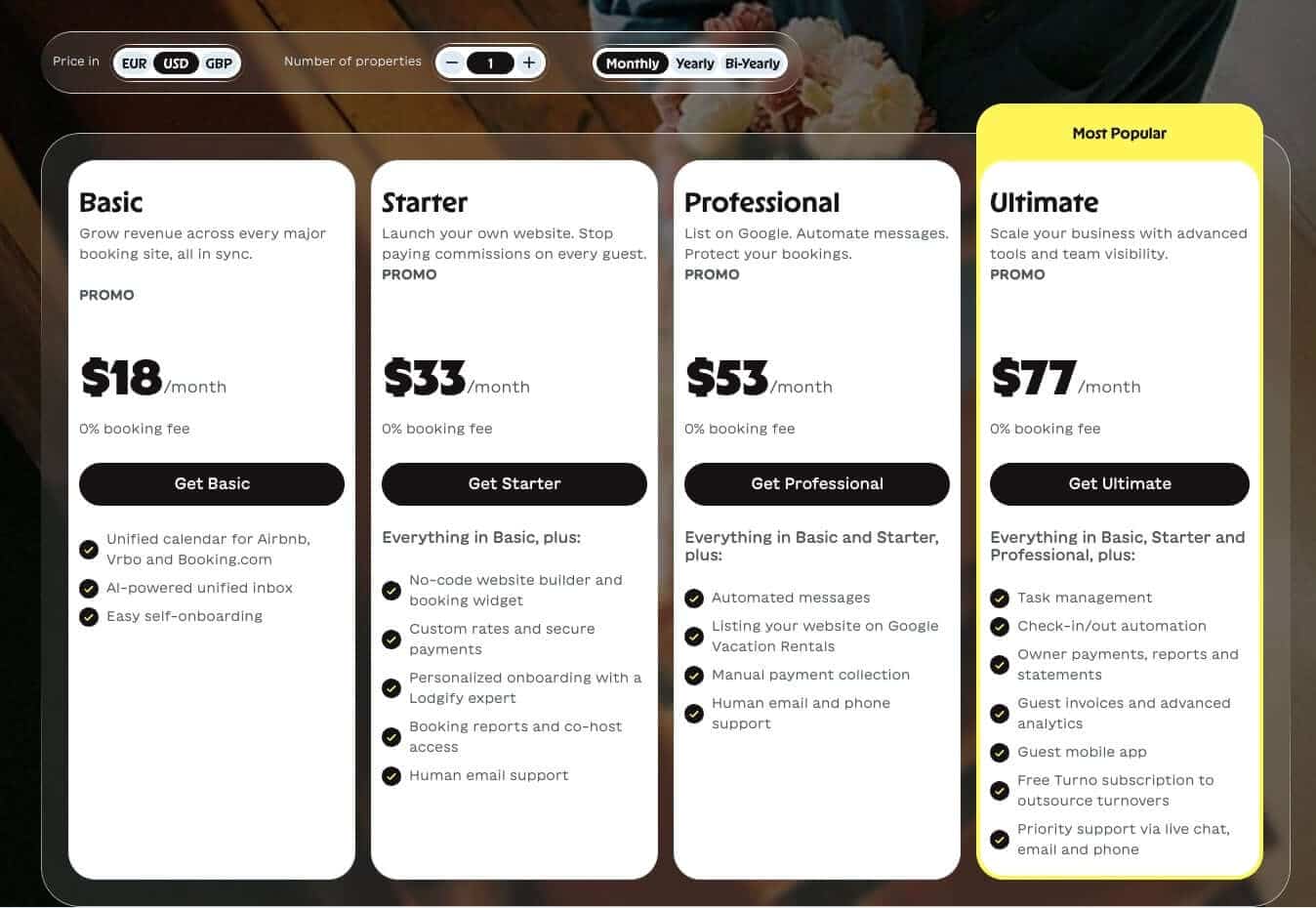
Lodgify's pricing is based on the number of properties you manage and the features you need. All plans come with 0% booking fees, so you pay a flat subscription and keep 100% of your rental income. Pricing starts at $14/month on yearly billing, and every plan includes a 7-day free trial with no credit card required.
Here’s a detailed breakdown of the main tiers and what you get at each level:
Tier | Price (paid yearly) | Included features | Notes |
|---|---|---|---|
| Basic | $14/month | Unified calendar for Airbnb/Vrbo/Booking.com, AI-powered unified inbox, self-onboarding | Limited to 1 property; you'll need to upgrade to grow |
Starter | $33/month | Everything in Basic + no-code website builder, booking widget, custom rates and payments, personalized onboarding, booking reports, email support | Limited to 2 properties; the cheapest way to start taking direct bookings |
Professional | $53/month | Everything in Starter + automated messages, Google Vacation Rentals listing, manual payment collection, phone support | Price scales with property count; no owner statements or task management |
Ultimate | $77/month | Everything in Professional + task management, check-in/out automation, owner payments/reports/statements, guest invoices, advanced analytics, guest mobile app, free Turno subscription, priority support | Most complete plan; likely more than solo hosts with 1–2 properties need |
| Dynamic Pricing add-on | 0.8% per confirmed reservation | Automatic nightly rate adjustments based on demand, seasonality, local events, and lead time built directly into the Lodgify calendar | Fee only applies while the tool is activated; most impactful once you have steady booking volume |
Choosing the Right Lodgify Plan
Single-property hosts: Basic covers the essentials, with synced calendars across Airbnb, Vrbo, and Booking.com, plus a unified inbox at the lowest price. Note that it's limited to one property.
New or solo hosts ready for direct bookings: Starter adds a no-code website builder and booking widget, so you can take commission-free direct bookings from day one. It supports up to two properties.
Growing portfolios: Professional makes sense once manual work starts piling up, since it adds automated guest messaging, listing on Google Vacation Rentals, and phone support.
Managers and teams: Ultimate is built for operations at scale, with task management, owner reports and payments, advanced analytics, and priority support.
Add-ons: Optional extras like Dynamic Pricing, Smart Locks, and Damage Protection can be added to any plan as your business grows.
Lodgify Alternatives and Competitors Compared
If you’re evaluating Lodgify, you might also be considering other vacation rental software like Smoobu, Guesty, OwnerRez, or iGMS. Some focus more on enterprise-scale features. Others are built with simplicity in mind, but may lack flexibility as your business grows.
The table below breaks down how Lodgify compares to each of these alternatives based on pricing structure, feature depth, target user type, and ease of use.
Platform | Best for | Pricing model | Feature focus | Ease of use |
|---|---|---|---|---|
Lodgify | Independent hosts and small-to-midsize property managers | Flat monthly fee, 0% booking fees | Website builder, channel manager, direct bookings | Beginner-friendly |
Smoobu | Solo hosts and side-hustlers | Flat monthly fee | Basic automation, direct bookings, calendar sync | Very easy |
Guesty | Larger operators and vacation rental businesses | Commission-based (3–5% per booking) | Enterprise-level features, integrations, task management | Moderate learning curve |
Guesty for Hosts | Individual hosts or small portfolios (1–3 properties) | Lower monthly fee than full Guesty | Slimmed-down version of Guesty, easier onboarding | Fairly easy |
OwnerRez | Tech-savvy property managers | Modular (pay per feature/module) | Deep automation, trust accounting, custom workflows | Steeper learning curve |
iGMS | Mid-sized hosts managing 3–15 units | Subscription or % per booking | Automation, team management, mobile tools | User-friendly |
How Lodgify Stands Out
All-in-one approach: Lodgify includes a direct booking website builder, while some competitors require third-party tools for this.
Scalability: Unlike Smoobu or iGMS, Lodgify is flexible enough to grow with you from one unit to multiple.
Ownership: Lodgify emphasizes guest data ownership and branding, which isn’t always prioritized by commission-based platforms like Guesty.
AI-powered hosting: Following its 2026 rebrand, Lodgify is rolling out an AI Co-Host that surfaces decisions and drafts guest responses for your approval, a rebuilt calendar that detects and helps fill gap nights, and tools that make your listings discoverable in AI-driven search.
How to Get Started with Lodgify
Getting started with Lodgify is quick, and you don’t need a tech background or property management experience to get up and running. Here’s the simplest way to launch your vacation rental website and booking system using Lodgify:
Sign up for a free trial: Head to Lodgify’s website and start a free trial. No credit card required upfront, and you can explore the platform’s core tools before committing to a plan.
Add your property details: Input basic info like your location, nightly rates, amenities, and availability. The setup wizard walks you through everything step by step.
Connect your channels: Sync with Airbnb, Vrbo, Booking.com, or other platforms you already use. Lodgify’s channel manager will automatically sync calendars and booking info.
Customize your website: Choose a theme, upload your logo and photos, and personalize your direct booking site. This is where your brand starts to take shape.
Vacation Rental Management: Best Practices for Beginners
Start with one property: Focus on perfecting your listing and guest experience before scaling.
Use automation early: Enable auto-messages and booking rules to save time from day one.
Set your cancellation and payment policies clearly: Avoid miscommunication and last-minute issues.
FAQs
Does Lodgify charge booking fees on all plans?
No. Lodgify doesn't charge booking fees on any plan. You pay a flat monthly subscription and keep 100% of your rental income.
Can Lodgify manage multiple properties under one account?
Yes. Lodgify supports multi-property management from a single dashboard, though the entry-level plans have limits: Basic covers one property and Starter covers two. On Professional and Ultimate, you can add listings, connect calendars, manage rates, and automate messaging across your whole portfolio.
How easy is it to switch from Airbnb or Vrbo to Lodgify?
Lodgify makes it relatively easy to switch. You can import listings, sync calendars with platforms like Airbnb and Vrbo using their channel manager, and set up direct booking capabilities. Most users can get started without a developer or IT support.
Does Lodgify provide a built-in blog or content features?
No, Lodgify doesn't include a built-in blog. For hosts who want to rank on Google and publish helpful content, a dedicated solution like DropInBlog is the recommended option.
What level of customer support and onboarding does Lodgify provide?
Lodgify offers email and chat support, along with setup guides and onboarding assistance. Higher-tier plans may include priority support, and the platform also has a knowledge base and free resources to help new users get up and running.
Why You Should Add a Blog to Your Lodgify Website
Lodgify gives you a solid website, but its built-in blog is limited. If you want to grow organic traffic, build trust with guests, and rank for helpful content (like things to do nearby, hosting tips, or FAQs), you’ll need a real blogging tool.
That’s where DropInBlog comes in.
You can embed a DropInBlog-powered blog right into your Lodgify website in minutes – no coding required. This gives you:
SEO-optimized blog posts without relying on a developer
Clean design that matches your Lodgify site
The ability to drive more direct bookings through helpful content
Whether you’re writing travel guides, showcasing guest stories, or answering common questions, a blog helps bring traffic to your site, and DropInBlog makes everything about blogging easy.