
Table of Contents
BigCommerce and Magento are excellent e-commerce business solutions that provide a lot more than just basic e-commerce tools. However, there’s a major difference between how they work and how they help e-commerce businesses achieve their goals.
While Magento comes as open-source software and as Adobe Commerce, which is available as SaaS, PaaS, or on-premises, BigCommerce is SaaS and, for the most part, closed-source. What does this mean, and which is better for your e-commerce business? Stay until the end of this on BigCommerce vs. Magento comparison, and you’ll find out.
PaaS vs. SaaS
Before we get into the similarities and differences between the two platforms, let’s start by explaining the basic distinction between PaaS and SaaS.
PaaS stands for platform-as-a-service, and SaaS is short for software-as-a-service.
PaaS
PaaS is a cloud-based service that provides both hardware and software tools that enable users, typically developers, to build, deploy, and manage, in our case, e-commerce-related web applications.
Paying for this type of cloud service is similar to renting a car or an apartment. You don’t own them, but you’re free to use them for your benefit in return for a certain amount of money.
SaaS
SaaS has to do with the cloud, too. SaaS provides everything users need to build, run, and manage their e-commerce stores. It makes things like procuring servers, downloading and installing software, software and hardware maintenance, taking care of hosting, and a lot more, unnecessary.
You just need a stable internet connection to get access to all of the benefits SaaS offers through a monthly or annual subscription.
The Key Difference Between the Two
It still sounds like there’s not much difference between a PaaS and a SaaS e-commerce solution. However, the key thing to note here is that the PaaS model provides a lot more in terms of control, scalability, and flexibility.
On the other hand, with the SaaS model, you can’t even get close to the extent of customization and the number of options/functions that are available with PaaS solutions.
This is the case primarily because PaaS provides a development environment, which gives users potentially endless opportunities regarding the look and functionality of their e-commerce stores and businesses. Usually, a business owner hires developers who create custom solutions specific to their business and brand.
In contrast, with SaaS, there are boundaries to how much and what you can do. It’s expandable, but SaaS keeps you within certain limits. You can’t have the scope of functionality found in PaaS. Having said that, as we’ll see later, there’s a rationale behind these restrictions.
Open-Source vs. Closed-Source
In addition to its hosted versions, Magento is also available as open-source software. This means that users are free to modify and share the source code under the terms of its open-source license (OSL 3.0). But are PaaS and open-source the same?
Nope. Open-source software does include the benefits of PaaS in terms of control and flexibility, but without web hosting.
There are many benefits to using open-source software, but there are also trade-offs. For instance, due to their nature, open-source platforms can be more vulnerable to cyber attacks if they’re not kept up to date. Firstly, this is due to the fact that a hacker would always have access to the code (open-source). But secondly, it is the client who needs to install security patches regularly to keep them up to date. If they fail to do that on a regular basis, their business is at risk.
In line with this, there are two types of Magento: Adobe Commerce (formerly Magento Commerce, available as SaaS, PaaS, or on-premises) and Magento Open Source. There are significant differences between them, but more on that later.
In contrast, BigCommerce is closed-source software, meaning the source code is not available to the public. Despite the company flirting with the open-source community and launching its open-source project Open Checkout in 2020 – which is a pretty uncommon practice for an SaaS company – it still remains closed-source software.
Who Is BigCommerce For?
BigCommerce is well-suited for businesses with smaller budgets and profits. It’s ideal for business owners who prefer a simple and hassle-free e-commerce experience over endless possibilities, which bring a higher level of complexity.
Despite the company’s efforts toward transforming itself into a par excellence e-commerce solution for well-established medium and enterprise-level businesses, it’s mainly used by small-sized businesses. To a certain extent, this is not surprising, considering that SaaS platforms are usually perfect for smaller businesses.
Generally speaking, a SaaS platform is much simpler and easier to use than any PaaS or open-source platform, which business owners may find overly technical. As an SaaS platform, BigCommerce takes care of software maintenance: updates, upgrades, and bug fixes; in short, all the technical stuff involved in running an e-commerce business.
The main objective is to make things simple for users, enable them to have their store up and running in no time, and allow them to focus on the most important thing: their business.
Who Is Magento For?
It doesn’t matter whether it’s Adobe Commerce or Magento Open Source; both are well-suited for larger, enterprise-level, well-established businesses with a big and steady customer base and high profits.
Just like PaaS, open-source software is extremely flexible, which makes it a good option for those who really require endless customization for their e-commerce store.
However, both types require a team of software professionals to run your store smoothly and get the most out of the platform. This is basically one of the reasons Magento is an excellent choice for larger businesses. Usually, bigger companies have the means and resources to utilize the potential of PaaS and open-source software to the utmost.
In essence, larger businesses, both size-wise and revenue-wise, are the ones that really need all of the options available through Magento, which become necessities once a business reaches a higher level of complexity. Usually, an SaaS platform cannot adequately meet the needs and requirements of a client at this stage of development.
This doesn’t mean that small businesses can’t or don’t use Magento. It only means that larger businesses are in a better position to utilize the platform's full potential. It’s like having a Swiss army knife with a ton of functions.
You can use it, but if you’re not a soldier, gardener, handyman, or mountaineer, and you only use the large blade most of the time, maybe this particular knife is not the best one for you.
Ease of Use
Having read all of the BigCommerce vs Magento characteristics above, you must be wondering how accessible and easy to use they are. Truth is, there is a big difference here too, which will become apparent as you read on.
Simply put, BigCommerce is much easier to use than Magento, and here’s the main reason why: you don’t have to use code to build a functional e-commerce website. You certainly can if you want to, but its features won’t be limited if you don’t. Additionally, you don’t need to find a hosting integration yourself, as BigCommerce hosts your site for you.
If you’re not experienced in web development, you’ll probably struggle with Magento. The main setback here is that the setup and customization process can be challenging to tackle. Once you get past that, Magento isn’t that hard to use, and you’ll quickly get used to it, but it’s definitely better suited for intermediate and experienced web developers.
On the other hand, using BigCommerce definitely requires having at least some knowledge about how business software solutions work, but you don’t need to be super techy to use it. Even though the UI isn’t the most intuitive one we’ve seen, BigCommerce was designed to be easy to learn and use. The only area you might need more time to master is the actual customization of your store and getting all the details in order.
Features
A large part of what was said in the previous sections was more or less general. We talked about SaaS, PaaS, closed-source software, and open-source software. Now, let’s delve into some of the specifics of BigCommerce vs Magento.
BigCommerce
BigCommerce shares certain features with Magento, like the ability to accept payments in multiple currencies, the possibility to set up your store in multiple languages, or the opportunity to use a variety of B2B tools. This is only natural, considering that they’re both e-commerce platforms. But, some features are specific to each of the platforms.
Let’s first look at a short list of some key features that BigCommerce offers:
Design Tools for Your E-Commerce Store
BigCommerce has a drag-and-drop page builder and visual editor that enables you to create various types of pages. The themes found in the theme store are fully customizable with built-in CSS, HTML, and JavaScript, so if you’re code-savvy, you can easily customize your chosen theme to the more minute details.
In addition to this, if you’re tech-savvy, you can use the Stencil CLI to get even more in terms of design and customization. This tool allows you to customize and preview a theme locally without affecting the live site, and you can simultaneously test it on mobile, computer, and tablet with ease.
BigCommerce offers 12 free themes and over 200 paid themes, priced from $99 to $450. All themes are mobile-responsive and are very good-looking. Even though the selection isn’t as big as some other SaaS solutions, the themes truly look professional and are very versatile.
Marketing and Conversion Tools
BigCommerce is very rich in built-in features, and when it comes to conversion tools, it definitely doesn’t come up short. For one, you can create native discount promotions and coupons to attract more customers.
On Growth plans and up, you can also send automated abandoned cart emails to customers who left the site without checking out to prompt them to complete their purchase. BigCommerce explains how abandoned cart recovery can increase your revenue. Similarly, you can use apps like MailChimp and Hubspot for email marketing for a more personalized touch.
Another interesting feature is BigCommerce’s Buy Buttons, which let you add “Buy now” buttons anywhere you can add HTML or a link, like blogs, social media posts, and marketing emails, to get your brand out there and attract customers.
Multichannel Sales
With BigCommerce, you can sell your products on Amazon, eBay, Walmart, Facebook, Instagram, TikTok, Google, Pinterest, and Microsoft. BigCommerce doesn’t have its own POS system, but it integrates with POS providers like Square, Clover, Vend, Hike POS, and others.
You’ll be able to accept online and offline payments easily, sync your inventory, and keep all your finances in one place. For businesses that want to go international, BigCommerce allows payments in over 100 currencies and, since August 2026, supports multiple storefront languages natively, with translation apps available too.
B2B E-commerce
With BigCommerce, you can offer custom pricing, bulk pricing, and different payment methods. You can also divide customers into various groups for different pricing, product access, and promotions based on factors like industry, location, previously-bought products, and much more.
High Page Speed
BigCommerce stores run on Google Cloud Platform with a built-in CDN, which keeps load times fast.
Products and Shipping
BigCommerce lets you sell both physical and digital products without a separate app, which helps reduce costs.
BigCommerce also supports adding different versions of the same product and auto-generates SKUs to make categorizing the products easier. You can easily manage your product catalog from the control panel.
As far as shipping is concerned, there are plenty of options with third-party apps. You can offer free shipping, real-time shipping rates, and print your own shipping labels. BigCommerce also has a built-in Shipping Manager for real-time carrier quotes and flat-rate or weight-based pricing. And if you’re interested in dropshipping, you can also integrate with Spocket, Doba, Printful, and other apps.
SEO and Blog
BigCommerce has all the tools you need to optimize your pages for search engines, which is crucial for online visibility, and the best part is that you don’t need to integrate with any third-party apps. With its native tools, you’ll be able to add and edit the metadata, header tags, add image alt text, and edit the URL of each product page and page category.
In addition, BigCommerce also has a native blogging solution, which is wonderful for SEO. However, compared to their other features, the blog is pretty basic and wouldn’t be sufficient for businesses that rely on blogging for their online presence.
API Performance
BigCommerce is quite robust. Its API rate limits are generous: 150 requests per 30 seconds on Core and Growth, 450 on Scale, and no rate limit for some Performance clients. What this means is that syncing data with BigCommerce is very fast. For example, you can get accurate real-time shipping information quicker than with other platforms.
Security
Unlike Magento, BigCommerce takes care of everything security-related. Starting from free SSL certificates to safe and reliable hosting, you’ll be pretty much covered on all fronts, including store data backups. BigCommerce is certified to ISO/IEC 27001:2022 and holds PCI DSS v4.0.0 Level 1 attestations as both a Merchant and a Service Provider, as listed in its Trust Center.
Magento
Magento is highly customizable and gives a lot of creative freedom to its customers. It gives you so much control that it even lets you build your own features into the platform. How cool is that?
As we mentioned before, Magento Open Source and Adobe Commerce (Magento’s paid version) are not quite the same things. For illustrative purposes, let’s have a look at an image that clearly shows the difference between the two:
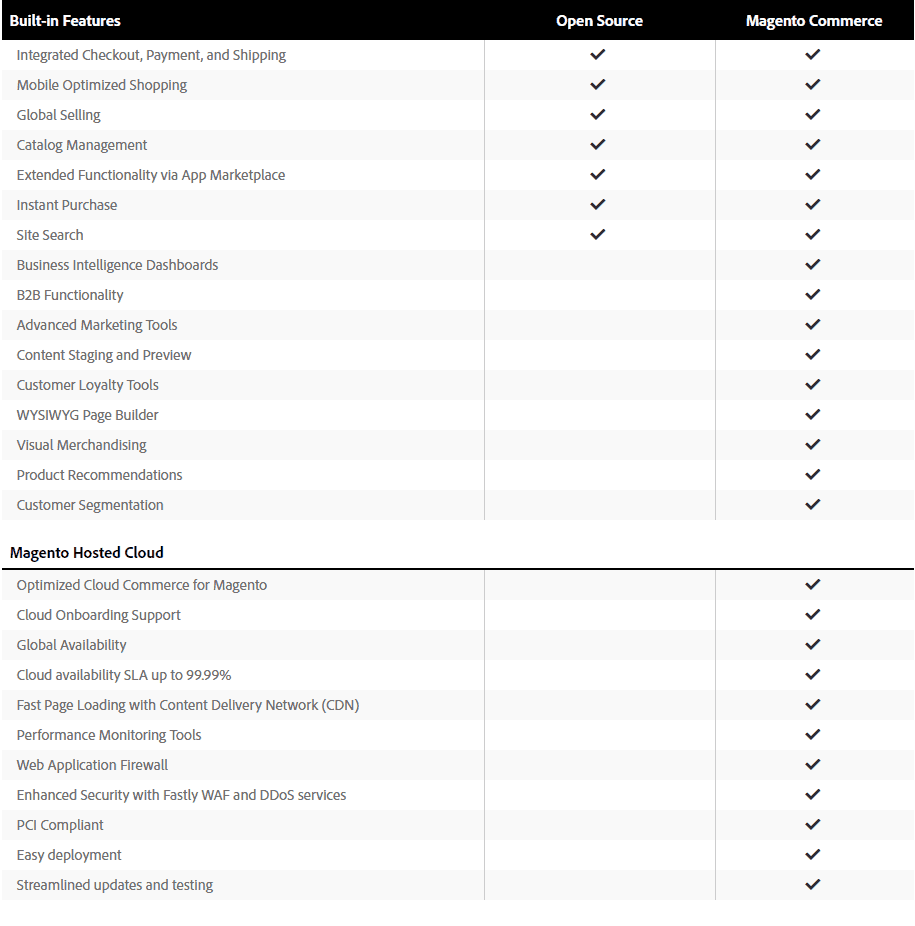
Magento Open Source now comes with a basic version of Page Builder, Adobe’s drag-and-drop page editor, but a built-in B2B functionality is nowhere to be found, just like automated upsells and cross-sells, advanced segmentation and analytics, Magento-certified cloud infrastructure, or the possibility to scale up and tackle more complex e-commerce sales scenarios. However, remember that a team of good IT professionals can save the day, along with the many integrations compatible with Magento.
As for Adobe Commerce, there’s a myriad of built-in features available. You can learn more about them here.
Since a large portion of the features can be seen in the image above, to avoid redundancy, we’ll now just look at some of the most notable Adobe Commerce features.
SEO
Magento’s out-of-the-box SEO features are quite good, and it’s unlikely that you’ll need anything more. SEO is automatically configured, but it’s very customizable – you can go back and change things such as keywords, meta descriptions, image alt-tags, and product descriptions.
Additionally, you get automatically generated Google sitemaps, search engine-friendly URLs, URL rewrites, and more in order to allow Google to crawl your site more easily. Lastly, mobile optimization is also included, so you can rest assured that your site looks good on smaller screens.
Marketing
Adobe Commerce’s marketing features are also impressive because of the many available marketing app integrations. There are over a hundred email marketing apps available for integration (abandoned cart recovery and more).
With Magento, you can create different types of coupons and offer discounts and promotions, allow customers to create and share wishlists via email, and add social media buttons for sharing.
You can also use the “Persistent cart” option to save your customers’ full carts so that the added products are still there the next time they come back. Lastly, you can segment customers by demographics and location and tailor their recommendations accordingly.
Store Management
Multi-store and multi-site capability that lets you have many e-commerce stores/sites controlled from one admin account is also available with Magento. BigCommerce offers this too, with Multi-Storefront.
With Multi-Storefront, you run several storefronts from one BigCommerce back end, so you can update a price or product once and publish it everywhere. Extra storefronts are a paid add-on on every plan.
On top of this, there’s an option to define different roles and allow different levels of access to admin features, create system reports to identify technical problems with the store, and more.
Products
Magento lets you add unlimited product attributes as well as have your products assigned in groups automatically based on their attributes. You can also add your products to multiple product type groups, like downloadable, personalized, bundled, virtual, etc. And to make browsing easier, you can sort them into different product categories.
Additionally, you can enhance your customers’ shopping experience. Magento shows you which products have been recently viewed so you can offer them to your customers, and you can choose to also display related products to give them targeted recommendations.
As for inventory management, Magento allows you to use CSV files to import and export your products in bulk.
Multi-Location Inventory
You can track products in many different places and manage when to fulfill orders. You also have control over from which location the orders are fulfilled to avoid out-of-stock issues.
Multichannel Integrations
Similar to BigCommerce, you can also sell across multiple channels with Magento by integrating with major online marketplaces like Amazon, Facebook, Etsy, eBay, and more through extensions.
Payment Methods
Magento supports payments via check/money order, cash on delivery, purchase order, bank transfer, and zero subtotal checkout (which refers to cases where the coupon/promotion takes the total sum to $0, but taxes still apply).
Magento supports many payment integrations that support different languages, currencies, and countries, which is perfect for businesses that plan to go international. Of course, there are also the big guys here, like PayPal, Stripe, Square, and Amazon Pay, plus Apple Pay through Adobe’s Payment Services.
Complex B2B Functionality
One of the strongest sides of Magento is its complex B2B functionality that allows you to create quick order forms, requisition lists, custom catalogs, and price lists. It also gives you the ability to create company accounts and set up multiple buyers, and much more.
PWAs: Progressive Web Applications Technology
Magento allows you to make use of state-of-the-art PWA (progressive web application) technology to build top-notch e-commerce stores. This is possible thanks to JavaScript libraries like React and Redux.
Some of the major advantages of PWAs are the following:
Installability: A web app behaves similarly to any other application that you install on your device. For instance, you can open the web app through an icon on your home screen.
Network independence: Web apps function smoothly in case a network is not dependable or even completely missing/down.
Responsiveness: In simple terms, these types of web apps are compatible with any type of screen size, no matter if it’s a desktop, smartphone, tablet, or device that we’ll be using in the future.
Safety: A mechanism that thwarts snooping, which is generally listening to network traffic and communication protocols like ARP and TCP.
With Magento, unless you’re proficient at web development, you’ll definitely need the professional help of developers and IT engineers because it’s difficult to do any customization on your own.
Pricing
Magento
Magento Open Source is something like a Magento free plan. Similar to WooCommerce, it requires users to find hosting themselves and take care of upgrades, maintenance, security, and added functionalities through third-party apps.
Setting up and building your store on Magento is time-consuming, and more often than not, it requires hiring a developer, which can be pretty costly. It’s also likely that you’ll need to hire an agency to manage your Magento e-commerce store.
As we already saw, the commercial version, Adobe Commerce, can include hosting (on Adobe’s cloud versions) and a lot more. It’s mainly geared toward big players, and Adobe prices it by quote, based on your business.
BigCommerce
There’s no free plan with BigCommerce. It offers four plans (Core, Growth, Scale, and Performance) and a 15-day free trial with no credit card required. Paying annually saves 25% on Core, Growth, and Scale. See current prices on the BigCommerce pricing page.
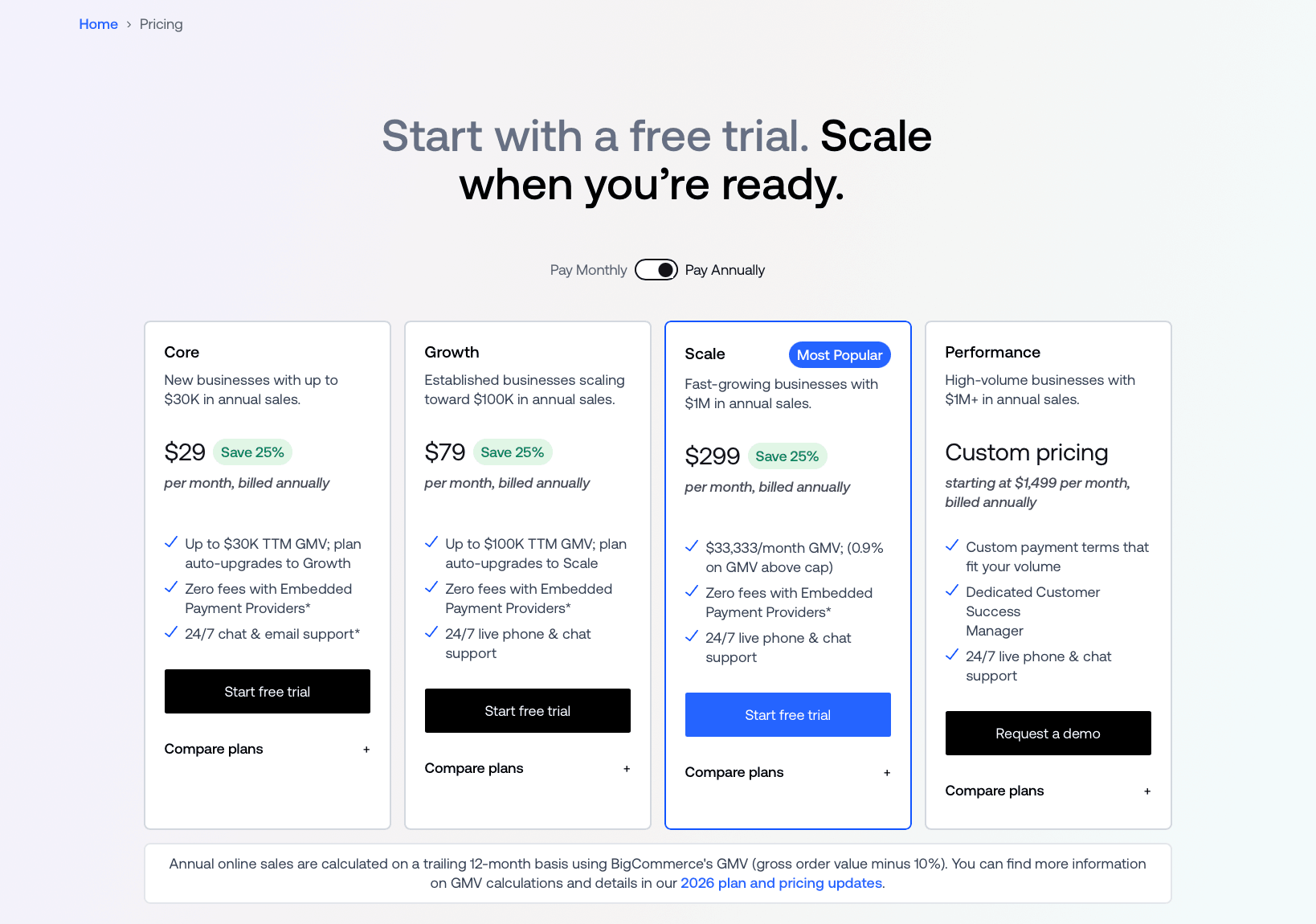
Clearly, each of the plans is designed to cover different customer needs, ranging from a really small business to an enterprise-level company.
Integrations
Magento
Being an open-source platform, Magento has a lot of room for third-party apps. Since so many developers in the community have access to the code, new apps and extensions get added very frequently. That’s why Magento has a large app marketplace with about 4,000 available apps.
As you can see in the image below, they’re divided into six categories: Customer Support, Payments & Security, Marketing, Accounting & Finance, Shipping & Fulfillment, and Site Optimization.
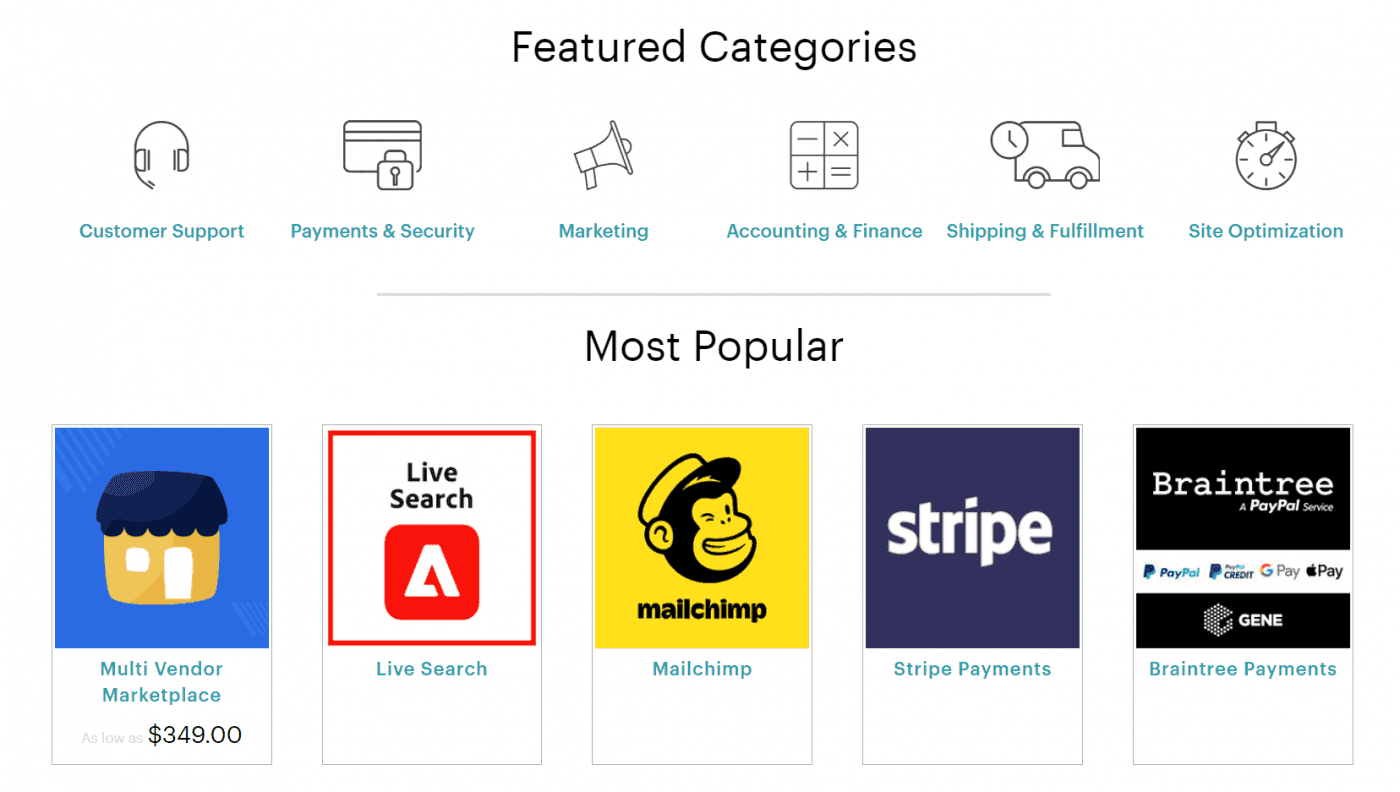
Most apps are free to install, but the software you’ll be using is rarely free, which is why you need to factor the apps you’ll integrate with into the overall costs.
BigCommerce
There’s a BigCommerce app store as well. It’s not as big as Magento's, but it’s still pretty solid. BigCommerce offers over 1,200 apps in 21 categories, like Marketing, CMS & Hosting, B2B, and Analytics & Reporting. The good news is that many of them are free.
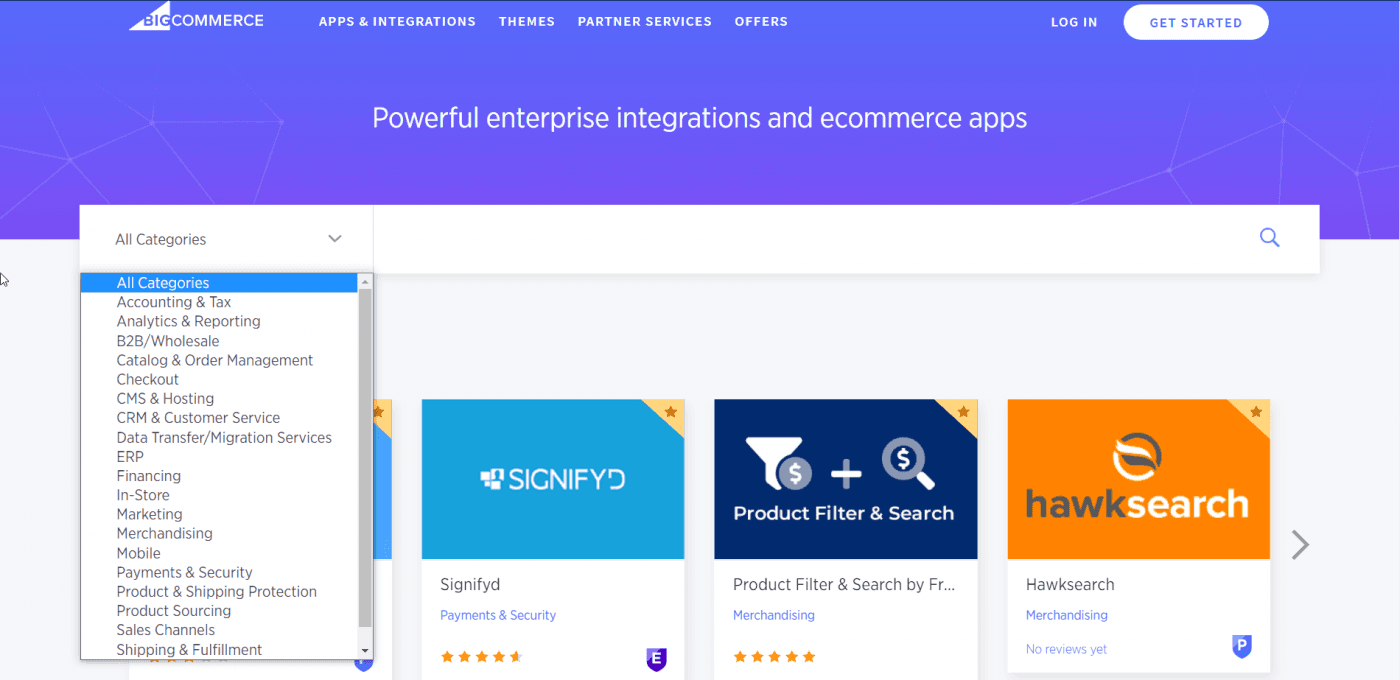
Along with this, there’s an alternative way to add third-party software to your BigCommerce store: embed codes. This can be very handy in certain situations. For instance, we mentioned that BigCommerce offers a blogging option, but it’s fairly basic.
For serious blogging, you’ll need a top-shelf blogging integration like DropInBlog. You just need to install the DropInBlog app from the BigCommerce App Marketplace to enjoy the benefits and perks of this first-rate blogging platform on BigCommerce.
BigCommerce takes care of everything related to your e-commerce store, including third-party integrations. This means that you don’t need to install security patches or updates, and generally, you don’t have to do any software maintenance. BigCommerce makes the whole process of running an e-commerce business extremely convenient.
Customer Support
Magento
Magento Open Source doesn’t include typical customer service. There are a lot of online resources, though: extensive documentation and posts by other users that can help you with your problems. However, keep in mind that the bulk of the Magento community consists of developers, not business people, which means that the posts you’ll be reading will probably be more technical.
When it comes to the commercial version, Magento has been working on improving its customer service, but it’s still not quite there. With this version of Magento, you get 24/7 support for critical issues, plus online and phone support. A dedicated technical account manager and customer success manager come with Adobe’s higher-tier support plan. Also, there’s a ticket system in place.
BigCommerce
BigCommerce has a more traditional approach to customer service and shows its care for clients in many different ways: 24/7 chat and email support on every plan, plus phone support on Growth, Scale, and Performance, which we really appreciate.
Other resources include a Help Center, where you’ll find a ton of helpful articles on anything you need. Then, there’s the BigCommerce University, where you can find self-paced courses for individuals and teams.
Similarly, the Webinars page is another useful resource where you can learn more about how to use BigCommerce and how e-commerce works in general. The BigCommerce Community and Knowledge Base are additional repositories of knowledge and places where you can connect with other merchants.
FAQs
Which one is better for starting an e-commerce business, BigCommerce or Magento?
BigCommerce is definitely better suited than Magento for starting an e-commerce business. As we previously said, SaaS platforms like BigCommerce are generally much easier to use because they provide you with everything you need – from the more technical stuff like hosting and software on the back end to customization on the front end.
Additionally, BigCommerce comes with many good features out-of-the-box, which means you won’t have to rely on integrations for a lot of functionalities as you would with Magento, and increase your expenses, as most integrations have their own pricing plans.
How do BigCommerce and Magento compare to Shopify?
We talked about BigCommerce vs Magento, but what if we add Shopify into the mix? BigCommerce, Magento, and Shopify are all e-commerce powerhouses, which is why people often compare them. While all three are excellent business software solutions, they are different in the way they’re designed and how they perform.
To start with the obvious, BigCommerce and Shopify are both hosted platforms, whereas Magento Open Source is self-hosted (Adobe Commerce, Magento’s paid version, can be hosted by Adobe). But leaving that aside, all three come with useful built-in features for running a functional business – inventory management, shipping options, marketing tools, page builder, integrations, blogging, and more. Here’s a short comparison to see where they differ.
Shopify is a very famous platform and one of the leading business software solutions, right behind WordPress. It’s affordable, very versatile, user-friendly, easy to navigate, and customizable to a point. However, Shopify works best for small to medium-sized businesses. They offer an enterprise plan called Shopify Plus for large businesses, which is quite good, but the majority of businesses that use Shopify aren’t that big.
Similarly, BigCommerce is also a very agile and affordable platform. It’s a secure platform with reliable customer support and good features. It has great customization options and integrates with hundreds of apps, but when it comes to scaling your business, it has its limits.
Magento is much more customizable than the former two. However, that also means that users who don’t know code will have a hard time navigating it. Additionally, it’s not really suited for small businesses. To use Magento’s features to the fullest, you need more resources, which only enterprise businesses can afford.
And unlike Shopify and BigCommerce, Magento’s security depends entirely on how secure you make it if you’re using the Open Source variant. You can read more about our Magento vs Shopify comparison here.
Is BigCommerce good for small businesses?
Yes, BigCommerce is good for small businesses, especially if you have a big inventory and you need to manage a lot of products. It’s affordable enough and offers some really great features in its cheapest plan that can get you started.
BigCommerce can grow with you to a certain point and support your business. However, you may also find that you won’t make use of some of the features you’re paying for because they’re intended for slightly larger businesses, though this shouldn't be a problem. The product management features it offers are quite solid, and it has an advanced B2B system for wholesale opportunities that’s pretty reliable.
Is BigCommerce better than Magento?
BigCommerce is better than Magento only if you don’t know how to code because that’s the biggest setback for using Magento in general. But in all other aspects, it really comes down to what your business needs and what you can afford, as Magento can be considerably more expensive, but it also offers better customization.
Then again, if your business isn’t enterprise-level yet, you’ll be paying for features that you probably won’t get to use, so in that case, BigCommerce would be the better option.
Is Magento a CMS?
Not exactly. Magento is an e-commerce platform. It’s built with PHP and uses a MySQL or MariaDB database.
How long does it take to learn Magento?
Being open-source software, Magento does have a steep learning curve, but for many users, it can take about a couple of months to get the hang of the basics and set up a store. From that point on, it takes consistent effort to build upon your skills so you can do the fine-tuning and have overall better control.
Many users are put off by the thought of dedicating hours of their time to learning how to use a certain platform, but learning Magento has a very good payoff because, overall, it’s a very good platform once you get used to it. However, remember that with beginner-level skills, you can only do so much for your business, so you may need to hire a developer, which will inevitably add to your overall costs.
BigCommerce or Magento: Which Should You Choose?
This concludes our comprehensive BigCommerce vs Magento comparison. As you can see, both are really nice platforms that can help you manage your business and build and maintain an e-commerce store successfully.
BigCommerce may not be as easy to use as some other business software solutions, but in this case, it’s much easier than Magento, so you should keep that in mind. On the other hand, Magento allows for better customization that large businesses will find necessary. So, in the end, it all comes down to what your business needs.
We hope that our BigCommerce vs Magento review was informative and that it will help you in your search for the best possible e-commerce solution for your business.